Microsoft 365 and Office | Excel | For business | Windows
A family of Microsoft spreadsheet software with tools for analyzing, charting, and communicating data

This browser is no longer supported.
Upgrade to Microsoft Edge to take advantage of the latest features, security updates, and technical support.
' cx='32' cy='32' r='32' /%3E%3Ctext x='50%25' y='55%25' dominant-baseline='middle' text-anchor='middle' fill='%23FFF' %3EMA%3C/text%3E%3C/svg%3E)
I have an Excel sheet and want to count cell B value with the condition of Cell A.
for example, I have data like that
cell A cell B cell C
Google 1 Google
Google 1
Facebook 1
how am use a formula to count google values in the entire sheet and also Facebook values with the required condition?
when cell c1 is equal to google it compare the value of cell C with cell A and count all value of cell B of Google.

Hi @Muhammad Asif ,
I have not heard back from you in a few days and wanted to check on the status of the problem. If you have any questions with the previous information I've provided, please don't hesitate to let me know. I am glad to be of assistance.
If the response is helpful, please click "Accept Answer" and upvote it.
Note: Please follow the steps in our documentation to enable e-mail notifications if you want to receive the related email notification for this thread.
Hi @Muhammad Asif ,
Do you want to SUM the values in cell B?
You can try this formula:
=SUMPRODUCT(($A$1:$A$3=C1)*($B$1:$B$3))
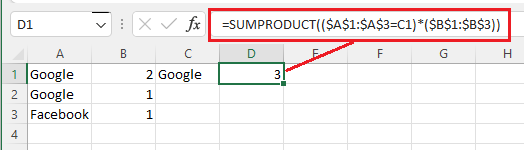
If you want to Count the values in cell B, try this formula:
=SUMPRODUCT(($A$1:$A$3=C1)*(B1:B3>0)*1)
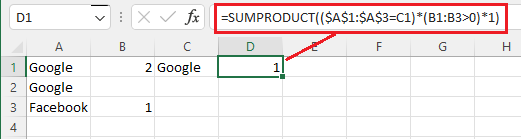
Just checking in to see if the information was helpful. Please let us know if you would like further assistance.
If the response is helpful, please click "Accept Answer" and upvote it.
Note: Please follow the steps in our documentation to enable e-mail notifications if you want to receive the related email notification for this thread.

Hi,
Try this formula
=groupby(A2:A4,B2:B4,SUM)
Hope this helps.