Azure Logic Apps
An Azure service that automates the access and use of data across clouds without writing code.
This browser is no longer supported.
Upgrade to Microsoft Edge to take advantage of the latest features, security updates, and technical support.
' cx='32' cy='32' r='32' /%3E%3Ctext x='50%25' y='55%25' dominant-baseline='middle' text-anchor='middle' fill='%23FFF' %3EAC%3C/text%3E%3C/svg%3E)
Following recommentation of @MayankBargali-MSFT in https://learn.microsoft.com/en-us/answers/questions/851590/failed-to-edit-api-connection-in-logic-app-from-az.html
I am unable to save the API connection edit after I have successfully authorised it.
Portal session ID: 4746ed6f292d4132abb144a125eaae11
Timeframe in UTC: 2022/11/2 11:22:00
Screenshot:
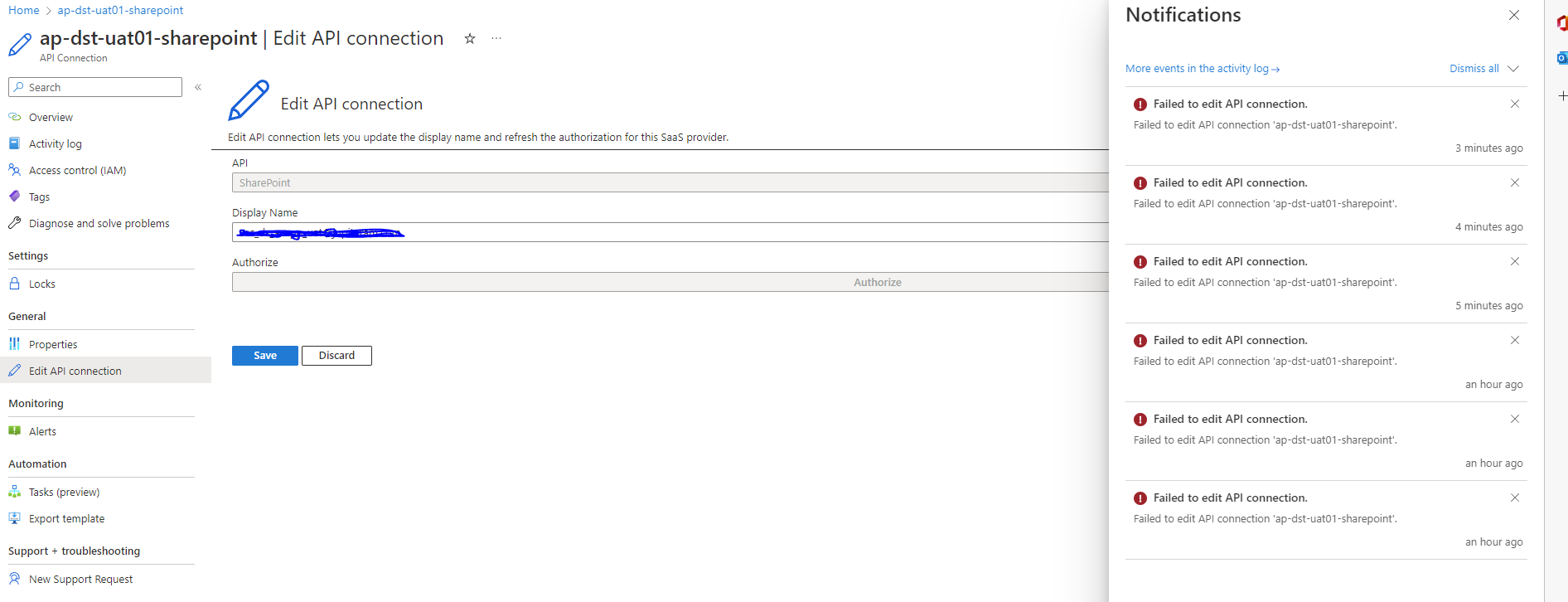

@Amy Chodorowski Thanks for reaching out. I was able to track the request using the portal session ID and I found that the update connection request was failing with the 403 error i.e. unauthorized error. I will suggest you to review the permission to see whether you have the right permission to perform the operation. You can navigate to the Access Control (IAM) on the connection resource --> Role Assignments and verify what permission and scope you have for your account. You can refer to Azure build in roles document for more details on different roles and permission.
Let me know if you need any help in verifying the details.
Thank you for the response.
Can you point to exactly which one I need in order to save API connection. I had permission errors with regards to authorising the API connection, but the error message clearly noted I needed "Microsoft.Web/connections/listConsentLinks/action", so I was able to change it. There are so many roles I can't begin to work out which one I need.
Amy
@Amy Chodorowski You should have Microsoft.Web/connections/* action permission that will help you to Create and manage a Connection. In case if you need want to manage logic apps so you should have Logic App Contributor access at the resouce group or subscription level as per your need. In case if you don't need any other permission then you can create the custom role and assign only specific permission (such as Microsoft.Web/connections/*) to the user.