Exchange | Exchange Server | Management
The administration and maintenance of Microsoft Exchange Server to ensure secure, reliable, and efficient email and collaboration services across an organization.
This browser is no longer supported.
Upgrade to Microsoft Edge to take advantage of the latest features, security updates, and technical support.
' cx='32' cy='32' r='32' /%3E%3Ctext x='50%25' y='55%25' dominant-baseline='middle' text-anchor='middle' fill='%23FFF' %3E5%3C/text%3E%3C/svg%3E)
Hi. Trying to make PS script with menu to make my job little faster.
It contains a menu with options and in opton 1 and 2 i use Get-MobileDevice comadlet to see status of devices of selected user.
In option 1 it works fine, but in option 2, where i want to see current state of devices after changes by another future options the comandlet Get-MobileDevice -Mailbox $User.Alias | Select-Object DeviceId,DeviceOS,DeviceAccessState | Sort -Property DeviceAccessState shows result at screen ONLY when i finish script by Q key, not when i press 2. Any idea why?
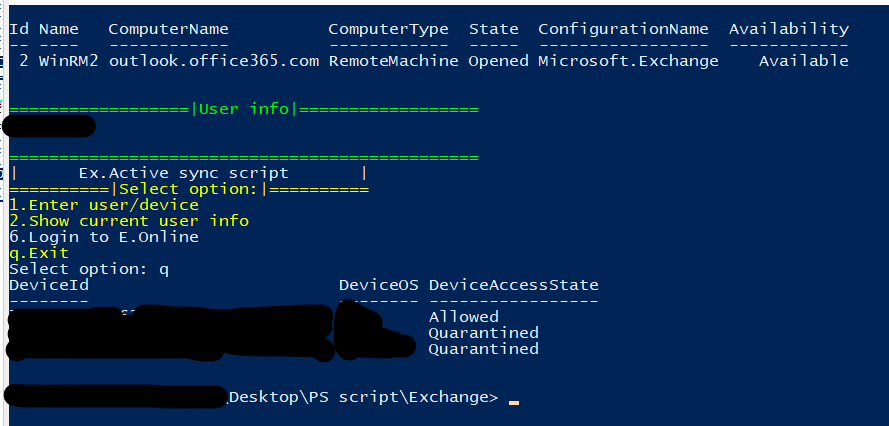
Do {
Write-Host "|      Ex.Active sync script       |" -ForegroundColor DarkYellow
Write-Host "==========|Select option:|==========" -ForegroundColor Yellow
Write-Host "1.Enter user/device" -ForegroundColor Yellow
Write-Host "2.Show current user info" -ForegroundColor Yellow
Write-Host "6.Login to E.Online" -ForegroundColor DarkYellow
Write-Host "q.Exit" -ForegroundColor Yellow
$MainMenu = Read-Host -Prompt 'Select option'
Switch ($MainMenu) {
#1.Enter User/Device
1 {
$SelectedUser = $Null
$SelectedDevice = $Null
cls
Get-PSSession| Format-Table -AutoSize
Write-Host "=============|Enter user login or email|=============" -ForegroundColor Yellow
$User = Read-Host "Login"
Write-Host "==================|Enter device ID|==================" -ForegroundColor Yellow
$Device = Read-Host "Device ID"
#The magic begins!
$SelectedUser = Get-MobileDevice -Mailbox $User | Select-Object DeviceId,DeviceOS,DeviceAccessState | Sort -Property DeviceAccessState
$SelectedDevice = $SelectedUser.DeviceId | Where-Object {$_ -eq $Device}
$User = $User = Get-Mailbox -Identity $User | select-object -Property Alias
if ($User.Alias -ne $null -and $SelectedDevice -ne $null) {
Write-Host "Matches found!" -ForegroundColor Green
Write-Host "=====================================================" -ForegroundColor Yellow
$User.Alias
$SelectedDevice}
else {
Write-Host "=====================================================" -ForegroundColor Yellow
Write-Host "User or device not found!" -ForegroundColor Red}
}
#Show current user info
2 {
cls
Get-PSSession| Format-Table -AutoSize
Write-Host "==================|User info|==================" -ForegroundColor Green
$User.Alias
Get-MobileDevice -Mailbox $User.Alias | Select-Object DeviceId,DeviceOS,DeviceAccessState | Sort -Property DeviceAccessState
Write-Host "===============================================" -ForegroundColor Green
}
#6.Login to E.Online
6 {
cls
Connect-EXOPSSession
}
}
}until($MainMenu -eq "q")
The administration and maintenance of Microsoft Exchange Server to ensure secure, reliable, and efficient email and collaboration services across an organization.
Fixed:
Get-MobileDevice -Mailbox $User.Alias | Select-Object DeviceId,DeviceOS,DeviceAccessState | Sort -Property DeviceAccessState | out-host
' cx='32' cy='32' r='32' /%3E%3Ctext x='50%25' y='55%25' dominant-baseline='middle' text-anchor='middle' fill='%23FFF' %3EJS%3C/text%3E%3C/svg%3E)
Hi,
That's cool, thanks for your sharing!
