Microsoft 365 and Office | SharePoint Server | For business
A family of Microsoft on-premises document management and storage systems.

This browser is no longer supported.
Upgrade to Microsoft Edge to take advantage of the latest features, security updates, and technical support.
' cx='32' cy='32' r='32' /%3E%3Ctext x='50%25' y='55%25' dominant-baseline='middle' text-anchor='middle' fill='%23FFF' %3EML%3C/text%3E%3C/svg%3E)
Hi all,
We have SP2016 on-premise with Dec 2019 patch. English (United States) is the base language and we didn't install any language pack. I can see the App Launcher with "Newsfeed","OneDrive","Sites".
Then I enabled the feature:
Enable-SPFeature -Identity CustomTiles -Url http://web_app -Force
It looks work. The hidden list "Custom Tile" is enabled. However all the column name are wrong. They are
Title
$Resources:spscore,CustomTilesList_Feature_Tile_Order;
$Resources:spscore,CustomTilesList_Feature_Url;
$Resources:spscore,CustomTilesList_Feature_Icon_Url;
$Resources:spscore,CustomTilesList_Feature_Audiences;
$Resources:spscore,CustomTilesList_Feature_TileSwitch;
Anyway, I tried add some entries. None of them show up in App Launcher. I have tried sign-in with another account with "_layouts/closeConnection.aspx?loginasanotheruser=true". Also tried with different browser. Also tried ClearSuiteLinksCache(). The App Launcher still the same.
How should I troubleshoot it?

Hi @Mark Lui ,
I could reproduce your issue per my test.
Then,I installed another CU which includes language pack, and the list looked normal:

Result:
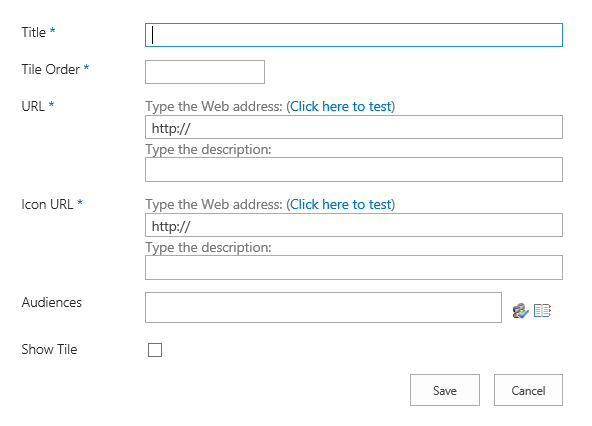
However, although the ClearSuiteLinksCache() function is run in the console of the developer's browser, the custom tiles will not be displayed in the app launcher.
Please wait 24 hours, then compare the results, if there is any update, I will post back.
--------------------------------------------Update---------------------------------------------------------
Please remember to tick the Show Tile option as shown below:

Then run ClearSuiteLinksCache() function again, refresh the page, the custom tile will show as follows:
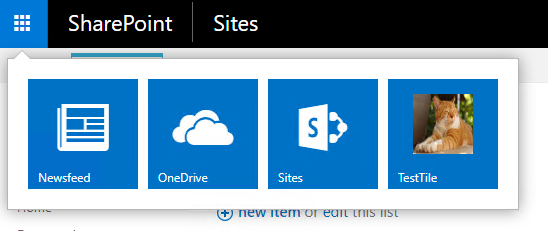
More information:
If an Answer is helpful, please click "Accept Answer" and upvote it.
Note: Please follow the steps in our documentation to enable e-mail notifications if you want to receive the related email notification for this thread.

This is likely because you're not properly updating your farm. In most months, there are two patches released, an sts-x-none (Language independent) and a wssmui (Language specific). You need to apply both for any given month, or if a wssmui patch is not provided, the most recent one.
https://learn.microsoft.com/en-us/officeupdates/sharepoint-updates
Per Microsoft, you should also be keeping up with PUs month to month, i.e. September 2020 -- there have been some significant unauthenticated remote code execution vulnerabilities in SharePoint this past year.
' cx='32' cy='32' r='32' /%3E%3Ctext x='50%25' y='55%25' dominant-baseline='middle' text-anchor='middle' fill='%23FFF' %3EHK%3C/text%3E%3C/svg%3E)
Hi @trevorseward what is the PU stands for? And what is the differences between CU and PU?
All SharePoint Server 2016 on up are Public Updates.