Databases object: Log File(s) Size (KB) vs Log File(s) Used Size (KB)

Alen Cappelletti 1,047 Reputation points
2022-11-04T17:13:10.197+00:00

Hi all,
I have a strange behavior with this 2 sql server performance object:

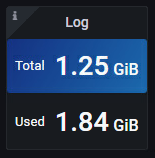
I got a DB XXX that in some case has more "Log File(s) Used Size (KB)" that "Log File(s) Size (KB)"?
How is it possible?

This is a panel from my Dashboard
257344-image.png

The row data are (now):

  • Databases_LogFile_s_Size_KB (1312120)
  • Databases_LogFile_s_UsedSize_KB (1960766)

Maybe I am the one who misinterpreted the data?
Can you give me a kind explanation?

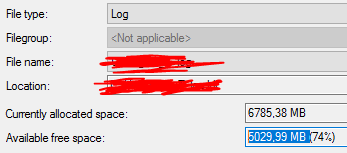
These below the figure from SSMS

257298-image.png

  • Current allocate space 6785 MB
  • Used 1755 MB
  • Availability space 5030 MB

Thanks ALEN

SQL Server | Other
0 comments No comments
{count} votes

Answer accepted by question author
  1. PandaPan-MSFT 1,931 Reputation points
    2022-11-10T02:39:52.853+00:00

    Hi @Alen Cappelletti ,
    I don't know if you still need the way to check the size of log file precisely.
    Yesterday I was reading the book and I found the content that the

    DBCC SQLPERF(LOGSPACE)  
    

    which is the most accurate description

    And the book is Chinese so I can't post the picture, I hope this idea can be helpful to you.

    1 person found this answer helpful.

3 additional answers

Sort by: Most helpful
  1. PandaPan-MSFT 1,931 Reputation points
    2022-11-07T03:14:58.097+00:00

    Hi @Alen Cappelletti ,
    That's a really confusing problem. I found a TSQL, which can show log file size and used log space. You could try this:

    USE MtbToolsDB  
    GO  
       
    /* Data file size and space used */  
    SELECT  
        DB_NAME(database_id) AS 'Database',  
        (total_page_count * 8.0) / 1024 AS 'Date file Size (MB)',  
        (allocated_extent_page_count * 8.0) / 1024 AS 'Used space (MB)',  
        (unallocated_extent_page_count * 8.0) / 1024 AS 'Free space (MB)'  
    FROM sys.dm_db_file_space_usage;  
    GO  
       
    /* Log file size and space used */  
    SELECT  
        DB_NAME(database_id) AS 'Database',  
        (total_log_size_in_bytes) * 1.0 / 1024 / 1024 AS 'Log file size (MB)',  
        (used_log_space_in_bytes) * 1.0 / 1024 / 1024 AS 'Used log space (MB)',  
        (total_log_size_in_bytes - used_log_space_in_bytes) * 1.0 / 1024 / 1024 AS 'Free log space (MB)'   
    FROM sys.dm_db_log_space_usage;   
    GO  
    

    And I got the result like:
    257659-image.png


    If the answer is helpful, please click "Accept Answer" and kindly upvote it. If you have extra questions about this answer, please click "Comment"

    1 person found this answer helpful.

  2. Erland Sommarskog 128.7K Reputation points MVP Volunteer Moderator
    2022-11-04T22:17:16.963+00:00

    Are you getting these values from sys.dm_os_performance_counters?

    Many of the performance counters are cumulative. That is, you need to collect them at two different points in time and compute the difference.

    For some counters, this is quite obvious, for instance "Active Transactions". I will have to admit that I cannot really wrap my head around how this would work with "Log File(s) Size (KB)". But the page you linked does say Cumulative size (in kilobytes) of all the transaction log files in the database.


  3. Alen Cappelletti 1,047 Reputation points
    2022-11-07T22:39:44.437+00:00

    And more...
    with this 3 statements below I got 3 kind of numbers (I don't mean Kb vs Mb)

    The first has always [LOG File(s) Size (KB)] more big of others...
    258003-image.png

    SELECT instance_name AS DatabaseName,  
           [Data File(s) Size (KB)],  
           [LOG File(s) Size (KB)],  
           [Log File(s) Used Size (KB)],  
           [Percent Log Used]  
    FROM  
    (  
       SELECT *  
       FROM sys.dm_os_performance_counters  
       WHERE counter_name IN  
       (  
           'Data File(s) Size (KB)',  
           'Log File(s) Size (KB)',  
           'Log File(s) Used Size (KB)',  
           'Percent Log Used'  
       )  
         AND instance_name not in ('_Total','mssqlsystemresource')  
    ) AS Src  
    PIVOT  
    (  
       MAX(cntr_value)  
       FOR counter_name IN  
       (  
           [Data File(s) Size (KB)],  
           [LOG File(s) Size (KB)],  
           [Log File(s) Used Size (KB)],  
           [Percent Log Used]  
       )  
    ) AS pvt  
    WHERE instance_name  = 'XXXX'  
    GO  
      
      
    DBCC SQLPERF(LOGSPACE);    
    GO    


    SELECT  
        DB_NAME(database_id)													AS 'Database',  
        (total_log_size_in_bytes) * 1.0 / 1024 / 1024							AS 'Log file size (MB)',  
        (used_log_space_in_bytes) * 1.0 / 1024 / 1024							AS 'Used log space (MB)',  
        (total_log_size_in_bytes - used_log_space_in_bytes) * 1.0 / 1024 / 1024 AS 'Free log space (MB)'   
    FROM sys.dm_db_log_space_usage;   
    GO  
    

    In conclusion, for the purpose of a report which is better to rely on? I was using the performace counters, but it seems to be the most incorrect in size.

    ALEN


Your answer

Answers can be marked as 'Accepted' by the question author and 'Recommended' by moderators, which helps users know the answer solved the author's problem.