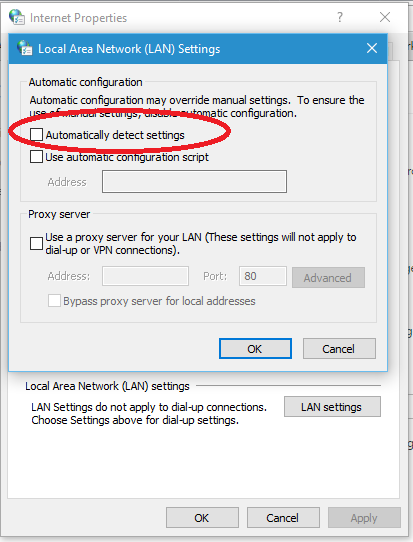
Disable "automatically detect settings" via powershell

Gustavo Lorenzett 126 Reputation points
2022-11-05T02:19:03.937+00:00

Hello everyone, everything good?
I need help disabling the option: "Automatically detect settings" in IE Windows 10 and 11 via powershell.
Which command do I use?

257318-lan-settings.png

Windows for business | Windows Server | User experience | PowerShell
Windows for business | Windows Client for IT Pros | User experience | Other
0 comments No comments
{count} votes

Answer accepted by question author
  1. Marten Theunissen 676 Reputation points
    2022-11-05T04:20:34.697+00:00

    Hi @Gustavo Lorenzett ,

    Some additional information would assist greatly, is this a single client, domain joined client any GPO's applied etc.

    The below thread could assist you in creating a PS Script to tend to the requirement.

    https://stackoverflow.com/questions/60652908/powershell-script-to-tick-proxy-settings-use-automatic-configuration-script/

    If this is helpful, please accept answer.

    1 person found this answer helpful.
    0 comments No comments

1 additional answer

Sort by: Most helpful
  1. Gustavo Lorenzett 126 Reputation points
    2022-11-05T13:28:42.07+00:00

    MartenTheunissen-2934, perfect, that's exactly what I needed, thanks for the help.
    God bless you.

    0 comments No comments

Your answer

Answers can be marked as 'Accepted' by the question author and 'Recommended' by moderators, which helps users know the answer solved the author's problem.