' cx='32' cy='32' r='32' /%3E%3Ctext x='50%25' y='55%25' dominant-baseline='middle' text-anchor='middle' fill='%23FFF' %3ELS%3C/text%3E%3C/svg%3E)

' cx='32' cy='32' r='32' /%3E%3Ctext x='50%25' y='55%25' dominant-baseline='middle' text-anchor='middle' fill='%23FFF' %3EA%3C/text%3E%3C/svg%3E)
Hello LiveseyScottParsippany-1691,
Thank you for posting in our Q&A forum.
Did you mean you want to remotely close the specific DFS shared files open by all the users on their clients?
If so, you may need to connect to their machine to close the specific DFS shared files via Computer Management (The premise is that you need to know who opened the file).
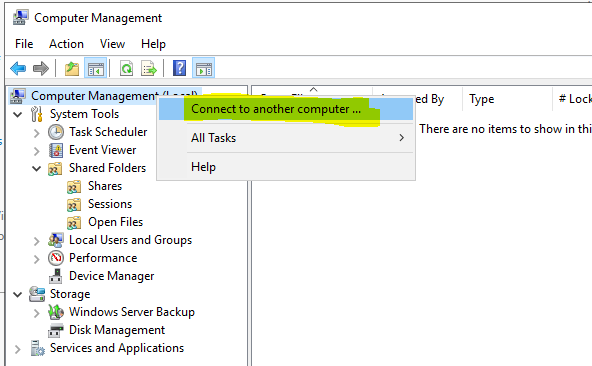
Similar thread:
https://superuser.com/questions/643916/remotely-close-open-shared-files
If it does not work above, you can try sending an email to someone who might use this particular file to close it.
Hope the information above is helpful.
Best Regards,
Daisy Zhou
============================================
If the Answer is helpful, please click "Accept Answer" and upvote it.
' cx='32' cy='32' r='32' /%3E%3Ctext x='50%25' y='55%25' dominant-baseline='middle' text-anchor='middle' fill='%23FFF' %3ELT%3C/text%3E%3C/svg%3E)