Microsoft 365 and Office | SharePoint | For business | Windows
A group of Microsoft Products and technologies used for sharing and managing content, knowledge, and applications.

This browser is no longer supported.
Upgrade to Microsoft Edge to take advantage of the latest features, security updates, and technical support.
' cx='32' cy='32' r='32' /%3E%3Ctext x='50%25' y='55%25' dominant-baseline='middle' text-anchor='middle' fill='%23FFF' %3EDM%3C/text%3E%3C/svg%3E)
I have created 2 Share Point Lists - List A and List B. Column A has a column with multiple choice information. I want to bring in the information from the multiple choice column into List B. I tried using the Look Up function but it does not give me the option to bring in the multiple choice information. How can I bring in information that was populated through multiple choice information? From what I am seeing, it allows me to select columns only that are single text.

Hi @Dimitrova,Mariya ,
Surely that we create list relationships by using lookup columns.
However, lookup column does not support all column types. Single line of text, choice (single value), number, currency, date and time, lookup (single value), person (single value) are supported.
More information about lookup column limitation.
You mention that your column in listA has multiple choice information. If your column type is Choice or Multiple lines of text, with multiple values, it cannot be lookup.
If the answer is helpful, please click "Accept Answer" and kindly upvote it. If you have extra questions about this answer, please click "Comment".
Note: Please follow the steps in our documentation to enable e-mail notifications if you want to receive the related email notification for this thread.
That's good to know. Thank you! Is there another function that I can use to map the 2 lists and bring me the information from the multiple choice column? Thank you!
Hi @Dimitrova,Mariya ,
Thanks for the reply.
This is not possible with conventional methods。
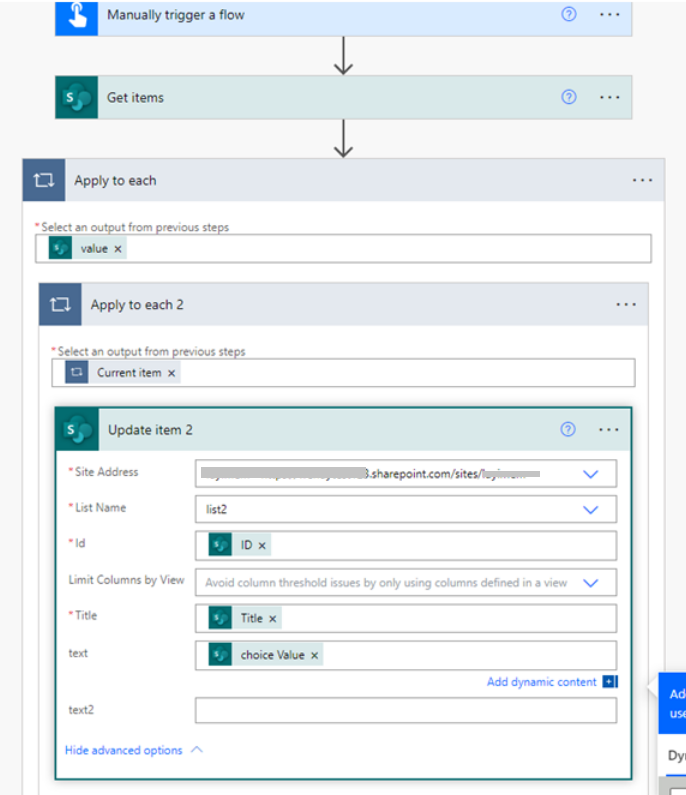
As a workaround, you could transfer your choice column to 'Single line of text', and then lookup this text column in ListB.
You could transfer by creating a flow in ListA.

Here is a flow template: