Cannot change password in Windows 10 computers

EdWin 121 Reputation points
2022-11-08T15:50:52.933+00:00

Hi everyone,

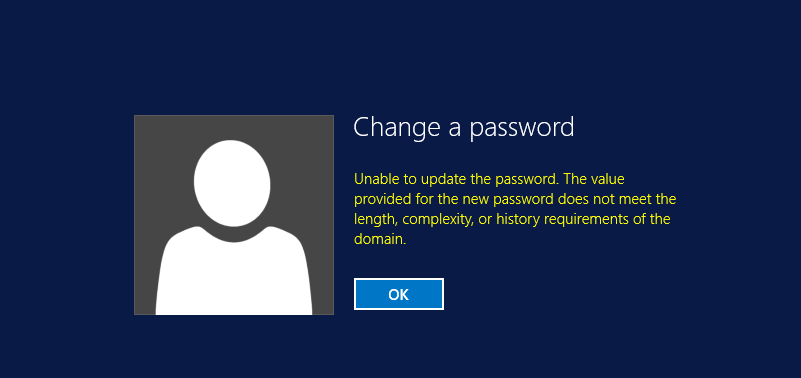
Users in my environment can't change their password by using CTRL+ALT+DEL. The message is the following:

258287-image.png

When I check my GPO configuration, I deactivated all the options, as shown in the picture below:

258383-image.png

And yet nobody can change the password...the same message is shown.

What can I do in this case?

Windows for business | Windows Client for IT Pros | Directory services | Active Directory
0 comments No comments
{count} votes

8 answers

Sort by: Most helpful
  1. Michael Taylor 61,096 Reputation points
    2022-11-08T16:00:01.38+00:00

    If you made the change in GPO then did you then force a GP update on the machine(s) impacted? Otherwise it takes a while to replicate.

    I notice that your settings are Not Defined. This leads me to believe this is not at your domain level. You aren't specifying any values then they are being inherited. You should set the options and then set them to something small. For example set the minimum password age to 0 days. This will override any inherited values. Of course you should set this at the domain level to impact all users (and ensure you force the update). The password complexity requirements should be set to disabled, not Not Defined.

    Of course I don't recommend that you disable any of the password complexity rules. They are there for a reason. It is reasonable to require users to have complex passwords these days. If they really don't like them then also allow Windows Hello or an alternative authentication option so they don't have to remember passwords.


    0 comments No comments

  2. Philippe Levesque 5,841 Reputation points Volunteer Moderator
    2022-11-08T16:00:25.937+00:00

    Hi

    By default on new ADDS the complexity is at ON, you need to Disable the setting it to be able to use less secure password, not to let in Not Defined. (and reboot the machine where you set the password to have it apply). (For that setting, passowrd requierment, it's easier to edit the default domain policy)

    For security's reason I don't recommand that. The new Microsoft guideline is more to use a complex password, but to set at longer expiry's time.

    A note, even if you use a complex password and still got the error message, Microsoft don't let you use a password that got the account name in it.

    0 comments No comments

  3. EdWin 121 Reputation points
    2022-11-08T16:37:07.343+00:00

    Hi @Michael Taylor , @Philippe Levesque , thank you for your prompt reply,

    Well, this settings were enabled, like "Enforce password history", "Maximum password age", and so on. Then I configurated these settings like the picture that i posted. But, nothing happened, I have the same situation.

    So, I configurated these settings again, as shown in the picture below:

    258235-image.png

    What do I have to do next?

    Thank you


  4. Guillaume Tsai 1 Reputation point
    2022-11-08T16:40:59.317+00:00

    Hello,

    The minimum characters length is 8.
    Can you set it again on your settings and retry again.

    Thanks.

    0 comments No comments

  5. EdWin 121 Reputation points
    2022-11-08T17:40:58.647+00:00

    Hi @Guillaume Tsai ,

    Actually, I want to make a test. After that, When I finally managed to make users change password by using CTRL+ALT+DEL, I will return to other configurations

    Thank you for answering

    0 comments No comments

Your answer

Answers can be marked as 'Accepted' by the question author and 'Recommended' by moderators, which helps users know the answer solved the author's problem.