Microsoft 365 and Office | Excel | For business | Windows
A family of Microsoft spreadsheet software with tools for analyzing, charting, and communicating data

This browser is no longer supported.
Upgrade to Microsoft Edge to take advantage of the latest features, security updates, and technical support.
' cx='32' cy='32' r='32' /%3E%3Ctext x='50%25' y='55%25' dominant-baseline='middle' text-anchor='middle' fill='%23FFF' %3EMA%3C/text%3E%3C/svg%3E)
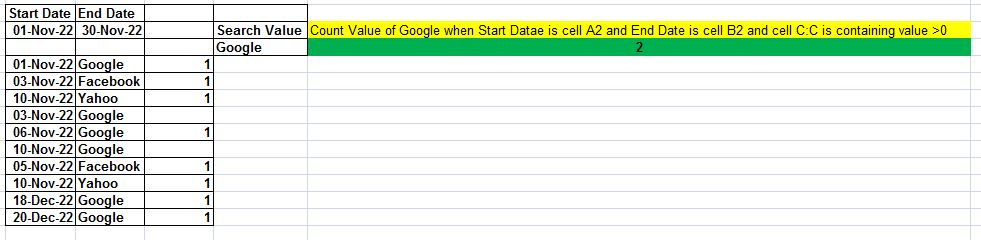
Cell A Cell B Cell C
01-Nov-2022 Google 1
05-Nov-2022 Facebook 1
10-Nov-2022 Yahoo 1
31-Nov-2022 Google 1
01-Dec-2022 Google 1
I want to count the value of google in cell f5 when the date between 01-Nov-2022 to 30-Nov-2022
in this total data value of google is 2.
The picture is attached for a better understanding.

Hi @Muhammad Asif ,
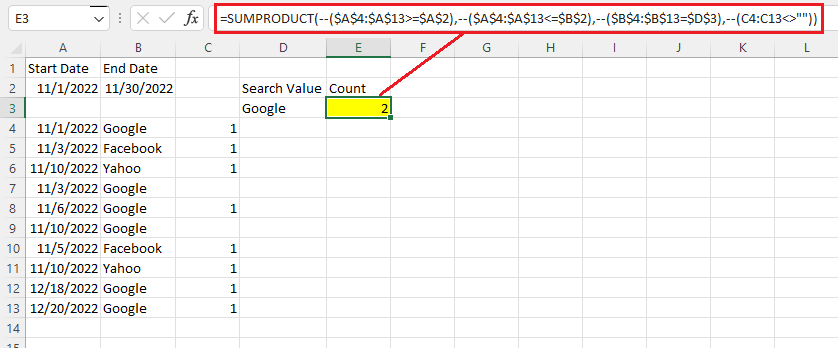
Try this formula:
=SUMPRODUCT(--($A$4:$A$13>=$A$2),--($A$4:$A$13<=$B$2),--($B$4:$B$13=$D$3),--(C4:C13<>""))
If the response is helpful, please click "Accept Answer" and upvote it.
Note: Please follow the steps in our documentation to enable e-mail notifications if you want to receive the related email notification for this thread.

Why you asking 3th times the same questions?
count-function.html
count-formula-with-condition.html