SharePoint
A group of Microsoft Products and technologies used for sharing and managing content, knowledge, and applications.
9,702 questions
This browser is no longer supported.
Upgrade to Microsoft Edge to take advantage of the latest features, security updates, and technical support.
' cx='32' cy='32' r='32' /%3E%3Ctext x='50%25' y='55%25' dominant-baseline='middle' text-anchor='middle' fill='%23FFF' %3ECC%3C/text%3E%3C/svg%3E)
Hello I have a SharePoint Document Library that holds autocad files. We use autocad web and would like to disable this warning message when opening the files through the Open-> AutoCAD (web files) option in the browser->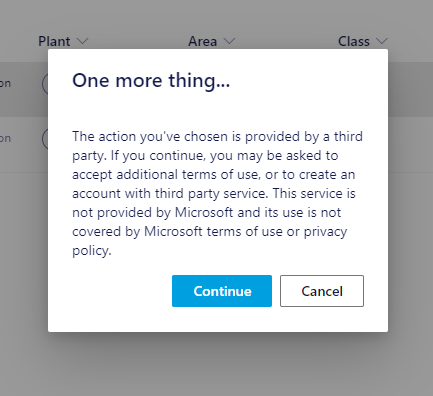
Can I just add Autocad's website to the trusted sites list for edge, or do I need to do something else so that this does not pop up for this document library?

Hi @Cameron Coventry ,
Thank you for your question. We will give you an update as soon as possible. Thank you for your understanding and support.
Hi @Cameron Coventry ,
As per my test, there is no way to disable this 3rd party warning. This is security policy for Microsoft.
If the answer is helpful, please click "Accept Answer" and kindly upvote it. If you have extra questions about this answer, please click "Comment".
Note: Please follow the steps in our documentation to enable e-mail notifications if you want to receive the related email notification for this thread.
Hi @Cameron Coventry ,
Do you have any further questions about this thread? If you have any concerns, please feel free to reply.
If the answer is helpful, please click "Accept Answer" and kindly upvote it. If you have extra questions about this answer, please click "Comment".
So you tried the trusted Sites method? This did not disable the SharePoint pop-up. I have sent the instructions to our infrastructure dept to test out but they haven't gotten to it yet.
Hi @Cameron Coventry ,
I tried below these following steps, but it does not seem to be working.
1.Search in the Start Menu for the Control Panel.
2.Click or double-click the Internet Options icon.
3. In the Internet Properties window, click the Security tab.
4.Select the Trusted sites entry and click the Sites button.
5.Enter the address for the trusted website in the Add this website to the zone text field.
6.Click the Add button, then click OK to save the website addition.
Hi @Cameron Coventry ,
Is there any update on this thread? Comment here if you still need any help.
If the answer is helpful, please click "Accept Answer" and kindly upvote it. If you have extra questions about this answer, please click "Comment".