Microsoft Security | Intune | Configuration Manager | Other
Other Configuration Manager-related features and issues

This browser is no longer supported.
Upgrade to Microsoft Edge to take advantage of the latest features, security updates, and technical support.
' cx='32' cy='32' r='32' /%3E%3Ctext x='50%25' y='55%25' dominant-baseline='middle' text-anchor='middle' fill='%23FFF' %3ED%3C/text%3E%3C/svg%3E)
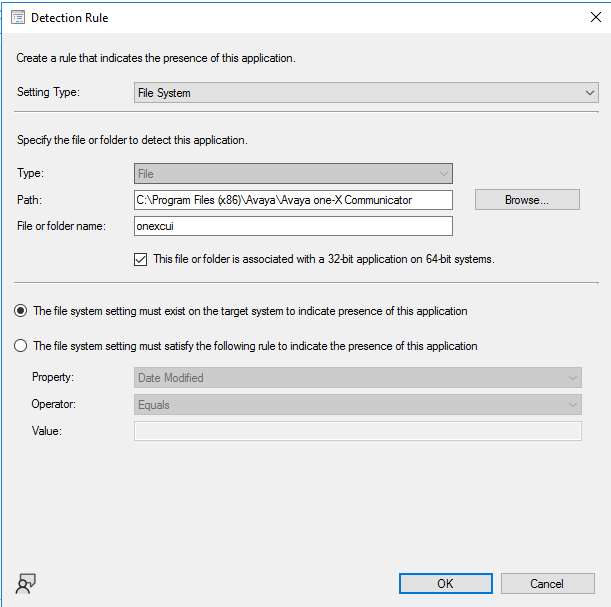
Hello I have an application (Avaya One X) which installs ok, but the detection keeps failing so in software center it will say "failed". If I point it to the installation path, that does not work and there does not appear to be a registry entry for Avaya. The install only works as a application, I already tried a package. I have also tried to lookup documentation online but haven't found anything as of yet to help me with it. Thank you.
' cx='32' cy='32' r='32' /%3E%3Ctext x='50%25' y='55%25' dominant-baseline='middle' text-anchor='middle' fill='%23FFF' %3ENG%3C/text%3E%3C/svg%3E)
@Draconna Have you tried using a custom script as the detection method? I find PowerShell pretty reliable and something simple like this should do the trick
$path =  "${env:ProgramFiles(x86)}\Avaya\Avaya one-X Communicator\onexcui"
If (Test-Path $path) {
    Write-Host  "INSTALLED"
}
Thank you Nathan, here is what worked for me. Thanks again, saved me a lot of time trying to get this to work and now I can use this for other difficult apps.
$path = "${env:C:\Program Files (x86)\Avaya\Avaya one-X Communicator\onexcui"
If (Test-Path $path) {
Write-Host "INSTALLED"
}
' cx='32' cy='32' r='32' /%3E%3Ctext x='50%25' y='55%25' dominant-baseline='middle' text-anchor='middle' fill='%23FFF' %3ERJ%3C/text%3E%3C/svg%3E)
If it is onexcui is a folder then adding a \ after Avaya x communicator folder should fix things. If onexcui is a file then add the extension after it.

Use %ProgramFiles% instead and tick that option to 32bit assiosiation.