
Could not change the connection state for server in RDS
' cx='32' cy='32' r='32' /%3E%3Ctext x='50%25' y='55%25' dominant-baseline='middle' text-anchor='middle' fill='%23FFF' %3ESM%3C/text%3E%3C/svg%3E)
Steve Maffin
1
Reputation point
I have a Windows Server 2016 Standard server that is part of an RDS host server group.
I installed MS patches on 11/1/2022.
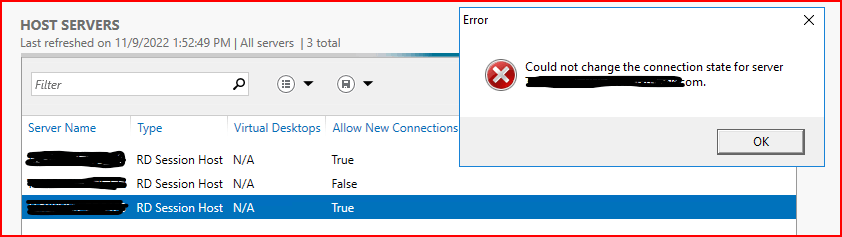
Now, I'm getting an error message when trying to set the server back to "Allow New Connections".
It says "Could not change the connection state for server."
I haven't been able to find much information and wondering if others have encountered this.
I did find a reddit post on this here: https://www.reddit.com/r/sysadmin/comments/vxa5ef/rd_session_host_issue/
In that post, it was suggested to make a change in the registry to enable logins again, which I did.
However, I'm still looking for a permanent solution.
In this snippet, I've already made these workaround changes to the first and third servers.
The second server allows changes without issue.
I've also found helpful information here: https://docs.vmware.com/en/VMware-Horizon-7/7.13/horizon-published-desktops-applications/GUID-89EDB3EE-06A6-400C-B5CF-D9D82E009EA6.html
Has anyone else seen this and found a solution?
EDIT: It appears that the 2nd RDS host did NOT get any updates applied to it. I can still change that one without error.
EDIT / SOLVED: Applying the latest windows patches to the Broker fixed the issue for me.
Windows for business | Windows Client for IT Pros | User experience | Remote desktop services and terminal services
Sign in to answer