Azure Logic Apps
An Azure service that automates the access and use of data across clouds without writing code.
This browser is no longer supported.
Upgrade to Microsoft Edge to take advantage of the latest features, security updates, and technical support.
' cx='32' cy='32' r='32' /%3E%3Ctext x='50%25' y='55%25' dominant-baseline='middle' text-anchor='middle' fill='%23FFF' %3EBS%3C/text%3E%3C/svg%3E)
Hi,
I currently have a Logic app which receive a HTTP request that contains list of To, subject, mail body and an optional attachment file.
It works perfect but I would like it to be able receiving multiple files data and attach those files - no matter how much were received.
Currently, it checks if there is a parameter named "AttachmentName" in the request body if so it takes this as the file name and also collect the "AttachmentContent" parameter as the file data as a string format.
I can change if required the data sent to the logic app in order to work as expected.
I've tried looking for it on the web and it seems like it should be easy but everything I tried just does not work.
In addition, I found a lot of solutions which uses Blob but I don't - only from HTTP request
This is my current logic app:
"definition": {
        "$schema": "https://schema.management.azure.com/providers/Microsoft.Logic/schemas/2016-06-01/workflowdefinition.json#",
        "actions": {
            "Condition": {
                "actions": {
                    "Send_an_email_(V2)": {
                        "inputs": {
                            "body": {
                                "Attachments": [
                                    {
                                        "ContentBytes": "@{base64(triggerBody()?['AttachmentContent'])}",
                                        "Name": "@{triggerBody()?['AttachmentName']}"
                                    }
                                ],
                                "Body": "<p>@{triggerBody()?['Body']}</p>",
                                "Subject": "@{triggerBody()?['Subject']}",
                                "To": "@{join(triggerBody()?['To'], ';')}"
                            },
                            "host": {
                                "connection": {
                                    "name": "@parameters('$connections')['office365']['connectionId']"
                                }
                            },
                            "method": "post",
                            "path": "/v2/Mail"
                        },
                        "runAfter": {},
                        "type": "ApiConnection"
                    }
                },
                "else": {
                    "actions": {
                        "Send_an_email_(V2)_2": {
                            "inputs": {
                                "body": {
                                    "Body": "<p>@{triggerBody()?['Body']}</p>",
                                    "Subject": "@{triggerBody()?['Subject']}",
                                    "To": "@{join(triggerBody()?['To'], ';')}"
                                },
                                "host": {
                                    "connection": {
                                        "name": "@parameters('$connections')['office365']['connectionId']"
                                    }
                                },
                                "method": "post",
                                "path": "/v2/Mail"
                            },
                            "runAfter": {},
                            "type": "ApiConnection"
                        }
                    }
                },
                "expression": {
                    "and": [
                        {
                            "contains": [
                                "@triggerBody()",
                                "AttachmentName"
                            ]
                        }
                    ]
                },
                "runAfter": {},
                "type": "If"
            }
        },
        "contentVersion": "1.0.0.0",
        "outputs": {},
        "parameters": {
            "$connections": {
                "defaultValue": {},
                "type": "Object"
            }
        },
        "triggers": {
            "manual": {
                "inputs": {
                    "schema": {}
                },
                "kind": "Http",
                "type": "Request"
            }
        }
    }
Thanks in advance

@Barak Stein Thanks for reaching out. Can you please confirm if you want to attach the blob file as the attachment on your send email action, but the blob path needs to be dynamic and passed through your http trigger. If my understanding is correct, then you can leverage the below workflow. Attaching the Code View for your reference.
Request Body: Array of file paths
{"path" : ["/test/CodeView.txt", "/test/img.png"]}
In case if you want to send multiple attachments as dynamic you need to define the array and append the content and file name of your attachments as below.
[
  {
    "ContentBytes": "base64byte",
    "Name": "attachmentName1"
  },
  {
    "ContentBytes": "base64byte",
    "Name": "attachmentName2"
  }
]
Workflow :
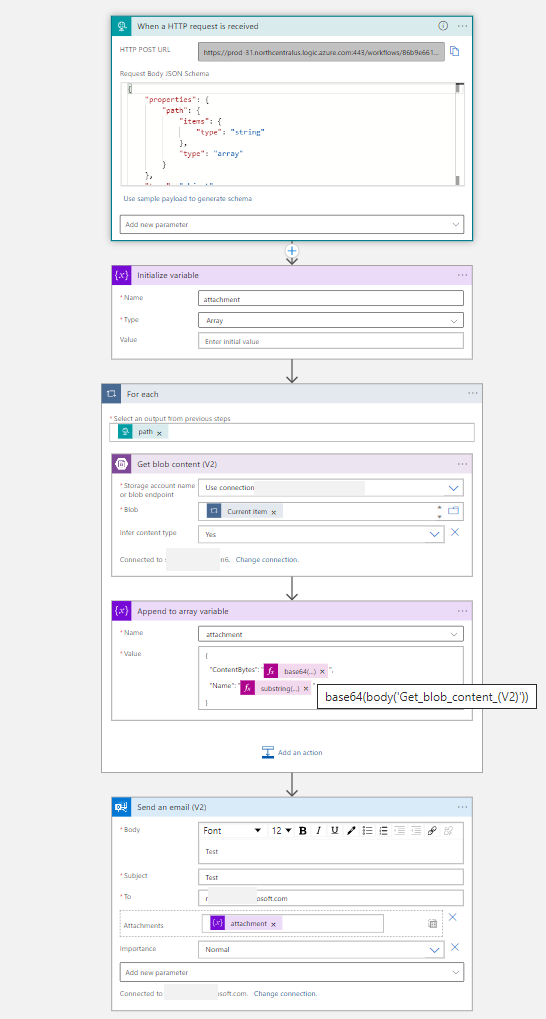
Let me know if I understood your requirement and share example so I can assist you.
Thanks.
But Actually I would like to work without blob at all.
Currently, I pass the file name and its content through the HTTP request body as "AttachmentName" and "AttachmentContent" and then on the mail attachment I'm pointing to these to params.
I would like to do the same maybe by sending a list of dictionaries on the same format.
body for example:
{
"Attachments":
  [
     {
       "ContentBytes": "base64byte",
       "Name": "attachmentName1"
     },
     {
       "ContentBytes": "base64byte",
       "Name": "attachmentName2"
     }
   ]
}
@Barak Stein Yes you need to pass array of attachments having two properties as ContentBytes and Name for individual attachments while calling your HTTP Post URL.
' cx='32' cy='32' r='32' /%3E%3Ctext x='50%25' y='55%25' dominant-baseline='middle' text-anchor='middle' fill='%23FFF' %3EAM%3C/text%3E%3C/svg%3E)
Hey Mayank, while passing the blob files dynamically, as I have some empty files to be sent, I am getting this error while appending the variable. base64 not working for null value. What can be best possible solution for this. Thanks in advance
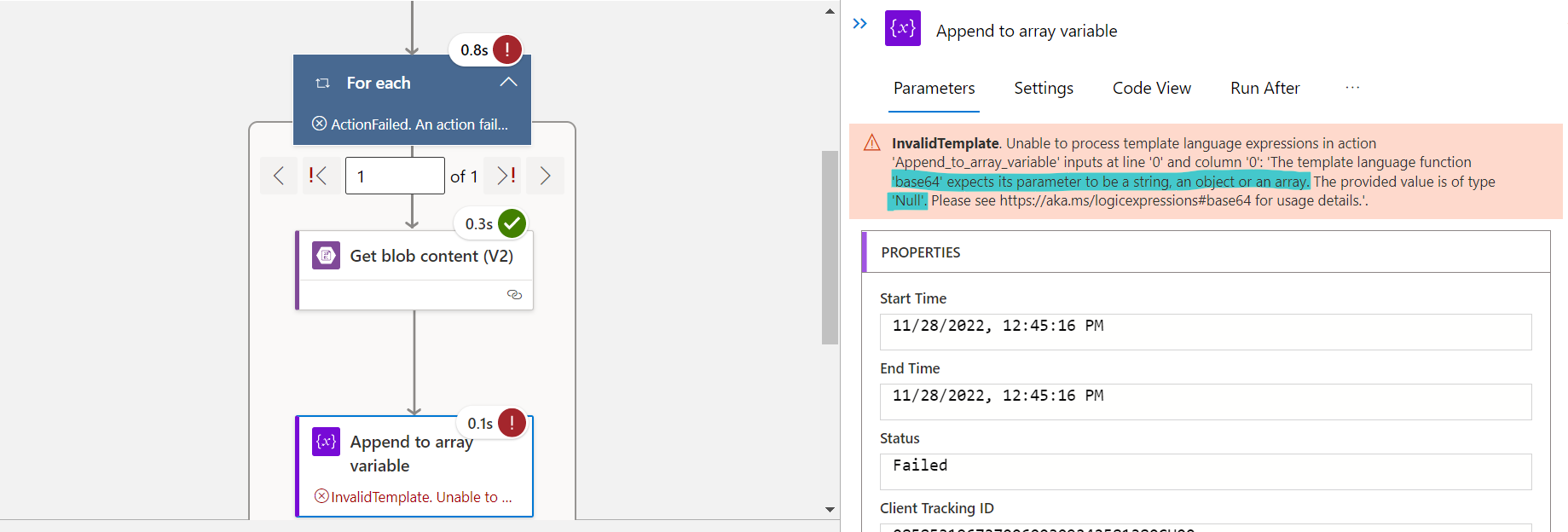
@Ahmed, Mushtaq As per the error the action Append to array variable you are passing the value as object or array but the append action only expects string value. Please make sure that whatever value you are assigning to the append to array variable should be of type string. In case if you still need assistance feel free to create a new Q&A thread.
' cx='32' cy='32' r='32' /%3E%3Ctext x='50%25' y='55%25' dominant-baseline='middle' text-anchor='middle' fill='%23FFF' %3EJS%3C/text%3E%3C/svg%3E)
Hi Mayank,
I am trying to do the same - email with attachments . I followed you and still cant get it to work ..any advice be much appreciated L1.png
here is my code view
{
    "definition": {
        "$schema": "https://schema.management.azure.com/providers/Microsoft.Logic/schemas/2016-06-01/workflowdefinition.json#",
        "actions": {
            "For_each": {
                "actions": {
                    "Append_to_array_variable": {
                        "inputs": {
                            "name": "attachment",
                            "value": {
                                "ContentBytes": "@{base64(body('Get_blob_content_(V2)'))}",
                                "Name": "@{substring(items('For_each'), add(lastIndexOf(items('For_each'),'/'), 1), sub(sub(length(items('For_each')),1), lastIndexOf(items('For_each'),'/')))}"
                            }
                        },
                        "runAfter": {
                            "Get_blob_content_(V2)": [
                                "Succeeded"
                            ]
                        },
                        "type": "AppendToArrayVariable"
                    },
                    "Get_blob_content_(V2)": {
                        "inputs": {
                            "host": {
                                "connection": {
                                    "name": "@parameters('$connections')['azureblob']['connectionId']"
                                }
                            },
                            "method": "get",
                            "path": "/v2/datasets/@{encodeURIComponent(encodeURIComponent('logappstoregeacct'))}/files/@{encodeURIComponent(encodeURIComponent(items('For_each')?['Path']))}/content",
                            "queries": {
                                "inferContentType": true
                            }
                        },
                        "runAfter": {},
                        "type": "ApiConnection"
                    }
                },
                "foreach": "@body('Lists_blobs_(V2)')?['value']",
                "runAfter": {
                    "Lists_blobs_(V2)": [
                        "Succeeded"
                    ]
                },
                "type": "Foreach"
            },
            "Initialize_variable": {
                "inputs": {
                    "variables": [
                        {
                            "name": "attachment",
                            "type": "array"
                        }
                    ]
                },
                "runAfter": {},
                "type": "InitializeVariable"
            },
            "Lists_blobs_(V2)": {
                "inputs": {
                    "host": {
                        "connection": {
                            "name": "@parameters('$connections')['azureblob']['connectionId']"
                        }
                    },
                    "method": "get",
                    "path": "/v2/datasets/@{encodeURIComponent(encodeURIComponent('AccountNameFromSettings'))}/foldersV2/@{encodeURIComponent(encodeURIComponent('JTJmaW5wdXQtbGFwcHM='))}",
                    "queries": {
                        "nextPageMarker": "",
                        "useFlatListing": true
                    }
                },
                "metadata": {
                    "JTJmaW5wdXQtbGFwcHM=": "/input-lapps"
                },
                "runAfter": {
                    "Initialize_variable": [
                        "Succeeded"
                    ]
                },
                "type": "ApiConnection"
            },
            "Send_an_email_(V2)": {
                "inputs": {
                    "body": {
                        "Attachments": [
                            {
                                "ContentBytes": "@{base64(triggerBody()?['AttachmentContent'])}",
                                "Name": "@{triggerBody()?['AttachmentName']}"
                            }
                        ],
                        "Body": "<p>@{triggerBody()?['Body']}</p>",
                        "Subject": "@{triggerBody()?['Subject']}",
                        "To": "******@yahoo.com"
                    },
                    "host": {
                        "connection": {
                            "name": "@parameters('$connections')['outlook']['connectionId']"
                        }
                    },
                    "method": "post",
                    "path": "/v2/Mail"
                },
                "runAfter": {
                    "For_each": [
                        "Succeeded"
                    ]
                },
                "type": "ApiConnection"
            }
        },
        "contentVersion": "1.0.0.0",
        "outputs": {},
        "parameters": {
            "$connections": {
                "defaultValue": {},
                "type": "Object"
            }
        },
        "triggers": {
            "manual": {
                "inputs": {
                    "method": "GET"
                },
                "kind": "Http",
                "type": "Request"
            }
        }
    },
    "parameters": {
        "$connections": {
            "value": {
                "azureblob": {
                    "connectionId": "/subscriptions/69ad1e58-75e4-419c-b78e-60abe473fe7a/resourceGroups/LogicApps_ResourceGrp/providers/Microsoft.Web/connections/azureblob",
                    "connectionName": "azureblob",
                    "id": "/subscriptions/69ad1e58-75e4-419c-b78e-60abe473fe7a/providers/Microsoft.Web/locations/eastus/managedApis/azureblob"
                },
                "outlook": {
                    "connectionId": "/subscriptions/69ad1e58-75e4-419c-b78e-60abe473fe7a/resourceGroups/LogicApps_ResourceGrp/providers/Microsoft.Web/connections/outlook",
                    "connectionName": "outlook",
                    "id": "/subscriptions/69ad1e58-75e4-419c-b78e-60abe473fe7a/providers/Microsoft.Web/locations/eastus/managedApis/outlook"
                }
            }
        }
    }
}
I missed to initialize var but now i am getting this error for loop - "The execution of template action 'For_each' failed: the result of the evaluation of 'foreach' expression '@triggerBody()?['path']' is of type 'Null'. The result must be a valid array." . I really need some help -
looking at this post i just cant seem to find where is the 'path' values set ?
I want to attached all the blobs in a container to email...
Thanks in Advance..