Azure Virtual Machines
An Azure service that is used to provision Windows and Linux virtual machines.
9,043 questions
This browser is no longer supported.
Upgrade to Microsoft Edge to take advantage of the latest features, security updates, and technical support.
' cx='32' cy='32' r='32' /%3E%3Ctext x='50%25' y='55%25' dominant-baseline='middle' text-anchor='middle' fill='%23FFF' %3EGN%3C/text%3E%3C/svg%3E)
Hi,
Is the option to boot an Azure Server into safe mode?

' cx='32' cy='32' r='32' /%3E%3Ctext x='50%25' y='55%25' dominant-baseline='middle' text-anchor='middle' fill='%23FFF' %3EA%3C/text%3E%3C/svg%3E)
Something here could help.
https://learn.microsoft.com/en-us/troubleshoot/azure/virtual-machines/boot-diagnostics
--please don't forget to upvote and Accept as answer if the reply is helpful--
There is no problem booting the system; I need to run a tool that can only run in a safe mode
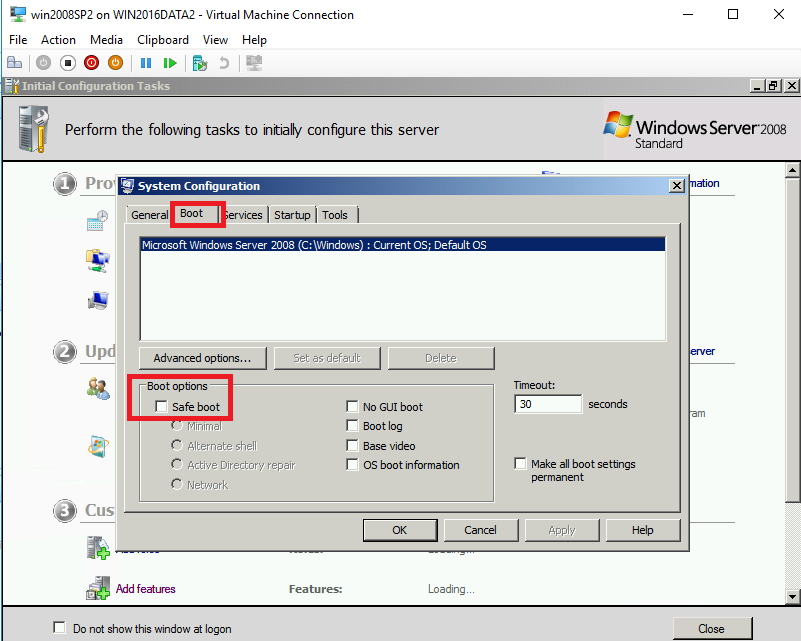
You could run msconfig, then on Boot tab choose Safe Mode
--please don't forget to upvote and Accept as answer if the reply is helpful--

Hello,
I think you ask about Azure, the only way is through Serial console with Azure VMs as described in the following link
https://microsoft.github.io/AzureTipsAndTricks/blog/blog/tip191.html
And I agree with Mr. @Anonymous and I add also the following link:
https://learn.microsoft.com/en-us/troubleshoot/azure/virtual-machines/serial-console-enable-disable?source=recommendations
Then you need to run the app through console.
BR,