
Hi @Efff dd
You could try disabling the php-cgi.exe service from startup services.
------------------------------
If this is helpful please accept answer.
This browser is no longer supported.
Upgrade to Microsoft Edge to take advantage of the latest features, security updates, and technical support.
' cx='32' cy='32' r='32' /%3E%3Ctext x='50%25' y='55%25' dominant-baseline='middle' text-anchor='middle' fill='%23FFF' %3EED%3C/text%3E%3C/svg%3E)
Hello
I would like to stop PHP without uninstalling, just in case I need to turn it back on.
slowly decommissioning a IIS server and sites.
thanks

Hi @Efff dd
You could try disabling the php-cgi.exe service from startup services.
------------------------------
If this is helpful please accept answer.
' cx='32' cy='32' r='32' /%3E%3Ctext x='50%25' y='55%25' dominant-baseline='middle' text-anchor='middle' fill='%23FFF' %3ESW%3C/text%3E%3C/svg%3E)
There are many ways can do it:
Stop from that panel, when you need to start again, just Start from there.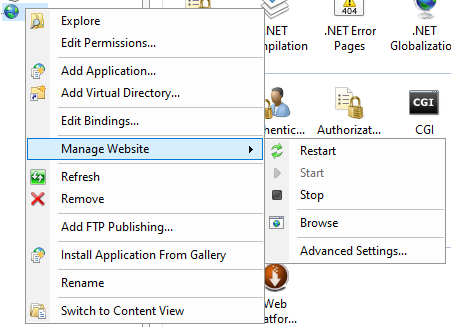
 <system.webServer>
    <security>
        <requestFiltering>
            <fileExtensions>
                <add fileExtension=".php" allowed="false" />
            </fileExtensions>
        </requestFiltering>
    </security>
</system.webServer>
    <rewrite>
        <rules>
            <clear />
            <rule name="Show Our Error Page for PHP files" stopProcessing="true">
                <match url="^.*\.php$" />
                <action type="Rewrite" url="/404.php" />
            </rule>
        </rules>
    </rewrite>
If the answer is the right solution, please click "Accept Answer" and kindly upvote it. If you have extra questions about this answer, please click "Comment".
Note: Please follow the steps in our documentation to enable e-mail notifications if you want to receive the related email notification for this thread.