How to fill in the "Line Changed" indicator

Jiří IV 1 Reputation point
2022-11-21T16:42:47.717+00:00

Hi,

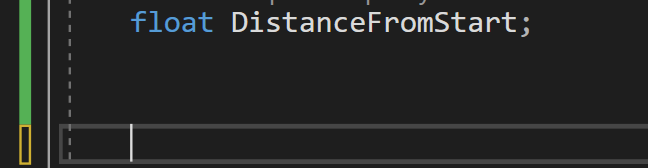
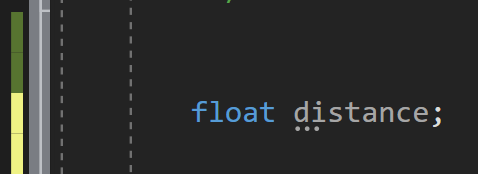
is there a way to fill the "Line Changed" indicator box as it used to be in the old visual studio? I guess this was done so that VS is more accessible for colourblind people, but I would prefer to have a filled-in block just like when the code is saved (see the 1st picture).

Please let me know if there is a way to change this.

What I get (VS 2022)

262669-image.png

What I want (VS 2019)

262771-image.png

Thank you in advance!

Developer technologies | C++
A high-level, general-purpose programming language, created as an extension of the C programming language, that has object-oriented, generic, and functional features in addition to facilities for low-level memory manipulation.
Developer technologies | Visual Studio | Other
A family of Microsoft suites of integrated development tools for building applications for Windows, the web, mobile devices and many other platforms. Miscellaneous topics that do not fit into specific categories.
0 comments No comments
{count} votes

1 answer

Sort by: Most helpful
  1. Tianyu Sun-MSFT 34,686 Reputation points Microsoft External Staff
    2022-11-22T09:54:21.573+00:00

    Hi @Jiří IV ,

    Welcome to Microsoft Q&A forum.

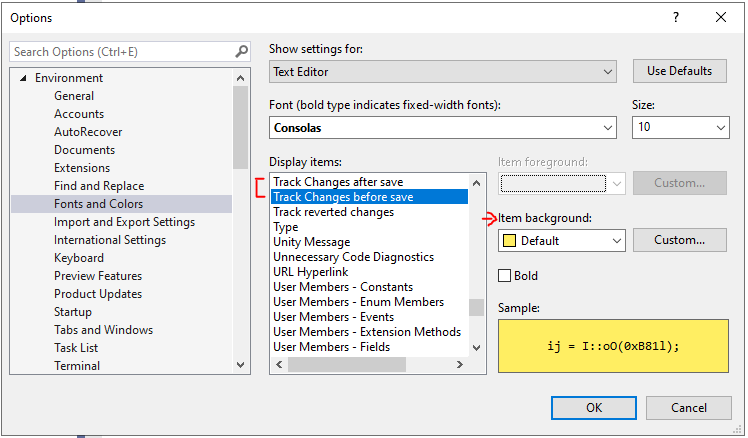
    Do you mean these two items: "Track Changes before save" and "Track Changed after save"? If so, please go to Tools > Options > Environment > Fonts and Colors > Display items > find these two items and change the related Item background.

    262999-image.png

    Feel free to contact us.

    Best Regards,
    Tianyu

    • If the answer is the right solution, please click "Accept Answer" and kindly upvote it. If you have extra questions about this answer, please click "Comment".
      Note: Please follow the steps in our documentation to enable e-mail notifications if you want to receive the related email notification for this thread.
    1 person found this answer helpful.

Your answer

Answers can be marked as 'Accepted' by the question author and 'Recommended' by moderators, which helps users know the answer solved the author's problem.