Azure API Management
An Azure service that provides a hybrid, multi-cloud management platform for APIs.
This browser is no longer supported.
Upgrade to Microsoft Edge to take advantage of the latest features, security updates, and technical support.
' cx='32' cy='32' r='32' /%3E%3Ctext x='50%25' y='55%25' dominant-baseline='middle' text-anchor='middle' fill='%23FFF' %3ESP%3C/text%3E%3C/svg%3E)
I have a middleware Azure API where the consumers POST a json body value such as this
{
"subscriptionId": "42345",
"type": "MailPieceId",
"status": [
{
"failedValues": [
"abc",
"123@"
],
"reason": "Invalid barcodes"
}
],
"customerWebhook": "https://url",
"referenceNumber": "12345"
}
I need to fetch the value of "customerWebhook" from the json request body and set it as the service backend url, as the url in the json body will be different for every new request.
Currently i am using this in my inbound policy.
<set-variable name="myVar" value="@(context.Request.Body.As<JObject>()["customerWebhook"])" />
<set-backend-service base-url="@(((string)context.Variables["myVar"]).ToString())" />
But this is the error that i keep getting.
"message": "Expression evaluation failed.",
"expression": "((string)context.Variables[\"myVar\"]).ToString()",
"details": "Unable to cast object of type 'Newtonsoft.Json.Linq.JValue' to type 'System.String'."
Can anyone please let me know a solution in this case.
' cx='32' cy='32' r='32' /%3E%3Ctext x='50%25' y='55%25' dominant-baseline='middle' text-anchor='middle' fill='%23FFF' %3EJM%3C/text%3E%3C/svg%3E)
Hi @Anonymous Thanks for reaching out. Please try using the below policy

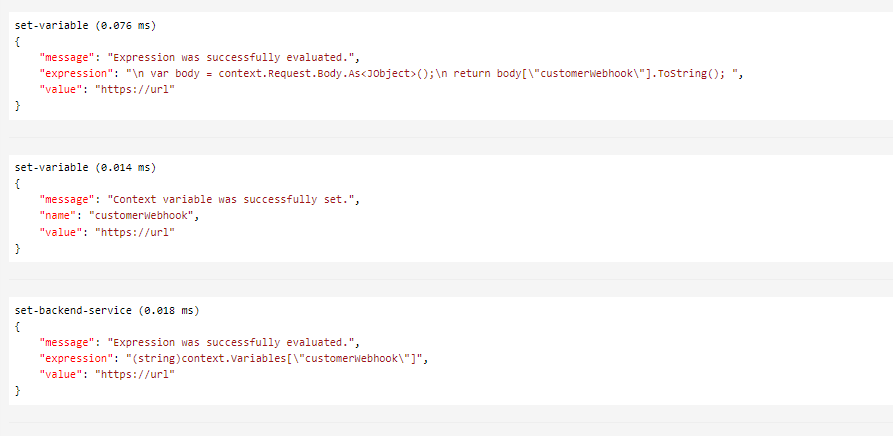
let me know incase of further queries, I would be happy to assist you.
Please 'Accept as answer' and ‘Upvote’ if it helped so that it can help others in the community looking for help on similar topics.