Developer technologies | VB
An object-oriented programming language developed by Microsoft that can be used in .NET.
This browser is no longer supported.
Upgrade to Microsoft Edge to take advantage of the latest features, security updates, and technical support.
' cx='32' cy='32' r='32' /%3E%3Ctext x='50%25' y='55%25' dominant-baseline='middle' text-anchor='middle' fill='%23FFF' %3EG%3C/text%3E%3C/svg%3E)
How do i stop/cancel extracting a zipfile in visual basic? theres no way to easily cancel and no matter what you do you cant stop or cancel from extracting until its actually finished
i even tried a thread but stopping it dosnet stop the zip actually extracting
Using archive As ZipArchive = ZipFile.OpenRead(zte)
'(code in here to deal with extracting zip)
End Using
thanks

Hi
Best to show your current code if you want help with it. Put any code into a code block 
my code is like this i need to have it automaticcly cancel when cancel is clicked
                             Using archive As ZipArchive = ZipFile.OpenRead(zte)
                                 For Each entry As ZipArchiveEntry In archive.Entries
                                     ' Gets the full path to ensure that relative segments are removed.
                                     Dim destinationPath As String = Path.GetFullPath(Path.Combine(zd, entry.FullName))

                                     ' Ordinal match is safest, case-sensitive volumes can be mounted within volumes that
                                     ' are case-insensitive.
                                     If destinationPath.StartsWith(zd, StringComparison.Ordinal) Then
                                             entry.ExtractToFile(destinationPath)
                                         End If
                                     End If
                                 Next
                             End Using

i even tried a thread but stopping it dosnet stop the zip actually extracting
How did you observe that stopping the thread does not stop the zip actually extracting?
when i press cancel, the disk usage stays the same until the zip is done so nothing happens
Maybe you should also interrupt the thread.
intterupting dosent seem to help it either it keeps going until its finished
really anoyying that there dosent seem to be a simple way to stop it process when you want to cancel
any other ideas? or do i have to go with something really crude such as completly reseting the whole program when you want to cancel it?
' cx='32' cy='32' r='32' /%3E%3Ctext x='50%25' y='55%25' dominant-baseline='middle' text-anchor='middle' fill='%23FFF' %3EJL%3C/text%3E%3C/svg%3E)
Hi @Gabrielo ,
It is recommended that you post your issue to GitHub.
https://github.com/dotnet/runtime/issues?q=area-system.io.compression
Hi
Here is one way of doing it. This example is JUST to show a generalize approach as I do noy have your data etc.
Setting up a simple BackGroundWorker to run your time consuming work. Allow the work to be interrupted and exit the BackGroundWorker using CancellationPending flag.
The example just uses a Thread.Sleep(2 seconds) in a generalized loop counting from 1 to 10.
Clicking the Start button starts the operation and the Stop button terminates the work.
In effect, putting your code into a BackGroundWorker and place the check for CancellationPending in an appropriate place (such as directly after the extract code for one item)
Example Form Design
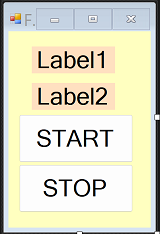
Example Code
Option Strict On
Option Explicit On
Imports System.ComponentModel
Public Class Form1
  Dim WithEvents bgw As New BackgroundWorker
  Private Sub Form1_Load(sender As Object, e As EventArgs) Handles MyBase.Load
    bgw.WorkerSupportsCancellation = True
  End Sub
  Private Sub Button1_Click(sender As Object, e As EventArgs) Handles Button1.Click
    'start operation
    bgw.RunWorkerAsync()
  End Sub
  Private Sub Button2_Click(sender As Object, e As EventArgs) Handles Button2.Click
    'stop operation
    bgw.CancelAsync()
  End Sub
  Private Sub bgw_DoWork(sender As Object, e As DoWorkEventArgs) Handles bgw.DoWork
    Invoke(Sub() Label1.Text = "Running")
    Invoke(Sub() Label2.Text = Nothing)
    For Each entry As Integer In {1, 2, 3, 4, 5, 6, 7, 8, 9, 10}

      'show loop counter in Label2
      Invoke(Sub() Label2.Text = entry.ToString)

      'emulate your operation with
      ' a dummy 'pause'
      Threading.Thread.Sleep(2000)

      'check for exit
      If bgw.CancellationPending Then
        Exit For
      End If
    Next
  End Sub
  Private Sub bgw_RunWorkerCompleted(sender As Object, e As RunWorkerCompletedEventArgs) Handles bgw.RunWorkerCompleted
    Label1.Text = "Stopped"
  End Sub
End Class
i just tried this and unfortuannly it dosent work since the zip extract code is just a single line then it dosent cancel until what is currently running actally finishes
need some kind of way to just outright terminate a sub or something so it ends instantly
hope to see if theres anything that can be done (surely so archive apps have cancel features)
thanks!
Hi
Sorry, the code I suggested will only Cancel after the current 'entry' in the For Each entry ........... loop. It seems you are asking for something to interrupt the OS file operations which I know nothing of. Similar to trying to stop an OS file copy/move/paste operation mid stream? I would be dubious of doing something like that even if I knew how to do it as file corruption may rear its ugly head!
I think Viorel-1 may have better understood your question.
yeah i know you can corrupt it by stopping it but then it would be the users fault since they clicked on cancel and any corrupted files that were attemped to be extracted would have to be deleted somehow
maybe if i cancel it i could try to automaticly delete all unfinished items as well but will need to find a way to cancel to begin with
any file archiver including windows built in one has a way to cancel the transfers and clean up any leftover files when u click on cancel so they should be some way
Hi
From the context, you must be talking about decompressing extremely large files - is that the case?
yeah large zips with large files inside my program can open any sort of file and im trying to make it so that its fluent and easy even if you are going to open a large file and be able to easily cancel extracing it even if that means the resulting file isnt complete in case they want to cancel it and go back , just like any other zip extracter