Azure Data Factory
An Azure service for ingesting, preparing, and transforming data at scale.
This browser is no longer supported.
Upgrade to Microsoft Edge to take advantage of the latest features, security updates, and technical support.
' cx='32' cy='32' r='32' /%3E%3Ctext x='50%25' y='55%25' dominant-baseline='middle' text-anchor='middle' fill='%23FFF' %3EA%3C/text%3E%3C/svg%3E)
I am having a lot of issue with Trigger in Azure Logic App for at least a month now.
Somehow, Trigger does not grab csv files as expected.
It was working fine for a while (maybe 2-3 months), but then as more files are loaded in SFTP folder, somehow, Trigger does not grab more than 4-5 files even though I changed the frequency from something like every 1 hour to every10 minutes.
I did some initial research which one to use, and some say Logic App should be (due to trigger).
https://stackoverflow.com/questions/70155363/move-files-in-ftp-with-logic-apps
https://stackoverflow.com/questions/63397919/how-to-create-azure-data-factory-pipeline-and-trigger-it-automatically-whenever
But, there is other suggestion to use ADF (Azure Data Factory):
https://stackoverflow.com/questions/69945067/ingest-data-from-on-premise-sftp-folder-to-azure-sql-database-azure-data-factor
Business requirement is that we need to somehow ingest csv files' data on a daily basis, but it does not necessarily have to be in a real time.
It could possibly run to grab whatever the new files like 3 times a day (6 am, 8 am, 10 am).
Can ADF fulfill the requirements?

Hi @Anonymous ,
Thank you for posting query in Microsoft Q&A platform.
You can achieve this using Azure data factory. Below are the few work arounds.
Approach1: Use GetMetaData activity to get list of files from folder and then use ForEach activity to loop them and inside ForEach activity use Copy activity to copy each file. Here Inside copy activity we should use parameterized datasets.
Please note, here after copy activity we should log copied filenames to some log table. And Before copy we should check if that file is already copied or not by comparing with log table. We can use Lookup activity or Script activity to run SQL query to check if file name presents or not in log table.
Approach2: Using Wild card file path in Copy activity.
Inside Copy activity use wild card file path to point to all files and then use Filter By last modified filed values to filter files based on last modified times to Copy.
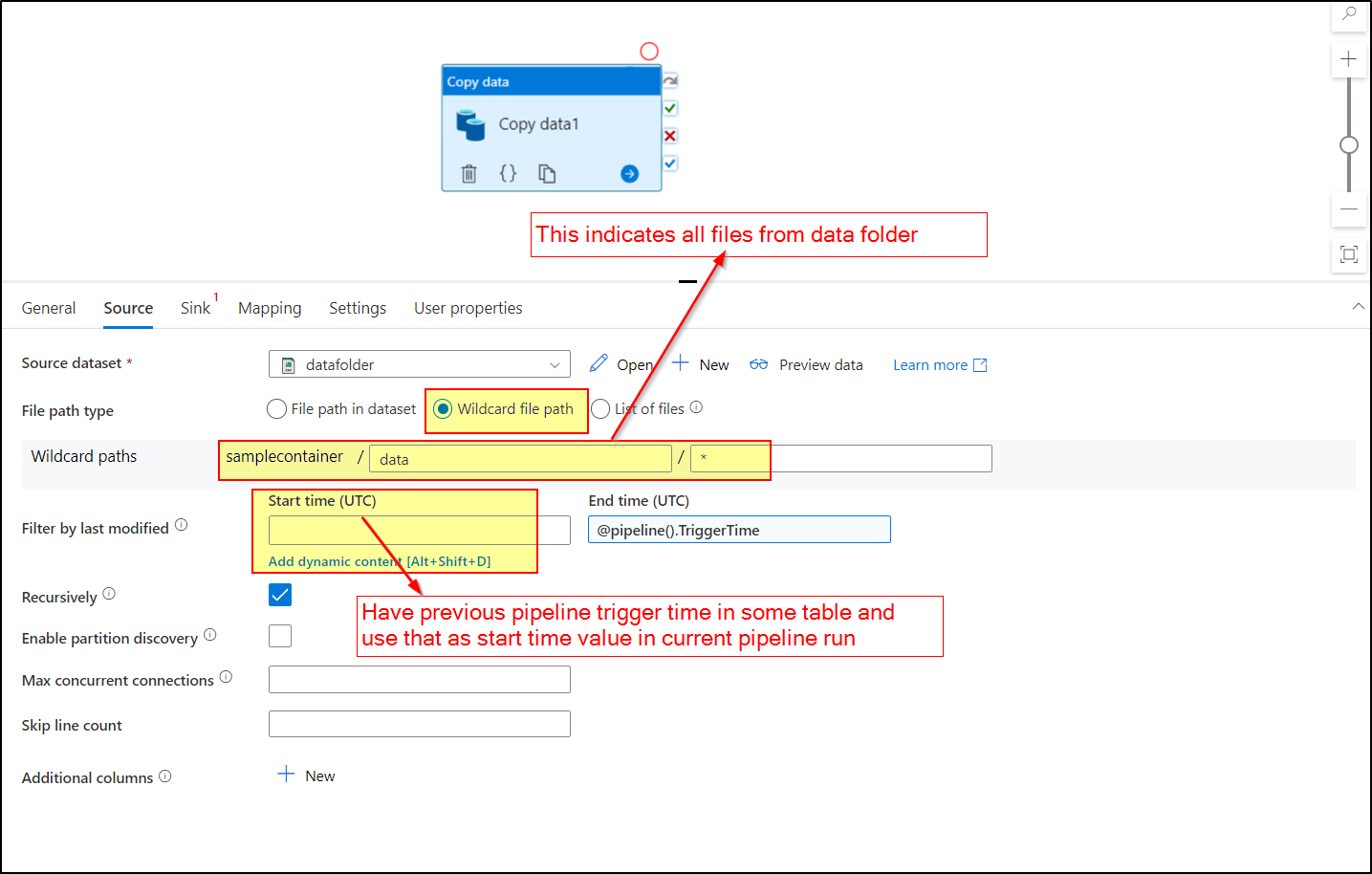
Refer below video for better understanding of Approach 2.
Incrementally copy new and changed files based on Last Modified Date in Azure Data Factory
Below are few useful videos you can refer:
Get Metadata Activity in Azure Data Factory
ForEach Activity in Azure Data Factory
Script Activity in Azure Data Factory or Azure Synapse
Hope this helps. Please let me know if any further queries.
---------------
Please consider hitting Accept Answer button. Accepted answers help community as well.
@ShaikMaheer-MSFT
Thank you so much for your help.
It appears that Approach 2 seems to be a simpler approach by watching YouTube.
Is there any down side from Approach 2 vs. Approach 1?
Thanks.
Hi @Anonymous , yes Approach 2 will be simpler and efficient. Approach 1 will be more time consuming. Kindly consider marking answer as Accepted Answer. Accepted answers help community as well.