Developer technologies | XAML
A language based on Extensible Markup Language (XML) that enables developers to specify a hierarchy of objects with a set of properties and logic.
This browser is no longer supported.
Upgrade to Microsoft Edge to take advantage of the latest features, security updates, and technical support.
' cx='32' cy='32' r='32' /%3E%3Ctext x='50%25' y='55%25' dominant-baseline='middle' text-anchor='middle' fill='%23FFF' %3ESO%3C/text%3E%3C/svg%3E)
Please check below Xaml code
  <Window.Resources>

        <DataTemplate  DataType="{x:Type local:MainViewModel}">
            <view1:View1_1_Usr/>
        </DataTemplate>
        <DataTemplate  DataType="{x:Type local:MainViewModel}">
            <view2:View_2_Usr/>
        </DataTemplate>

    </Window.Resources>
<grid>
<ContentControl x:Name="Display" Content="{Binding CurrentViemModel}"/>
</Grid>
Error :The key is already defined in this scope
The View1_1_Usr and View_2_Usr need the same viewmodel. if added with different Key, problem will be able to go away.
How can i switch View in ContentControl by loading MainViewModel?
' cx='32' cy='32' r='32' /%3E%3Ctext x='50%25' y='55%25' dominant-baseline='middle' text-anchor='middle' fill='%23FFF' %3EHL%3C/text%3E%3C/svg%3E)
You could try to refer to the code below.
App.xaml.cs:
<Application.Resources>
        <local:ViewModel x:Key="SharedViewModel" />
     </Application.Resources>
MainWindow.xaml and ViewModel:
264596-content-control-two-view-on-viewmodel.txt
View1:
<UserControl
...
  DataContext="{StaticResource SharedViewModel}">
     <Canvas>
    <TextBlock Text="{Binding Name}" Width="100" Height="50" Background="LightPink"  Margin="50"/>
    <Line x:Name="lin1" Stroke="Gray" StrokeThickness="2" X1="30" X2="30" Y1="20" Y2="40"/>
    <Line x:Name="lin2" Stroke="Blue" StrokeThickness="2" X1="40" X2="40" Y1="20" Y2="40"/>
    <Line x:Name="lin3" Stroke="Red" StrokeThickness="2" X1="50" X2="50" Y1="20" Y2="40"/>
</Canvas>
</UserControl>
View2:
<UserControl
...
DataContext="{StaticResource SharedViewModel}" >
    <Canvas>
    <Button Content="{Binding Address}" Width="100" Height="50" Background="AliceBlue"  Margin="70"/>
    <Line x:Name="lin1" Stroke="Gray" StrokeThickness="2" X1="30" X2="130" Y1="40" Y2="40"/>
    <Line x:Name="lin2" Stroke="Blue" StrokeThickness="2" X1="30" X2="120" Y1="50" Y2="50"/>
    <Line x:Name="lin3" Stroke="Red" StrokeThickness="2" X1="30" X2="120" Y1="60" Y2="60"/>
</Canvas>
</UserControl>
The result:
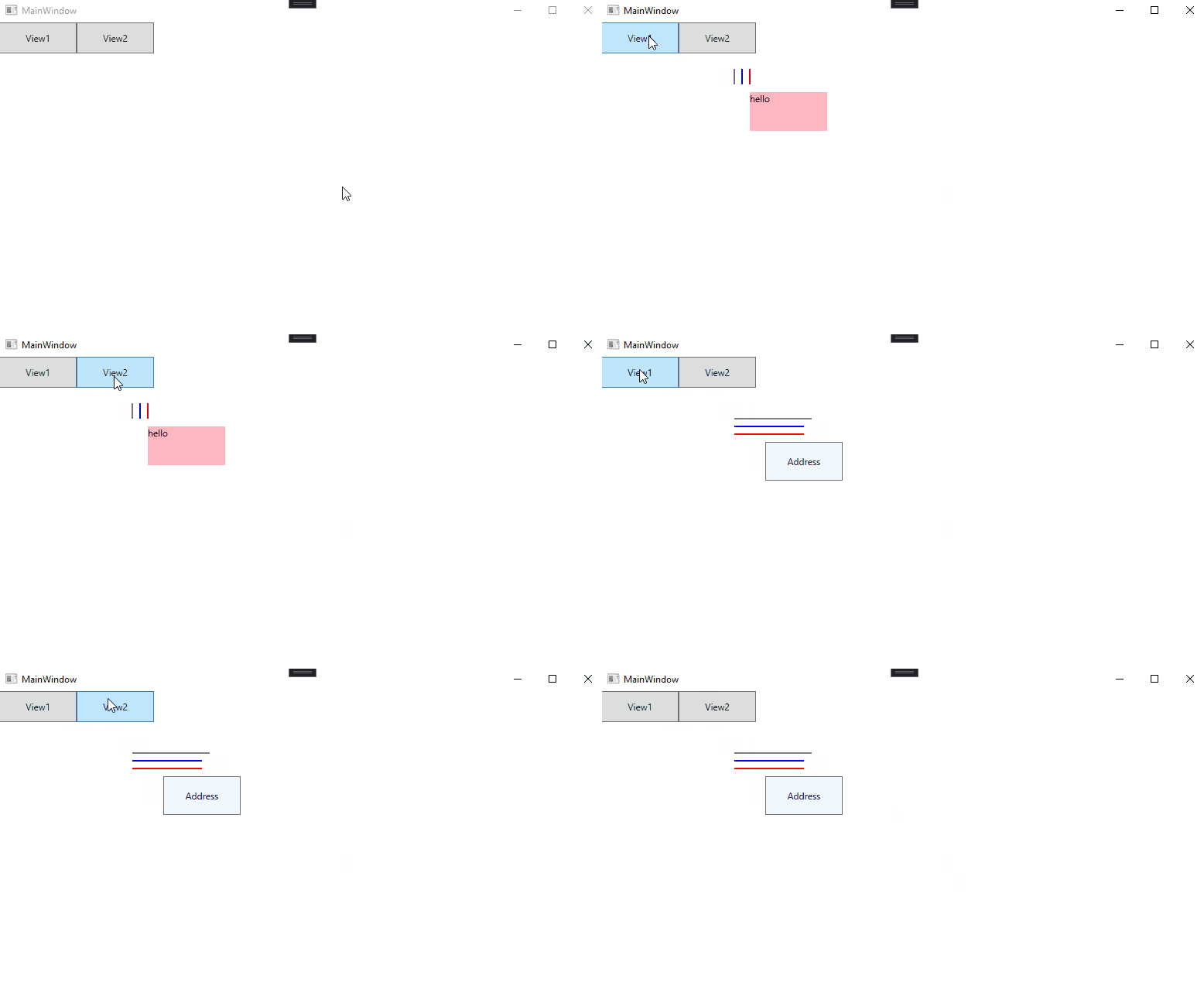
----------------------------------------------------------------------------
If the response is helpful, please click "Accept Answer" and upvote it.
Note: Please follow the steps in our documentation to enable e-mail notifications if you want to receive the related email notification for this thread.
Hello Mr Liu:
Thank you , unfortunately there is only on ContentControl , in which it is use to show different views. whereby view 1 and view 2 can be switch by 2 button. Each view have 3 line graphs to be displayed. Both Views will get the different sets of data from the viewmodel. What if there are some additional views to be added ?
Simon
Hi, @Simon Ong . I update my answer, you could check it out.
Hi, @Simon Ong . Is there any update to the question? Did the answer below solve your problem? If so, you could accept it as the answer. It's helpful for community members with related questions.