Azure App Service
Azure App Service is a service used to create and deploy scalable, mission-critical web apps.
6,950 questions
This browser is no longer supported.
Upgrade to Microsoft Edge to take advantage of the latest features, security updates, and technical support.
' cx='32' cy='32' r='32' /%3E%3Ctext x='50%25' y='55%25' dominant-baseline='middle' text-anchor='middle' fill='%23FFF' %3EZA%3C/text%3E%3C/svg%3E)
My container app to sleep mode after 20 mins or something and I didn't find the option to make it always on.
Please how I can set it ?

@zahreddine atoui ; To follow-up, Please let us know if you have further query on this.
Please don’t forget to Accept the answer
Thanks for reaching Q & A forum.
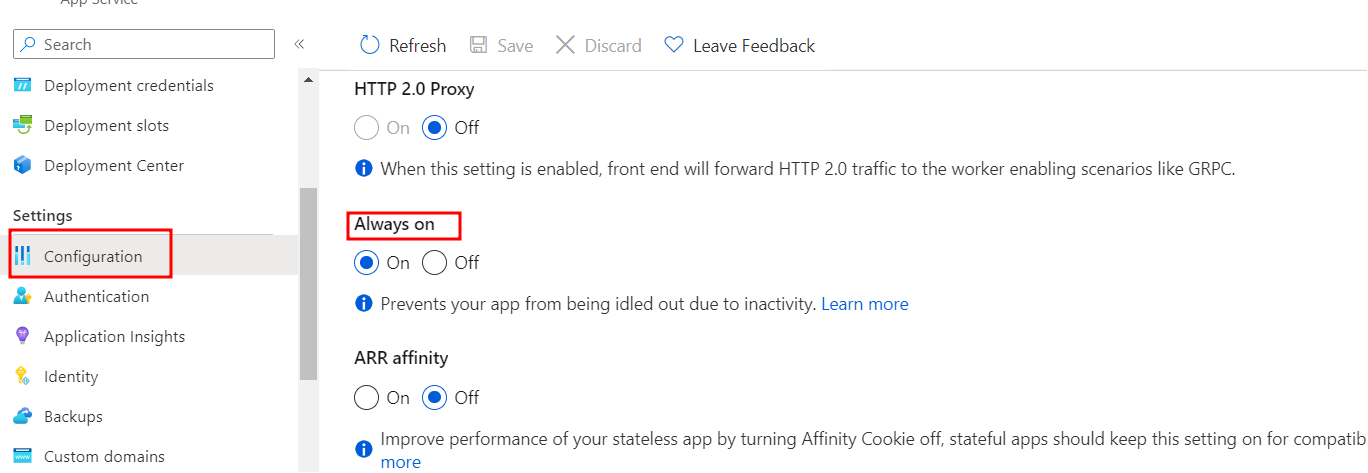
To keep the app always loaded, turn on the Always On setting in Basic and Standard service plans. Follow the steps below to change the Always On setting.
In Azure portal ->go to App Services -> from the left side -> Settings -> Select Configuration -> Select General settings -> For Always On, select On.
Refer below screenshot.
------
If this answers your query, do click Accept Answer and Up-Vote for the same. And, if you have any further query do let us know.
' cx='32' cy='32' r='32' /%3E%3Ctext x='50%25' y='55%25' dominant-baseline='middle' text-anchor='middle' fill='%23FFF' %3EMG%3C/text%3E%3C/svg%3E)