
Here are some options:
Essentially, I would create and enable the auto reply for external and use a transport rule to drop the internal automatic reply filtered on the unique body of the message you set in the auto reply
This browser is no longer supported.
Upgrade to Microsoft Edge to take advantage of the latest features, security updates, and technical support.
' cx='32' cy='32' r='32' /%3E%3Ctext x='50%25' y='55%25' dominant-baseline='middle' text-anchor='middle' fill='%23FFF' %3EIS%3C/text%3E%3C/svg%3E)
Hi,
I want to turn on automatic replies for external users only in outlook. I tried to turn on auto reply from exchange server. But the issue is when I turn on auto reply, it also sends email internal users too. That's group email for customer care. Could anyone help me for this issue?
Thank You!
Irin Sultana

Here are some options:
Essentially, I would create and enable the auto reply for external and use a transport rule to drop the internal automatic reply filtered on the unique body of the message you set in the auto reply
' cx='32' cy='32' r='32' /%3E%3Ctext x='50%25' y='55%25' dominant-baseline='middle' text-anchor='middle' fill='%23FFF' %3EJX%3C/text%3E%3C/svg%3E)
Hi @Irin Sultana ,
There are two ways to turn on automatic replies for external users only:
1.Set up in outlook and create mail flow rules in EAC
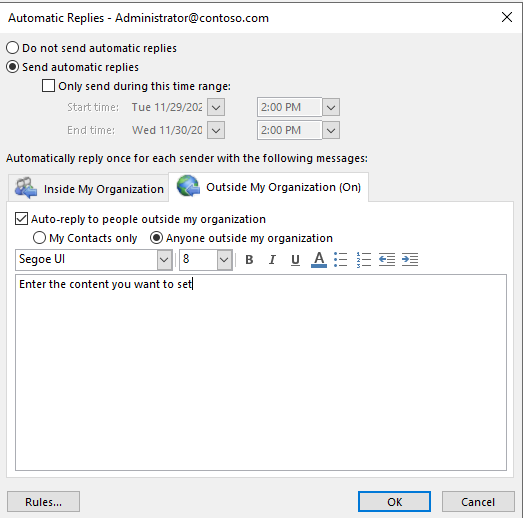
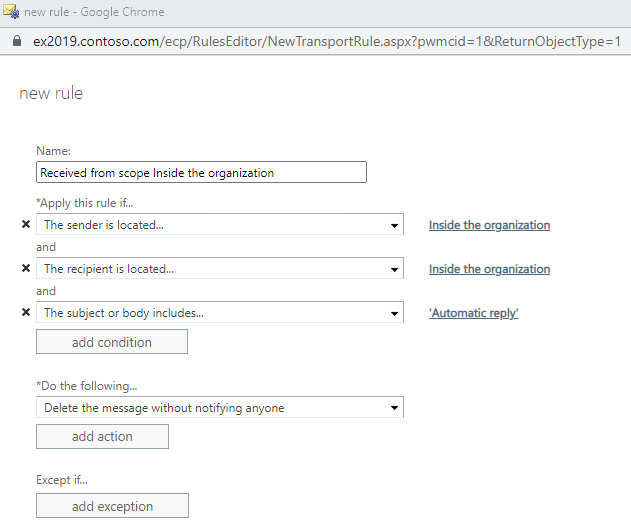
2.Use the cmdlet:
Set-MailboxAutoReplyConfiguration -Identity <> -AutoReplyState Enabled -ExternalMessage "Enter the content you want to set"
refer to: Set-MailboxAutoReplyConfiguration
If an Answer is helpful, please click "Accept Answer" and upvote it.
Note: Please follow the steps in our documentation to enable e-mail notifications if you want to receive the related email notification for this thread.