Developer technologies | ASP.NET Core | Other
A set of technologies in .NET for building web applications and web services. Miscellaneous topics that do not fit into specific categories.
This browser is no longer supported.
Upgrade to Microsoft Edge to take advantage of the latest features, security updates, and technical support.

.
.
using System;
using System.Collections.Generic;
using System.Linq;
using System.Threading.Tasks;
using Microsoft.AspNetCore.Mvc;
using Microsoft.AspNetCore.Mvc.Rendering;
using Microsoft.EntityFrameworkCore;
using Project.Data;
using Project.Models;

namespace Project.Controllers
{
    public class ModelController : Controller
    {
        private readonly ProjectContext _context;

        public ModelController(ProjectContext context)
        {
            _context = context;
        }

        //GET: Model

        public async Task<IActionResult> Index(string sortOrder, string currentFilter, string searchString, int? pageNumber)

        // ********************* Previous **************************

        //public async Task<IActionResult> Index(string sortOrder, string searchString)

        {
            ViewData["Text"] = String.IsNullOrEmpty(sortOrder) ? "text_desc" : "";
            ViewData["Number"] = sortOrder == "Number" ? "number_desc" : "Number";
            ViewData["CurrentFilter"] = searchString;
            ViewData["CurrentSort"] = sortOrder;

            if (searchString != null)
            {
                pageNumber = 1;
            }
            else
            {
                searchString = currentFilter;
            }

            var models = from s in _context.Models
                           select s;

            if (!String.IsNullOrEmpty(searchString))
            {
                models = models.Where(s => s.Text.Contains(searchString));

                                     // || s.Number.Contains(searchString)
            }

            switch (sortOrder)
            {
                case "text_desc":
                    models = models.OrderByDescending(s => s.Text);
                    break;
                case "Number":
                    models = models.OrderBy(s => s.Number);
                    break;
                case "number_desc":
                    models = models.OrderByDescending(s => s.Number);
                    break;
                default:
                    models = models.OrderBy(s => s.Text);
                    break;
            }

            int pageSize = 3;
            return View(await PaginatedList<Model>.CreateAsync(models.AsNoTracking(), pageNumber ?? 1, pageSize));

        }


@model PaginatedList<Project.Models.Model>

@********************** Previous **********************

@model IEnumerable<Project.Models.Model>*@

@{
    ViewData["Title"] = "Index";
}

<h1>Index</h1>

<p>
    <a asp-action="Create">Create New</a>
</p>

<form asp-action="Index" method="get">
    <div class="form-actions no-color">
        <p>
            Find by name: <input type="text" name="SearchString" value="@ViewData["CurrentFilter"]" />
            <input type="submit" value="Search" class="btn btn-default" /> |
            <a asp-action="Index">Back to Full List</a>
        </p>
    </div>
</form>

@********************** Previous **********************

<form asp-controller="Model" asp-action="Index"></form>*@

<table class="table">
    <thead>
        <tr>
            <th>
               <a asp-action="Index" asp-route-sortOrder="@ViewData["Text"]" asp-route-currentFilter="@ViewData["CurrentFilter"]">Text</a>

               @*<a asp-action="Index" asp-route-sortOrder="@ViewData["Text"]">@Html.DisplayNameFor(model => model.Text)</a>*@

               @* @Html.DisplayNameFor(model => model.Text)*@
            </th>

            <th>
                <a asp-action="Index" asp-route-sortOrder="@ViewData["Number"]" asp-route-currentFilter="@ViewData["CurrentFilter"]">Number</a>

                @*<a asp-action="Index" asp-route-sortOrder="@ViewData["Number"]">@Html.DisplayNameFor(model => model.Number)</a>*@

                @*@Html.DisplayNameFor(model => model.Number)*@
            </th>
            <th>
                Bool
                @*@Html.DisplayNameFor(model => model.Bool)*@
            </th>
            <th>
                Date
                @*@Html.DisplayNameFor(model => model.Date)*@
            </th>
            <th></th>
        </tr>
    </thead>
    <tbody>
@foreach (var item in Model) {
        <tr>
            <td>
                @Html.DisplayFor(modelItem => item.Text)
            </td>
            <td>
                @Html.DisplayFor(modelItem => item.Number)
            </td>
            <td>
                @Html.DisplayFor(modelItem => item.Bool)
            </td>
            <td>
                @Html.DisplayFor(modelItem => item.Date)
            </td>
            <td>
                <a asp-action="Edit" asp-route-id="@item.ID">Edit</a> |
                <a asp-action="Details" asp-route-id="@item.ID">Details</a> |
                <a asp-action="Delete" asp-route-id="@item.ID">Delete</a>
            </td>
        </tr>
}
    </tbody>
</table>

@{
    var prevDisabled = !Model.HasPreviousPage ? "disabled" : "";
    var nextDisabled = !Model.HasNextPage ? "disabled" : "";
}

<a asp-action="Index"
   asp-route-sortOrder="@ViewData["CurrentSort"]"
   asp-route-pageNumber="@(Model.PageIndex - 1)"
   asp-route-currentFilter="@ViewData["CurrentFilter"]"
   class="btn btn-default @prevDisabled">
    Previous
</a>
<a asp-action="Index"
   asp-route-sortOrder="@ViewData["CurrentSort"]"
   asp-route-pageNumber="@(Model.PageIndex + 1)"
   asp-route-currentFilter="@ViewData["CurrentFilter"]"
   class="btn btn-default @nextDisabled">
    Next
</a>
.
.
using System.ComponentModel.DataAnnotations;
namespace Project.Models
{
public class Model
{
public int ID { get; set; }
    public string? Text { get; set; }

    public int? Number { get; set; }

    public bool? Bool { get; set; }

    [DataType(DataType.Date)]
    public DateTime? Date { get; set; }
}
}
A set of technologies in .NET for building web applications and web services. Miscellaneous topics that do not fit into specific categories.
Sorry, trying to edit question but no link provided to edit original question.
More specifics on the question above are provide in comment below.
Thank you.
Line
50 models = models.Where(s => s.Text.Contains(searchString)); <- "s.Text" is underlined in green after adding pagination. Code works.
52 // || s.Number.Contains(searchString) <- had to comment out this line for code to work. It was stating that it couldn't search on a number?
Also getting other weird problems with different bool and date property headers throwing errors. Possibly related, but, in case not, I'll deal with that in a separate question.
None of these problems existed prior to adding pagination.
If it's easier, I provided a link to same code in github (above)
Answer accepted by question author
' cx='32' cy='32' r='32' /%3E%3Ctext x='50%25' y='55%25' dominant-baseline='middle' text-anchor='middle' fill='%23FFF' %3EA%3C/text%3E%3C/svg%3E)
Hi @Dean Everhart ,
50 models = models.Where(s => s.Text.Contains(searchString)); <- "s.Text" is underlined in green after adding pagination.
If you move the mouse over the "s.Text", you can see it will show the CS8602 nullable warnings, it means this property might be null. Because the Text property is nullable: public string? Text { get; set; }
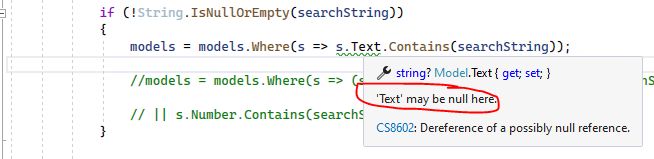
To disable this warning, you can change the Text property to not-null or add a missing null check. You can try to use the following code:
models = models.Where(s => s.Text != null && s.Text.Contains(searchString));
52 // || s.Number.Contains(searchString) <- had to comment out this line for code to work. It was stating that it couldn't search on a number?
The Contains method is a String class's method, so, you can't directly use it with the Int number. If you want to check whether the number contains special number, you can convert it to a String, then use the Contains method. Code like this:
models.Where(s => s.Number.GetValueOrDefault().ToString().Contains(searchString));
To combine them, the query statement as below:
models.Where(s => (s.Text != null && s.Text.Contains(searchString)) || s.Number.GetValueOrDefault().ToString().Contains(searchString));
If the answer is the right solution, please click "Accept Answer" and kindly upvote it. If you have extra questions about this answer, please click "Comment".
Note: Please follow the steps in our documentation to enable e-mail notifications if you want to receive the related email notification for this thread.
Best regards,
Dillion
Thank you Dillion! Very much appreciated.