Azure Logic Apps
An Azure service that automates the access and use of data across clouds without writing code.
This browser is no longer supported.
Upgrade to Microsoft Edge to take advantage of the latest features, security updates, and technical support.
' cx='32' cy='32' r='32' /%3E%3Ctext x='50%25' y='55%25' dominant-baseline='middle' text-anchor='middle' fill='%23FFF' %3ESM%3C/text%3E%3C/svg%3E)
I have a logic app which I am trying to make some changes. It has some sql server connectors.
When I try to save the logic app, it is showing message as shown :
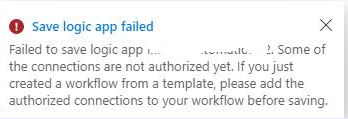
I have tried authorizing the connector using Service Principal AD (in Home > Api connection), but after authorizing it only forces to discard the changes when navigating back to the designer.
What is the right way to authorize the connector app to fix this error?

The best way to correct the error is to remove the SQL connector and re-add it. Any downstream components dependent on the query results will show an error but you should still be able to save the logic app, re-open it, and re-add the connection. If prevented, then you'll have to delete those downstream components as well.