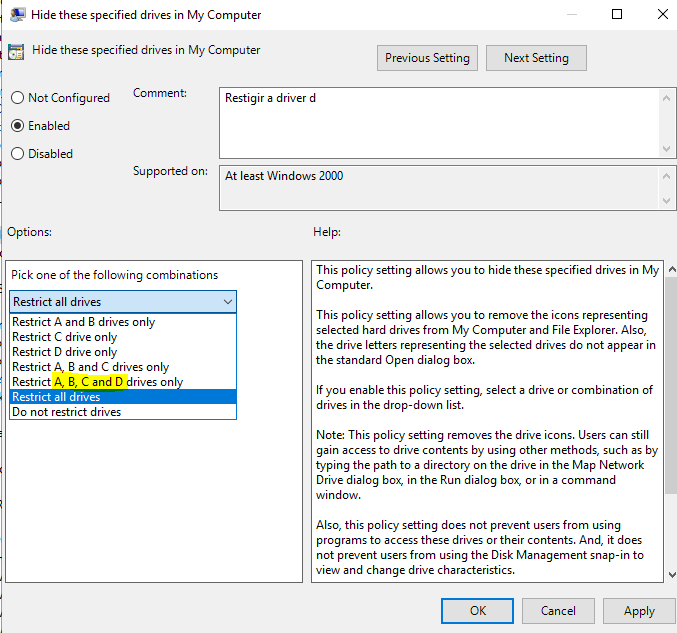
Hello Mariusroma,
Hope this helps:
Cheers,
Miguel Fra
www.falconitservices.com
This browser is no longer supported.
Upgrade to Microsoft Edge to take advantage of the latest features, security updates, and technical support.
' cx='32' cy='32' r='32' /%3E%3Ctext x='50%25' y='55%25' dominant-baseline='middle' text-anchor='middle' fill='%23FFF' %3EMR%3C/text%3E%3C/svg%3E)
I need to create a GPO on a Windows Server 2019 DC to hide specific drive letters (let's say A, B, C and K).
I read the article on page https://support.microsoft.com/en-us/help/231289/using-group-policy-objects-to-hide-specified-drives but I can't locate the .adm files to edit.
Where can I locate an up-do-date descriprion of the procedure to customize the GPO options for Windows Server 2019 and 2016?
Regards
marius

' cx='32' cy='32' r='32' /%3E%3Ctext x='50%25' y='55%25' dominant-baseline='middle' text-anchor='middle' fill='%23FFF' %3EA%3C/text%3E%3C/svg%3E)
Hello,
Thank you so much for posting here.
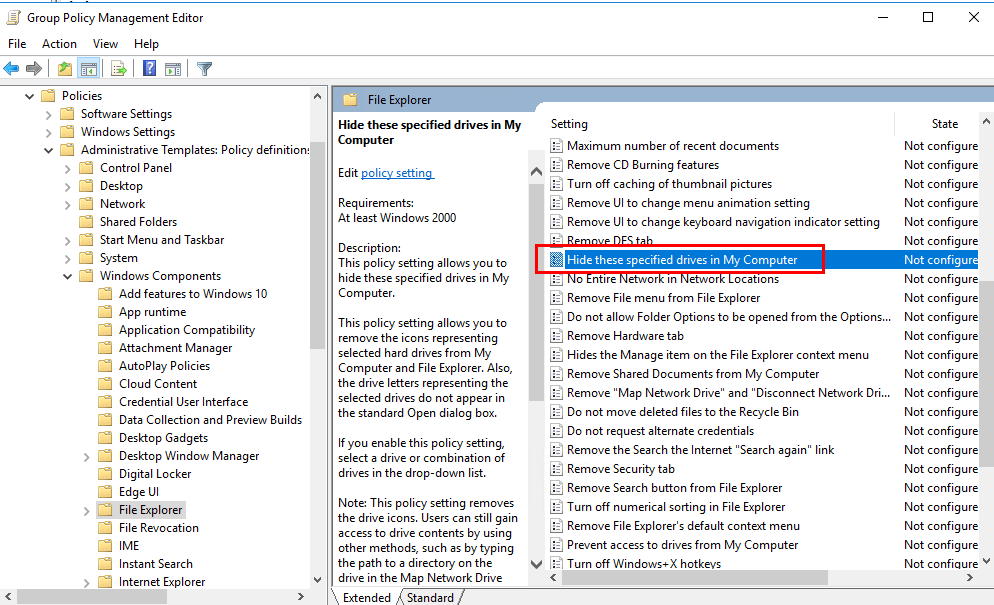
Could we find the Hide these specified drives in My Computer under User Configuration, Administrative Template, Windows Components, File Explorer as shown below?
For any question, please feel free to contact us.
Best regards,
Hannah Xiong
============================================
If the Answer is helpful, please click "Accept Answer" and upvote it.
Note: Please follow the steps in our documentation to enable e-mail notifications if you want to receive the related email notification for this thread.

how can I modify the driver letter? I want to use drive D, E and H