Exchange | Exchange Server | Management
The administration and maintenance of Microsoft Exchange Server to ensure secure, reliable, and efficient email and collaboration services across an organization.
This browser is no longer supported.
Upgrade to Microsoft Edge to take advantage of the latest features, security updates, and technical support.
' cx='32' cy='32' r='32' /%3E%3Ctext x='50%25' y='55%25' dominant-baseline='middle' text-anchor='middle' fill='%23FFF' %3EMS%3C/text%3E%3C/svg%3E)
Hi Team,
Most of the users, we have attached mailboxes, when the .ost corrupted we create a new user profile, which normally takes time to download. But in the Mailbox , the folders doesn't update at all, and some time it doesn't show up with the subfolders in the Mailboxes.
(Where as in webmail it works fine). Even left for a week it doesn't update the mails, need to click send/receive to get the mails manually, each time to check recent mails.
All the shared box users have Full permissions.
Tried reinstalling the 0365, also with latest update, it doesn't help.
Only solution found is through Online(uncheck the cache mode), which it makes hard for the users to look emails, which takes time to load/search unfriendly as exchange mode.

Yes, the recommendation is to not cache shared mailboxes. Its an old issue. So cache the main mailbox but do not cache the shared one.
Uncheck that option:
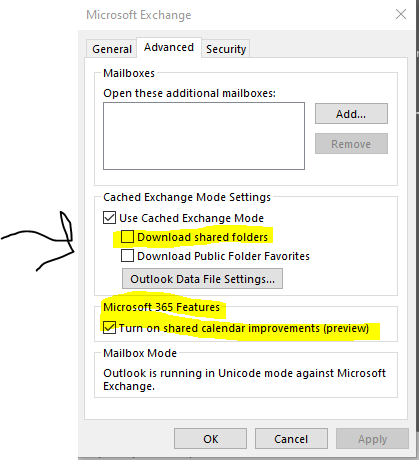
Note that these are issues are being worked on in Exchange Online and improvements are coming for Microsoft 365 mailboxes
https://support.microsoft.com/en-us/office/calendar-sharing-in-microsoft-365-b576ecc3-0945-4d75-85f1-5efafb8a37b4
Hello Andy,
I tried these steps already, still it didn't work. Any other way around option exists?
Thank You,
So Download Shared Folders is unchecked? I would also create a new Outlook profile after unchecking that option. Just want to verify.
I see you have two threads open. Are these issues related? Seems like it.

@Mithun S
Any update about this thread now?
If this issue still exist, could you tell us the version of mail server that you used?
I also suggest you try to remove permission from this shared mailbox, then add permission and try again.
If the response is helpful, please click "Accept Answer" and upvote it.
Note: Please follow the steps in our documentation to enable e-mail notifications if you want to receive the related email notification for this thread.