Developer technologies | VB
An object-oriented programming language developed by Microsoft that can be used in .NET.
This browser is no longer supported.
Upgrade to Microsoft Edge to take advantage of the latest features, security updates, and technical support.
' cx='32' cy='32' r='32' /%3E%3Ctext x='50%25' y='55%25' dominant-baseline='middle' text-anchor='middle' fill='%23FFF' %3EJL%3C/text%3E%3C/svg%3E)
Hello, Im running windows 11 and have visual studio 2022. Im making a vb.net applications. Ive selected windows forms application. I have been able to add a number of controls such as text boxes, list boxes and button, but I need to add a windows media player control to it. I went in the toolbox and successfully imported the player along with some other controls (windows forms 2.0). But they are all greyed out along with the media player. Also I cannot find the msserial control anywhere. Does anyone have any insight into this?
Thanks,
Jeff
' cx='32' cy='32' r='32' /%3E%3Ctext x='50%25' y='55%25' dominant-baseline='middle' text-anchor='middle' fill='%23FFF' %3EJL%3C/text%3E%3C/svg%3E)
Hi @jeff luminais ,
May I know if you have got any chance to check the answers? I am glad to help if you have any other questions.
Hi @jeff luminais ,
According to Using the Windows Media Player Control with Microsoft Visual Studio,
You can add the Windows Media Player 9 Series or later ActiveX control to a .NET Framework application through the Toolbox in Visual Studio.
So you should create a Windows Forms App(.NET Framework), not Windows Forms App.
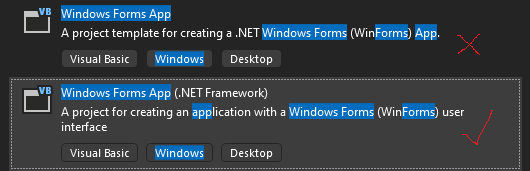
Best Regards.
Jiachen Li
If the answer is helpful, please click "Accept Answer" and upvote it.
Note: Please follow the steps in our documentation to enable e-mail notifications if you want to receive the related email notification for this thread.

Select a .NET Framework project, not .NET (Core) :
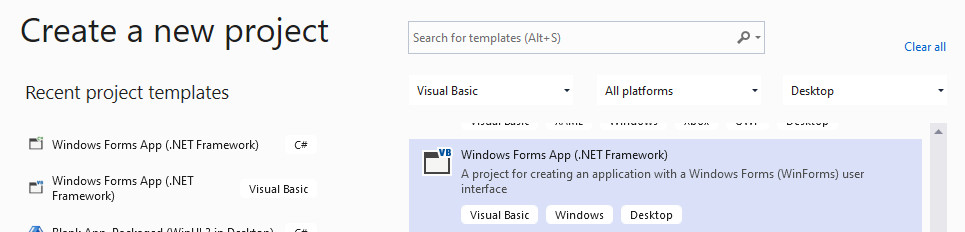
Hi Castorix, not sure what you are trying to say here, but I know how to create the project, Ive already done that, a little more info, when you start vs if you click new project, you are presented with a few options, windows forms with visual basic, windows forms with c#, and then another windows forms application. In the first two, windows media player is greyed out and cannot be placed on the form, in the third one, windows media player can actually be placed on the form, but that project is a c# application. Im trying to do this in vb.net. Understand, not all the controls are greyed out, things like text boxes, list boxes , buttons are ok, but the media player is greyed out. Its confusing to me that this would not be allowed in visual basic as there are a number of tutorials on youtube that show this being done.
As I said , you must create a .NET Framework application , not a .NET application
Sometimes, I ask myself why I lose my time on those forums...
Yes, what I realized is that in my copy of visual studio which is the community version, I am not provided an option to creat a net framework using vb. The only option I have is to use c#. So Ive decided to just go ahead and convert it to c#. I found a useful web tool to do a line by line conversion from vb6 code to c#. Its far far from perfect but it did about 40% of the work for me. Thank you for your response.
Jeff
' cx='32' cy='32' r='32' /%3E%3Ctext x='50%25' y='55%25' dominant-baseline='middle' text-anchor='middle' fill='%23FFF' %3EAK%3C/text%3E%3C/svg%3E)
> I am not provided an option to creat a net framework using vb.
Well, actually, yes you are. it just that by default vs2022 does not install the older templates, but if during vs2022 installing, or later, you select those options, then you are free to create + use .net framework and winforms and vb.net.
Same goes if you want to create older asp.net "webforms". All of these features and options have 100% FULL support in vs2022. As long as you install the bits and parts you require, then you should be just fine.
Tools->get tools and features.
Then, just pick the systems and options you want. vs2022 is already a HUGE massive install, and thus by default it does not install every convincible type of project that vs can and could create in the last 20 years. However, most if not all of those templates and project options are STILL available in vs2022.
So, these ones:
first choose individual components:
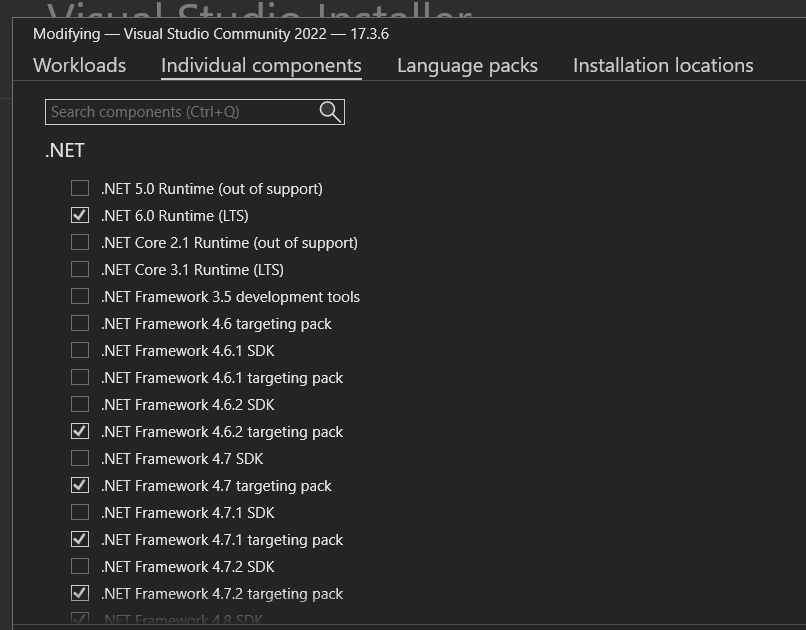
Then
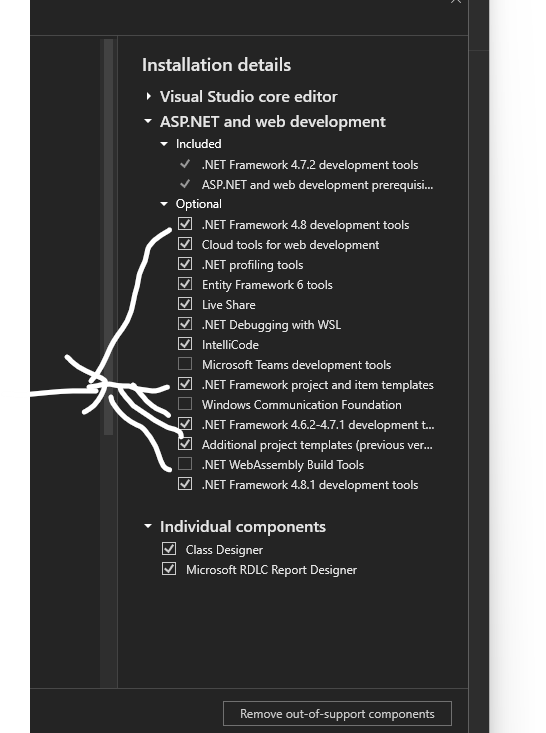
I am able to use + develop 15+ year old projects that are vb.net winforms without issues in vs2022.
As a follow up, if you install the correct bits and parts, and make sure you create a windows vb.net "framework" application?
Then yes, I am freely able to drop in the windows meda player
(and I am on an new laptop - windows 11).
So, after you create the project, then you most certianly do NOT want to add activeX form 2.0 controls.
So, with a new project, then I add the media player to the toolbox like this:
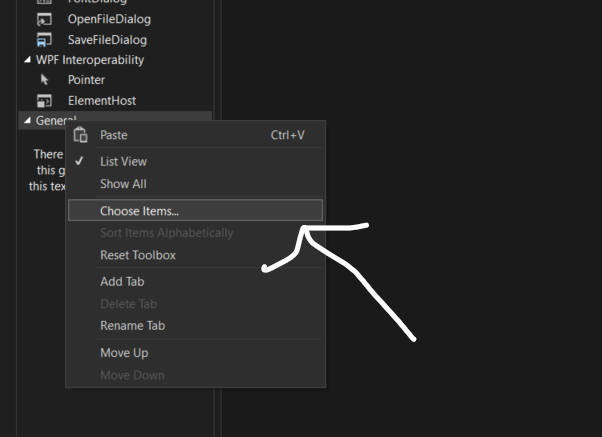
then choose this one:
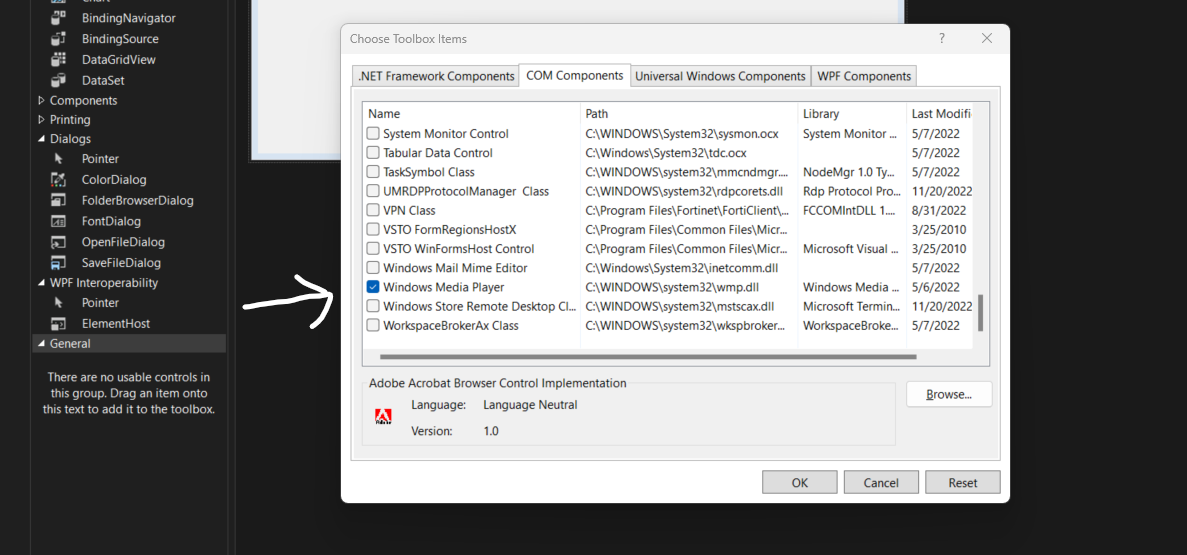
Ok, now create (add) a new form, and drag + drop the windows media player onto the form.
Thus this:
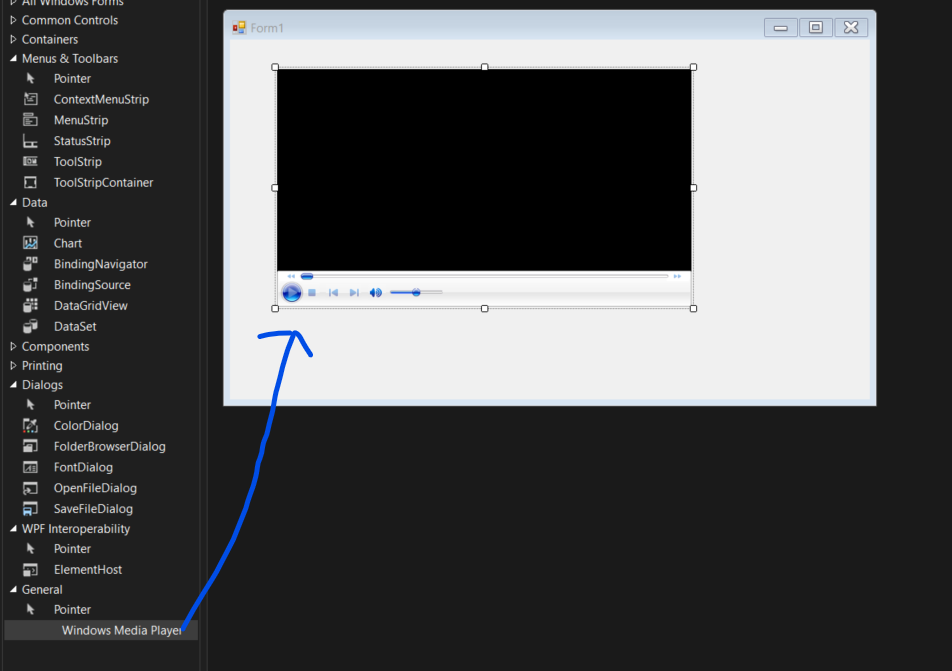
So, media player - no problem.
Now the ms-serial control? Hum, that we need some googling for this - I'm not sure if the msserial control is avaible, but you can most certainly use/create serial control code in vb.net.
As a FYI?
The above is being done on a new windows 11 computer, and vs2022 community edition.
Edit:
And I do see the serial control in the tool box - you don't even have to add it.
thus:
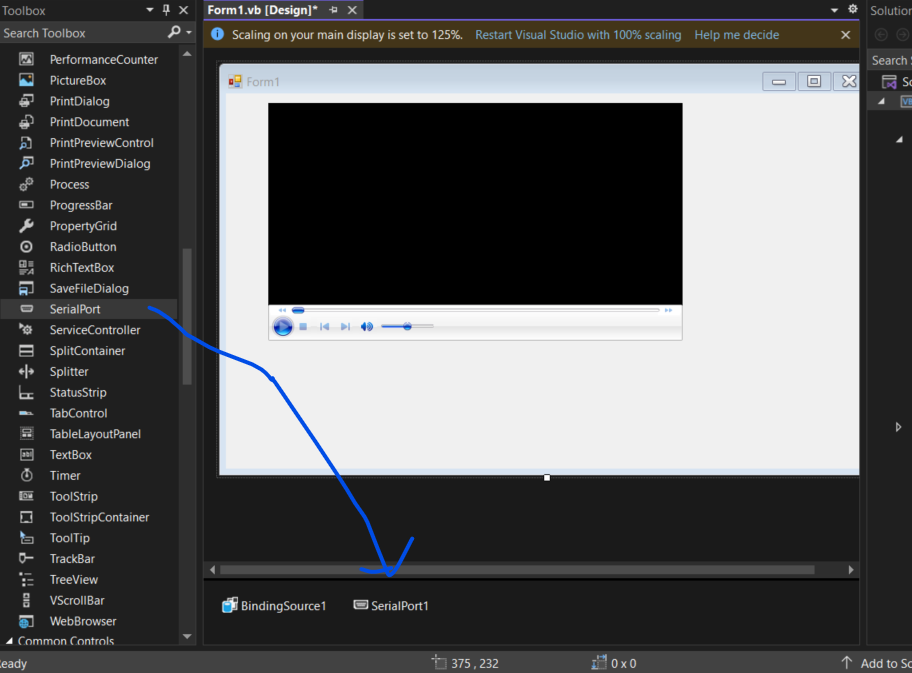
So, from what I can tell, both the serial port, and the windows media control exist, and work fine in vs2022 community edition. They have NOT removed these features.