Azure Kinect DK
A Microsoft developer kit and peripheral device with advanced artificial intelligence sensors for sophisticated computer vision and speech models.
292 questions
This browser is no longer supported.
Upgrade to Microsoft Edge to take advantage of the latest features, security updates, and technical support.
' cx='32' cy='32' r='32' /%3E%3Ctext x='50%25' y='55%25' dominant-baseline='middle' text-anchor='middle' fill='%23FFF' %3ECO%3C/text%3E%3C/svg%3E)
The Body tracking data has been successfully applied onto the avatar in Unity using the Azure Kinect body tracking samples - unity integration sdk.
(Followed @Angus Antley )
But the Avatar is Static and does not move in space. It mimics the point body i.e. All the body tracking is mapped onto to the Avatar but unlike the Point body it does not move in space. The movement is not mapped onto the Avatar.
Example: When I move with respect to the Kinect Device in real world, that movement is being mapped onto the Point body and can be seen moving in the Unity window. But the Avatar stays in position. (The leg movement can be seen on the Avatar but it does not move in space). (The Avatar has the script Puppet Avatar applied on it.)
How to get the Avatar moving like the point body?
Any help would be much appreciated.
Thank you!
' cx='32' cy='32' r='32' /%3E%3Ctext x='50%25' y='55%25' dominant-baseline='middle' text-anchor='middle' fill='%23FFF' %3EQ%3C/text%3E%3C/svg%3E)
Hello @Code 'o Brian Welcome to Microsoft Q&A Platform and thanks for your query. Community SME's on this topic or our team will review your scenario and circle back at the possible earliest time.
I am using Unity version 2021.13f
' cx='32' cy='32' r='32' /%3E%3Ctext x='50%25' y='55%25' dominant-baseline='middle' text-anchor='middle' fill='%23FFF' %3EAA%3C/text%3E%3C/svg%3E)
Hi @Code 'o Brian ,
Have you tried the example scene PuppetMaster that can be found under the Assets/Scenes folder? That is a complete example that applies translation to the root of the puppeted avatar. I just tested that scene with a fresh clone of the repo and I was unable to repro the fixed root behaviour you are seeing.
Hi @Angus Antley , Thank you for the reply.
I did try the PuppetMaster scene and got the same result (No translation).
Does it have to do with some kind of a version problem?
I'm using Body tracking SDK ver 1.1.2 and Sensor SDK ver 1.4.1.
Also, I have an empty script attached to the Kinect Tracker. Do I have to attach something here or is it fine?
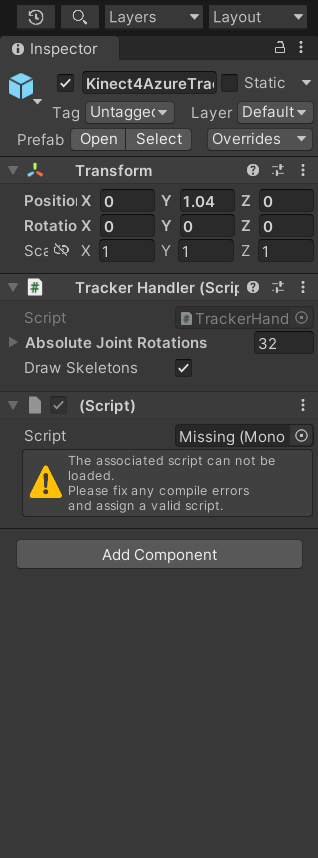
I am also missing that script. So that is not the difference.
Also I have 1.1.2 and 1.4.1 for versions too
Okay, I will try the puppetMaster scene with a fresh clone as well. BTW Can it be something to do with the rig of the character?