Developer technologies | ASP.NET | Other
A set of technologies in .NET for building web applications and web services. Miscellaneous topics that do not fit into specific categories.
This browser is no longer supported.
Upgrade to Microsoft Edge to take advantage of the latest features, security updates, and technical support.
' cx='32' cy='32' r='32' /%3E%3Ctext x='50%25' y='55%25' dominant-baseline='middle' text-anchor='middle' fill='%23FFF' %3EJM%3C/text%3E%3C/svg%3E)
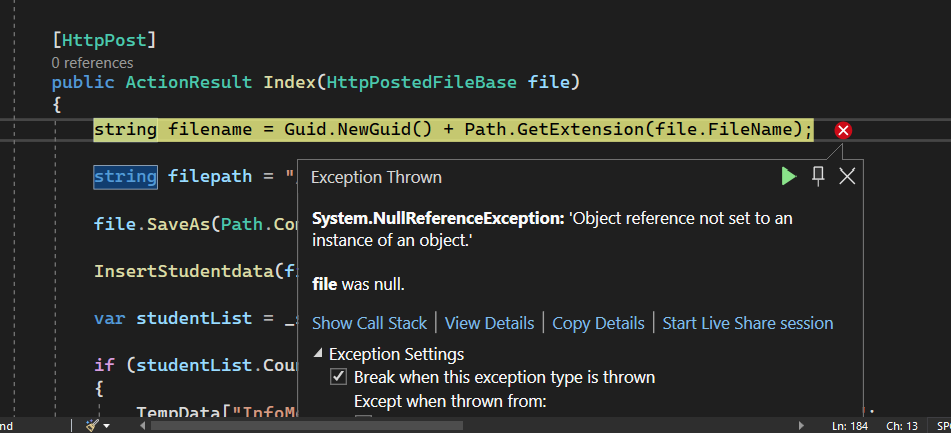
Hi I have 2 submit buttons and I'm getting a null... any idea how I can fix this?
Here is my controller:
private void InsertStudentdata(string fileepath, string filename)
    {

        string fullpath = Server.MapPath("/excelfolder/") + filename;

        ExcelConn(fullpath);

        string query = string.Format("Select * from [{0}]", "Sheet1$");


        OleDbCommand Ecom = new OleDbCommand(query, Econ);

        Econ.Open();

        DataSet ds = new DataSet();

        OleDbDataAdapter oda = new OleDbDataAdapter(query, Econ);

        Econ.Close();

        oda.Fill(ds);

        DataTable dt = ds.Tables[0];

        SqlBulkCopy objbulk = new SqlBulkCopy(con);

        objbulk.DestinationTableName = "dbo.Student";
        objbulk.ColumnMappings.Add("StudentID", "StudentID");

        objbulk.ColumnMappings.Add("FirstName", "FirstName");

        objbulk.ColumnMappings.Add("LastName", "LastName");

        objbulk.ColumnMappings.Add("Program", "Program");

        objbulk.ColumnMappings.Add("YearGraduate", "YearGraduate");

        objbulk.ColumnMappings.Add("BoardScore", "BoardScore");

        con.Open();

        objbulk.WriteToServer(dt);

        con.Close();

    }

    // EXCEL IMPORT FILE TABLE
    private void InsertExceldata(string fileepath, string filename)

    {

        string fullpath = Server.MapPath("/excelfolder/") + filename;

        ExcelConn(fullpath);

        string query = string.Format("Select * from [{0}]", "Sheet1$");


        OleDbCommand Ecom = new OleDbCommand(query, Econ);

        Econ.Open();

        DataSet ds = new DataSet();

        OleDbDataAdapter oda = new OleDbDataAdapter(query, Econ);

        Econ.Close();

        oda.Fill(ds);

        DataTable dt = ds.Tables[0];

        SqlBulkCopy objbulk = new SqlBulkCopy(con);

        objbulk.DestinationTableName = "dbo.ExcelFile";

        objbulk.ColumnMappings.Add("FileName", "FileName");

        objbulk.ColumnMappings.Add("TakerProgram", "TakerProgram");

        objbulk.ColumnMappings.Add("ExamDate", "ExamDate");

        objbulk.ColumnMappings.Add("UserIDUp", "UserIDUp");

        objbulk.ColumnMappings.Add("FilePath", "FilePath");


        con.Open();

        objbulk.WriteToServer(dt);

        con.Close();

    }


    //--------------------------------------------------------------------------------------------------------------------------------------------------------------

    // MANIPULATE STUDENT DATA

    StudentDAL _studentDAL = new StudentDAL();

    public ActionResult GetStudList()
    {
        using (boardexamEntities2 db = new boardexamEntities2())
        {
            var studList = db.Students.ToList<Student>();
            return Json(new { data = studList }, JsonRequestBehavior.AllowGet);
        }


    }

    public ActionResult GetExcelList()
    {
        using (boardexamEntities3 db = new boardexamEntities3())
        {
            var excelList = db.ExcelFiles.ToList<ExcelFile>();
            return Json(new { data = excelList }, JsonRequestBehavior.AllowGet);
        }


    }

    // GET: Student
    public ActionResult Index()
    {
        var studentList = _studentDAL.GetallStudents();
        if (studentList.Count == 0)
        {
            TempData["InfoMessage"] = "Student data unavailable in the Database.";
        }
        return View(studentList);

    }


    [HttpPost]
    public ActionResult Index(HttpPostedFileBase file)
    {
        string filename = Guid.NewGuid() + Path.GetExtension(file.FileName);

        string filepath = "/UploadedFiles/" + filename;

        file.SaveAs(Path.Combine(Server.MapPath("/UploadedFiles"), filename));

        InsertStudentdata(filepath, filename);

        var studentList = _studentDAL.GetallStudents();

        if (studentList.Count == 0)
        {
            TempData["InfoMessage"] = "Student data unavailable in the Database.";

        }

        return View(studentList);


    }


    // GET: Student/Create
    [HttpGet]
    public ActionResult Create()
    {
        return View();
    }

    // POST: Student/Create
    [HttpPost]

    public ActionResult Create(Excel1 student)
    {
        bool IsInserted = false;
        try
        {
            if (ModelState.IsValid)
            {
                IsInserted = _studentDAL.InsertExcel(student);
                if (IsInserted)
                {
                    TempData["SuccessMessage"] = "Student data saved successfully!";
                }
                else
                {
                    TempData["ErrorMessage"] = "Unable to save student data.";
                }
            }
            return RedirectToAction("Index");
        }
        catch (Exception ex)
        {
            TempData["ErrorMessage"] = ex.Message;
            return View();

        }
View:
}
@using (Html.BeginForm("Create","Student",FormMethod.Post))
{
@azzedinehtmlsql .AntiForgeryToken()
<div class="form-horizontal">
    <hr />
    @Html.ValidationSummary(true, "", new { @class = "text-danger" })


    <div class="form-group">
        @Html.LabelFor(model => model.FileName, htmlAttributes: new { @class = "control-label col-md-2" })
        <div class="col-md-10">
            @Html.EditorFor(model => model.FileName, new { htmlAttributes = new { @class = "form-control" } })
            @Html.ValidationMessageFor(model => model.FileName, "", new { @class = "text-danger" })
        </div>
    </div>

    <div class="form-group">
        @Html.LabelFor(model => model.TakerProgram, htmlAttributes: new { @class = "control-label col-md-2" })
        <div class="col-md-10">
            @Html.EditorFor(model => model.TakerProgram, new { htmlAttributes = new { @class = "form-control" } })
            @Html.ValidationMessageFor(model => model.TakerProgram, "", new { @class = "text-danger" })
        </div>
    </div>

    <div class="form-group">
        @Html.LabelFor(model => model.ExamDate, htmlAttributes: new { @class = "control-label col-md-2" })
        <div class="col-md-10">
            @Html.EditorFor(model => model.ExamDate, new { htmlAttributes = new { @class = "form-control" } })
            @Html.ValidationMessageFor(model => model.ExamDate, "", new { @class = "text-danger" })
        </div>
    </div>

    <div class="form-group">
        @Html.LabelFor(model => model.UserIDUp, htmlAttributes: new { @class = "control-label col-md-2" })
        <div class="col-md-10">
            @Html.EditorFor(model => model.UserIDUp, new { htmlAttributes = new { @class = "form-control" } })
            @Html.ValidationMessageFor(model => model.UserIDUp, "", new { @class = "text-danger" })
        </div>
    </div>


    <div class="form-group">
        @Html.LabelFor(model => model.FilePath, htmlAttributes: new { @class = "control-label col-md-2" })
        <div class="col-md-10">
            @Html.EditorFor(model => model.FilePath, new { htmlAttributes = new { @class = "form-control" } })
            @Html.ValidationMessageFor(model => model.FilePath, "", new { @class = "text-danger" })
        </div>
    </div>
    <div class="form-group">
        <div class="col-md-offset-2 col-md-10">
            <input type="submit" value="Save" formmethod="get" class="btn btn-primary" />


                <input name="file" type="file" required />
                <input type="submit" value="Import" enctype="multipart/form-data" class="btn btn-outline-primary" formmethod="post" formaction="Index" />
        </div>
    </div>
</div>
}
<div>
@azzedinehtmlsql .ActionLink("Back to List", "Default")
</div>
@section Scripts {
@Scripts.Render("~/bundles/jqueryval")
}
I've already returned the required values on view, perhaps I did something wrong on my front-end?

The error clearly states the "file" parameter is null. The code that POSTs to the Index action either did not send a HttpPostedFileBase or the payload names do not match the HttpPostedFileBase property names.
You did not share the HttpPostedFileBase model so we have no way to determine of the HTML form you've shared has the same input names as HttpPostedFileBase. I assume they do not match due to the error. I must say you code is rather confusing. You have a form where the action is set to Student/Create but the submit button set the action to "Index". Can you explain how the code is supposed to work?
hi thank you for the reply
My goal is to input these textboxes and show it in the other table. Then the User will choose an excel file and will be uploaded in the database.
Also is there a way where I can merge these 2 actions on a click of 1 submit button? because as of my experience they are returning different datatypes so i don't know how to merge it.
That's why I code it with 2 submit buttons
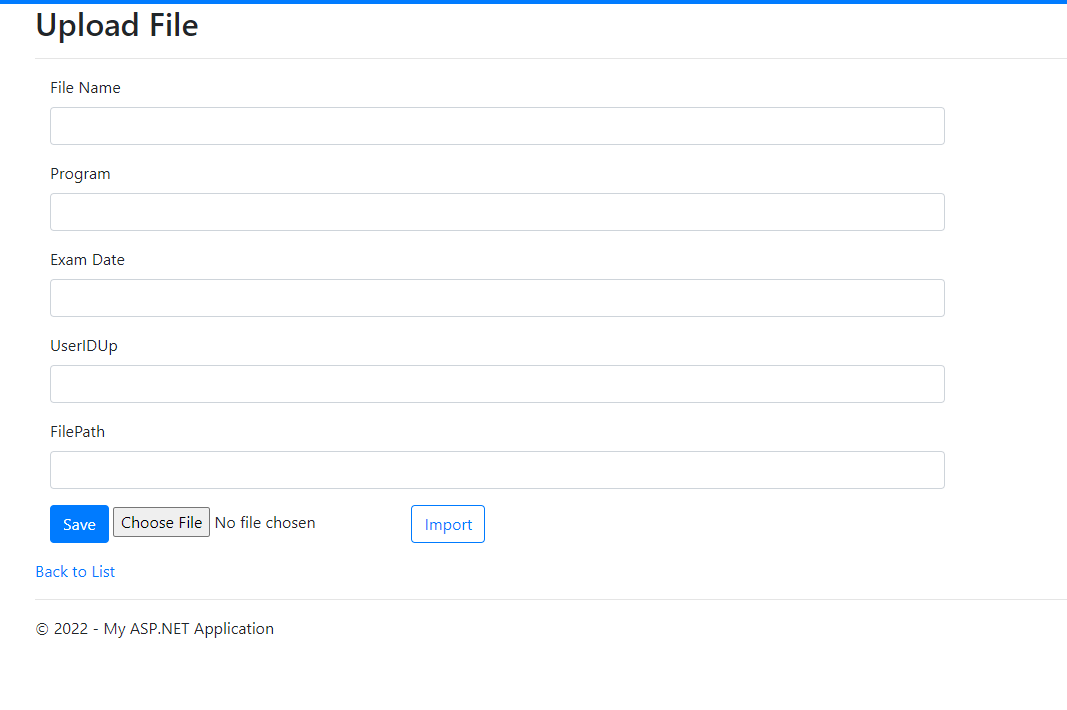
The Create() is the upload file with textboxes inputs and the choose file is the index() and so far my code on the inputs are working fine but choosing the file and uploading it on database returns a null.
' cx='32' cy='32' r='32' /%3E%3Ctext x='50%25' y='55%25' dominant-baseline='middle' text-anchor='middle' fill='%23FFF' %3EQM%3C/text%3E%3C/svg%3E)
Hello, have you tried the method of modifying the button of the View page? If it doesn't work, I can continue to help you improve it.
Hi @JUAN MIGUEL C. NIETO
The problem is with the file transfer of your View page. You can use following code:
<form enctype="multipart/form-data">
    <input name="filename" type="file" />
    <input type="button" value="Upload" />
</form>


$(':button').on('click', function () {
  $.ajax({
    url: 'xxxxx',
    type: 'POST',
    data: new FormData($('form')[0]),
    cache: false,
    contentType: false,
    processData: false,
    xhr: function () {
      var Xhr = $.ajaxSettings.xhr();
      if (Xhr.upload) {

        Xhr.upload.addEventListener('progress', function (e) {
          if (e.lengthComputable) {
            $('progress').attr({
              value: e.loaded,
              max: e.total,
            });
          }
        }, false);
      }
      return Xhr;
    }
  });
});
Best Regards
Qi You
If the answer is the right solution, please click "Accept Answer" and kindly upvote it. If you have extra questions about this answer, please click "Comment".
Note: Please follow the steps in our documentation to enable e-mail notifications if you want to receive the related email notification for this thread.