Developer technologies | C#
An object-oriented and type-safe programming language that has its roots in the C family of languages and includes support for component-oriented programming.
This browser is no longer supported.
Upgrade to Microsoft Edge to take advantage of the latest features, security updates, and technical support.
' cx='32' cy='32' r='32' /%3E%3Ctext x='50%25' y='55%25' dominant-baseline='middle' text-anchor='middle' fill='%23FFF' %3EAS%3C/text%3E%3C/svg%3E)
hi
I have a datatable with a lot of data from which I export the data to a text file.
The problem now is that I want to divide the data in the datatable into more than one text file. For example, if the datatable contains 45,000 people, I want to create and divide them into 5 files, so that the file does not exceed 1000 And the last file takes the number after 1000 : ex 500 or the number if available .
txt export
public void ExportDataTabletoFile(DataTable datatable, string delimited, bool exportcolumnsheader, string file)
{
    StreamWriter str = new StreamWriter(file, false, System.Text.Encoding.Default);
    if (exportcolumnsheader)
    {
        string Columns = string.Empty;
        foreach (DataColumn column in datatable.Columns)
        {
            Columns += column.ColumnName + delimited;
        }
        str.WriteLine(Columns.Remove(Columns.Length - 1, 1));
    }
    foreach (DataRow datarow in datatable.Rows)
    {
        string row = string.Empty;
        foreach (object items in datarow.ItemArray)
        {
            row += items.ToString() + delimited;
        }
        str.WriteLine(row.Remove(row.Length - 1, 1));
    }
    str.Flush();
    str.Close();
}

@AMER SAID , is any update?
@AMER SAID , Welcome to Microsoft Q&A, you could try to split your current datatable into many datatables.
Here is a code example you could refer to.
static void Main(string[] args)
        {
            DataTable table= new DataTable();
            table.Columns.Add("Name");
            table.Columns.Add("Age");
            table.Columns.Add("Id");
            for (int i = 0; i < 100; i++)
            {
                table.Rows.Add("test1", 22, 1001);
            }
            var list = SplitTable(table, 30);
            int m = 1;
            foreach (var item in list)
            {
                ExportDataTabletoFile(item, ";", true, "test"+m+".txt");
                m++;
            }


        }

        private static  List<DataTable> SplitTable(DataTable originalTable, int batchSize)
        {
            List<DataTable> tables = new List<DataTable>();
            int i = 0;
            int j = 1;
            DataTable newDt = originalTable.Clone();
            newDt.TableName = "Table_" + j;
            newDt.Clear();
            foreach (DataRow row in originalTable.Rows)
            {
                DataRow newRow = newDt.NewRow();
                newRow.ItemArray = row.ItemArray;
                newDt.Rows.Add(newRow);
                i++;
                if (i == batchSize)
                {
                    tables.Add(newDt);
                    j++;
                    newDt = originalTable.Clone();
                    newDt.TableName = "Table_" + j;
                    newDt.Clear();
                    i = 0;
                }


            }
            if (newDt.Rows.Count > 0)
            {
                tables.Add(newDt);
                j++;
                newDt = originalTable.Clone();
                newDt.TableName = "Table_" + j;
                newDt.Clear();

            }
            return tables;
        }

        public static void ExportDataTabletoFile(DataTable datatable, string delimited, bool exportcolumnsheader, string file)
        {
            StreamWriter str = new StreamWriter(file, false, System.Text.Encoding.Default);
            if (exportcolumnsheader)
            {
                string Columns = string.Empty;
                foreach (DataColumn column in datatable.Columns)
                {
                    Columns += column.ColumnName + delimited;
                }
                str.WriteLine(Columns.Remove(Columns.Length - 1, 1));
            }
            foreach (DataRow datarow in datatable.Rows)
            {
                string row = string.Empty;
                foreach (object items in datarow.ItemArray)
                {
                    row += items.ToString() + delimited;
                }
                str.WriteLine(row.Remove(row.Length - 1, 1));
            }
            str.Flush();
            str.Close();
        }
For example, I have a datatable has 100 rows. I split the current datatable into 4 datatables, the three datatables have 30 rows and the left has 10 rows.
Tested result:
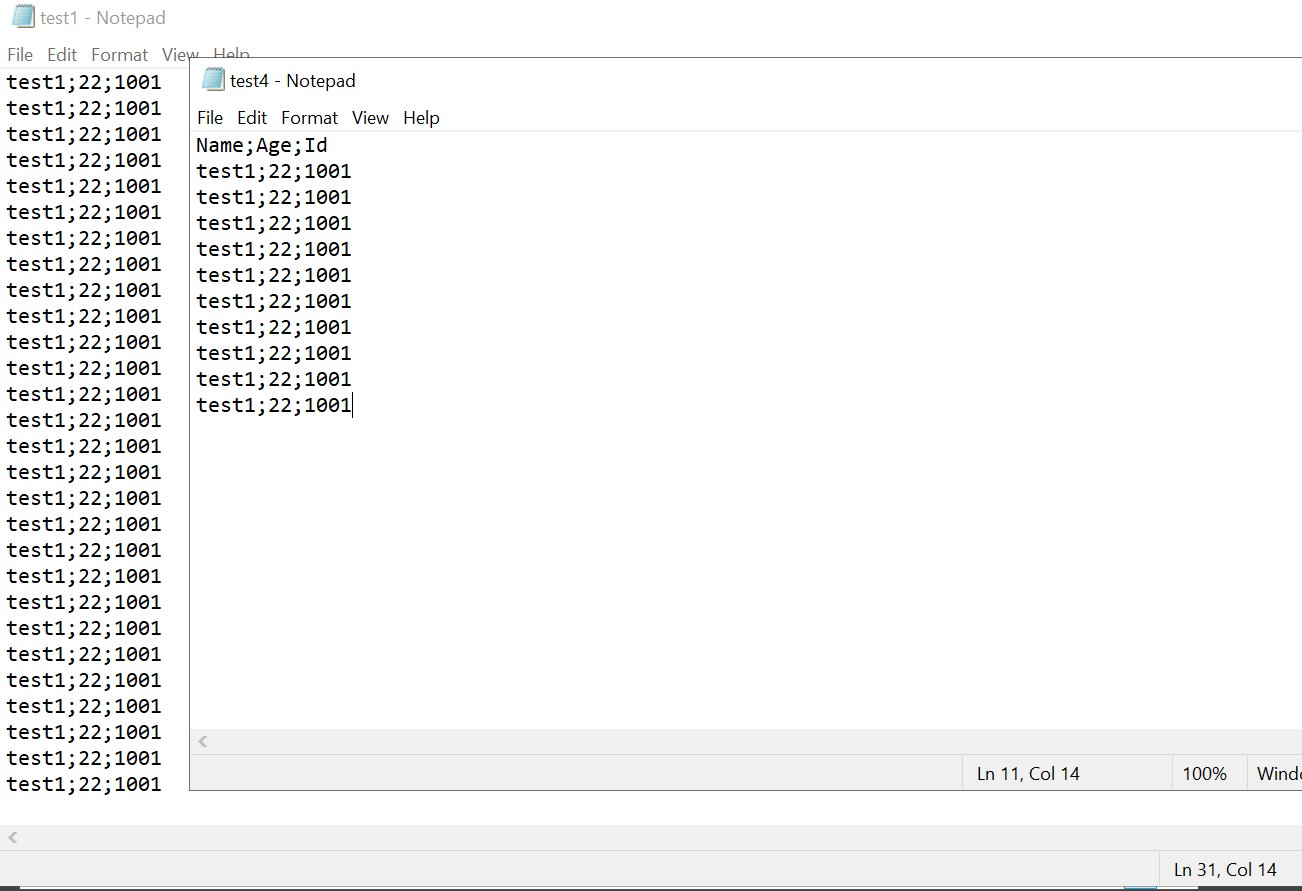
Hope my code could help you.
Best Regards,
Jack
hi
JackJJun-MSFT
I thank you for the quick response
The code works, but there is a slight modification, which is the cause of the problem from the beginning, which is not getting a total value for the files with the same total datatable.
In other words, the total datatable, as in your example, is 100, and it was distributed 30, so it became 3 files, with a total of 90, and there is no complement to the hundredth number.
This means that another file containing the 100's complement is missing a total of 10
@AMER SAID , thanks for the feedback,
In other words, the total datatable, as in your example, is 100, and it was distributed 30, so it became 3 files, with a total of 90, and there is no complement to the hundredth number.
This means that another file containing the 100's complement is missing a total of 10
In fact, I could get 4 files. The picture I provided in the answer is test1.txt and test4.txt, which are the first txt file and the last txt file. The final 10 records is the last txt file(test4.txt).
Therefore, please don't worry about

hi
JackJJun-MSFT
I thank you for the quick response
Thank you for the answer
The problem was with my distribution method
     private static List<DataTable> SplitTable(DataTable originalTable, int batchSize)
        {
            List<DataTable> tables = new List<DataTable>();
            int i = 0;
            int j = 1;
            DataTable newDt = originalTable.Clone();
            newDt.TableName = "data" + j;
            newDt.Clear();
            foreach (DataRow row in originalTable.Rows)
            {
                DataRow newRow = newDt.NewRow();
                newRow.ItemArray = row.ItemArray;
                newDt.Rows.Add(newRow);
                i++;
                if (i == batchSize)
                {
                    tables.Add(newDt);
                    j++;
                    newDt = originalTable.Clone();
                    newDt.TableName = "data" + j;
                    newDt.Clear();
                    i = 0;
                }
            }
            return tables;
        }
@AMER SAID , thanks for the response, what problem did you meet when you used the above code?
@AMER SAID , please feel free to let me know if you still have the problem.

The following was tested with 77 records, chunked at 20 so no test for a large data set.
using System;
using System.Collections.Generic;
using System.Data;
using System.IO;
using System.Linq;
using System.Text.RegularExpressions;

namespace YourNamespace
{
    public static class Extensions
    {
        public static IEnumerable<IEnumerable<T>> ToChunks<T>(this IEnumerable<T> enumerable, int chunkSize)
        {
            int itemsReturned = 0;
            var list = enumerable.ToList(); // Prevent multiple execution of IEnumerable.
            int count = list.Count;

            while (itemsReturned < count)
            {
                int currentChunkSize = Math.Min(chunkSize, count - itemsReturned);
                yield return list.GetRange(itemsReturned, currentChunkSize);
                itemsReturned += currentChunkSize;
            }

        }
    }

    public class SequenceHelper
    {
        public static string NextValue(string sender)
        {
            string value = Regex.Match(sender, "[0-9]+$").Value;
            return sender[..^value.Length] + (long.Parse(value) + 1)
                .ToString().PadLeft(value.Length, '0');
        }
    }

    public class DataHelper
    {
        public static void ExportDataTableToFiles(DataTable dataTable, bool exportColumnsHeader, int chunk, string fileName, string delimited = ",")
        {
            var headers = string.Join(delimited, dataTable.Columns.Cast<DataColumn>().Select(x => x.ColumnName));

            IEnumerable<DataTable> tables = dataTable.AsEnumerable().ToChunks(chunk)
                .Select(rows => rows.CopyToDataTable());


            foreach (var table in tables)
            {
                var lines = table.Rows.Cast<DataRow>().Select(x => string.Join(delimited, x.ItemArray)).ToList();
                if (exportColumnsHeader)
                {
                    lines.Insert(0, headers);
                }

                File.WriteAllLines(fileName + ".txt", lines);
                fileName = SequenceHelper.NextValue(fileName);
            }
        }
    }
}
Basic usage
DataHelper.ExportDataTableToFiles(dataTable, true, 20, "tableData1");
hi
karenpayneoregon
Thank you for following up and replying