Microsoft 365 and Office | SharePoint | For business | Windows
A group of Microsoft Products and technologies used for sharing and managing content, knowledge, and applications.

This browser is no longer supported.
Upgrade to Microsoft Edge to take advantage of the latest features, security updates, and technical support.
' cx='32' cy='32' r='32' /%3E%3Ctext x='50%25' y='55%25' dominant-baseline='middle' text-anchor='middle' fill='%23FFF' %3ESK%3C/text%3E%3C/svg%3E)
I have 3 columns of where you can select any of the status types below, I would like to create a column that pivots based upon the status chosen. I have an excel formula that worked and I have seen other answers but I can not make the code work, I keep getting an error Can anybody help please?
The options in each drop column are
Pass
Fail
Not Assessed
In Progress-Documentation
In Progress-Awaiting Client
=IFS([8.1.1.1 Test Results]="Fail", "Fail", [8.1.1.2 Test Results]="Fail", "Fail", [8.1.1.3 Test Results]="Fail", "Fail", [8.1.1.1 Test Results]="", "", [8.1.1.2 Test Results]="", "", [8.1.1.3 Test Results]="", "", [8.1.1.1 Test Results]="In Progress-Awaiting Client", "In Progress-Awaiting Client", [8.1.1.2 Test Results]="In Progress-Awaiting Client", "In Progress-Awaiting Client", [8.1.1.3 Test Results]="In Progress-Awaiting Client", "In Progress-Awaiting Client",[8.1.1.1 Test Results]="In Progress-Documentation", "In Progress-Documentation", [8.1.1.2 Test Results]="In Progress-Documentation", "In Progress-Documentation", [8.1.1.3 Test Results]="In Progress-Documentation", "In Progress-Documentation", [8.1.1.1 Test Results]="Not Assessed", "Not Assessed", [8.1.1.2 Test Results]="Not Assessed", "Not Assessed", [8.1.1.3 Test Results]="Not Assessed", "Not Assessed", TRUE, "Pass")

Hi @Seth Kubli
First, I want to confirm some information with you. You have provided the formula:
=IFS([8.1.1.1 Test Results]="Fail", "Fail", [8.1.1.2 Test Results]="Fail", "Fail", [8.1.1.3 Test Results]="Fail", "Fail", [8.1.1.1 Test Results]="", "", [8.1.1.2 Test Results]="", "", [8.1.1.3 Test Results]="", "", [8.1.1.1 Test Results]="In Progress-Awaiting Client", "In Progress-Awaiting Client", [8.1.1.2 Test Results]="In Progress-Awaiting Client", "In Progress-Awaiting Client", [8.1.1.3 Test Results]="In Progress-Awaiting Client", "In Progress-Awaiting Client",[8.1.1.1 Test Results]="In Progress-Documentation", "In Progress-Documentation", [8.1.1.2 Test Results]="In Progress-Documentation", "In Progress-Documentation", [8.1.1.3 Test Results]="In Progress-Documentation", "In Progress-Documentation", [8.1.1.1 Test Results]="Not Assessed", "Not Assessed", [8.1.1.2 Test Results]="Not Assessed", "Not Assessed", [8.1.1.3 Test Results]="Not Assessed", "Not Assessed", TRUE, "Pass")
So, do you would like there is a priority in the formula like:
If so, you could use the following formula:
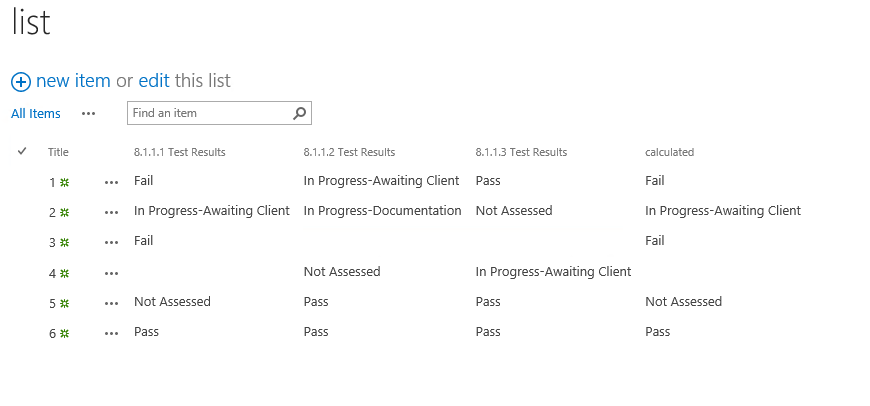
IF(OR([8.1.1.1 Test Results]="Fail", [8.1.1.2 Test Results]="Fail", [8.1.1.3 Test Results]="Fail"), "Fail", IF(OR([8.1.1.1 Test Results]="", [8.1.1.2 Test Results]="", [8.1.1.3 Test Results]=""), "",IF(OR([8.1.1.1 Test Results]="In Progress-Awaiting Client", [8.1.1.2 Test Results]="In Progress-Awaiting Client",[8.1.1.3 Test Results]="In Progress-Awaiting Client"), "In Progress-Awaiting Client",IF(OR([8.1.1.1 Test Results]="In Progress-Documentation", [8.1.1.2 Test Results]="In Progress-Documentation", [8.1.1.3 Test Results]="In Progress-Documentation"), "In Progress-Documentation", IF(OR([8.1.1.1 Test Results]="Not Assessed", [8.1.1.2 Test Results]="Not Assessed", [8.1.1.3 Test Results]="Not Assessed"), "Not Assessed","Pass")))))
As a result, you could see there is a clear prioritization relationship in this list:
If the answer is helpful, please click "Accept Answer" and kindly upvote it. If you have extra questions about this answer, please click "Comment".
Note: Please follow the steps in our documentation to enable e-mail notifications if you want to receive the related email notification for this thread.
Hi @Seth Kubli
I am checking to see if the above answer helps you. If you have any concerns, please feel free to reply.
Hi @Seth Kubli
Do you have any further questions about this thread? If you have any questions or progress, you can contact me in time.