Microsoft 365 and Office | SharePoint | For business | Windows
A group of Microsoft Products and technologies used for sharing and managing content, knowledge, and applications.

This browser is no longer supported.
Upgrade to Microsoft Edge to take advantage of the latest features, security updates, and technical support.
' cx='32' cy='32' r='32' /%3E%3Ctext x='50%25' y='55%25' dominant-baseline='middle' text-anchor='middle' fill='%23FFF' %3EA%3C/text%3E%3C/svg%3E)
I have noticed that SharePoint sometimes records a user as "anonymous" when an anyone link is used but on occasion will identify a user as "urn:spo:anon#<randomstring>".
What is this random string and why/how is it being created?
It seems like it is a Session ID? How does SharePoint create this string and associated it with different actions?
I've seen the same random string associated with different identifiers, such as IP address and SharePoint site.
As an example. The same "urn:spo:anon#<randomstring> will be associated with multiple IP addresses and multiple SharePoint sites over the course of several weeks.
Thanks in advance!
A group of Microsoft Products and technologies used for sharing and managing content, knowledge, and applications.
' cx='32' cy='32' r='32' /%3E%3Ctext x='50%25' y='55%25' dominant-baseline='middle' text-anchor='middle' fill='%23FFF' %3EXX%3C/text%3E%3C/svg%3E)
Hi @Anonymous ,
If possible, could you describe your problem in more detail, with screenshots. For example: Where did you see the user identify record?
Hi @Anonymous ,
You may see logins with anonymous or an account that starts with urn:spo:anon. This can happen when a user clicks on an anonymous link, a user ID will be automatically generated by Microsoft. This user starts with “urn:spo:anon#”.
This situation typically occurs when someone in the organization has shared 365 files publicly and anonymously and someone external is accessing that content. Microsoft logs this access as anonymous, so we cannot provide any additional details on the actual user or account that performed this anonymous activity.
Reference: https://support.blackpointcyber.com/article/63-365-defense-security-events
The same "urn:spo:anon#<randomstring> will be associated with multiple IP addresses and multiple SharePoint sites over the course of several weeks.
This means that the same anonymous user visited multiple SharePoint sites on different devices.
If you don't want this to happen, you can consider disabling anonymous public sharing to stop these types of alerts.
If the answer is helpful, please click "Accept Answer" and kindly upvote it. If you have extra questions about this answer, please click "Comment".
Note: Please follow the steps in our documentation to enable e-mail notifications if you want to receive the related email notification for this thread.
Hello @Xyza Xue_MSFT
Thank you for your question.
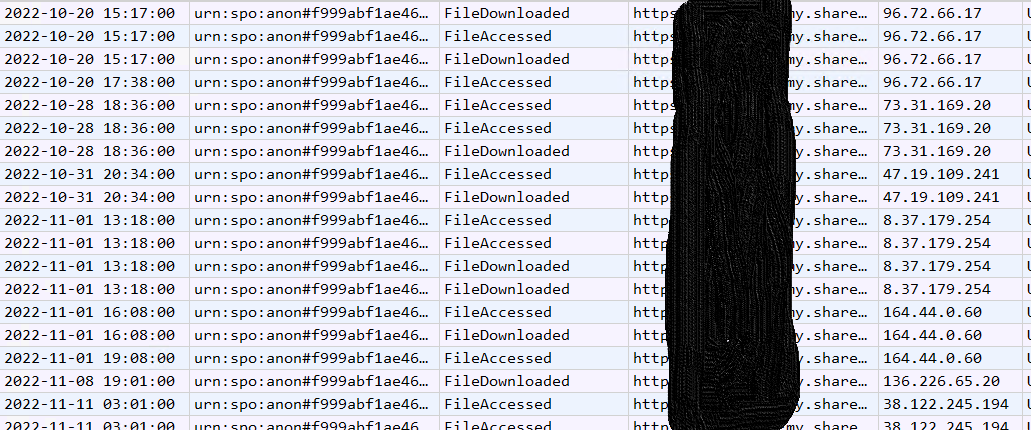
I was conducting SharePoint auditing and located the user identity. It seems as if SharePoint is tracking an anyone link based on some data points, I just haven't determined what data points. I attached a screenshot with what I've located. The only thing blocked out of the shot is the actual site, everything else is raw data pulled from the audit logs.
As you can see, the dates stretch several days and there are different IP addresses, but SharePoint is associating the activity with the same anonymous user ID.