Microsoft 365 and Office | SharePoint Server | For business
A family of Microsoft on-premises document management and storage systems.

This browser is no longer supported.
Upgrade to Microsoft Edge to take advantage of the latest features, security updates, and technical support.
' cx='32' cy='32' r='32' /%3E%3Ctext x='50%25' y='55%25' dominant-baseline='middle' text-anchor='middle' fill='%23FFF' %3ET0%3C/text%3E%3C/svg%3E)
Greetings,
While trying to run sharepoint configuration wizard I received this error below. What does it mean and how can I fix it?
"An error has occurred while validating the configuration settings. An exception of type System.Data.SqlClient.SqlException was thrown. Additional information: Login Failed for user Lingualistek\tking'."

Hi @Tevon2.0 ,
Generally speaking, the firewall does not authorize the SQL server may cause problems when running the sharepoint configuration wizard. Turn it off and make sure you run with a Farm Account(the login failure prompts that the account used when running the configuration wizard does not have the corresponding permissions).Then run the sharepoint configuration wizard again. After ensuring these two points, if other SqlException-like database configuration problems still occur,you can follow the solution in this article and go to SQL Server Configuration Manager to enable TCP/IP.
If the answer is helpful, please click "Accept Answer" and kindly upvote it. If you have extra questions about this answer, please click "Comment".
Note: Please follow the steps in our documentation to enable e-mail notifications if you want to receive the related email notification for this thread.
' cx='32' cy='32' r='32' /%3E%3Ctext x='50%25' y='55%25' dominant-baseline='middle' text-anchor='middle' fill='%23FFF' %3EYJ%3C/text%3E%3C/svg%3E)
Hi @Tevon2.0 ,
Is there anything else I can help with regarding this issue?
You can comment us at any time and we will continue to follow up.
I don't seem to be able to run the sharepoint configuration wizard due to the error "An exception of type System.Reflection.TargetInvocationException was thrown. Additional exception information: Exception has been thrown by the target of an invocation." The log doesn't clearly explain the steps needed to fix this error:
An exception of type System.Reflection.TargetInvocationException was thrown. Additional exception information: Exception has been thrown by the target of an invocation.
System.Reflection.TargetInvocationException: Exception has been thrown by the target of an invocation. ---> System.Security.Principal.IdentityNotMappedException: Some or all identity references could not be translated.
at System.Security.Principal.SecurityIdentifier.Translate(IdentityReferenceCollection sourceSids, Type targetType, Boolean forceSuccess)
at System.Security.Principal.SecurityIdentifier.Translate(Type targetType)
at Microsoft.SharePoint.Utilities.SPUserUtility.SidToAccountName(SecurityIdentifier sid)
at Microsoft.SharePoint.Utilities.SPUserUtility.IsLocalAccount(SecurityIdentifier sid)
at Microsoft.SharePoint.Utilities.SPUserUtility.WarnIfLocalAccountOnFarm(SecurityIdentifier sid, String accountUser)
at Microsoft.SharePoint.Administration.SPProcessIdentity.set_ManagedAccount(SPManagedAccount value)
at Microsoft.Office.Project.Server.Administration.ProjectServiceBase..ctor(String name, SPFarm farm)
--- End of inner exception stack trace ---
at System.RuntimeMethodHandle.InvokeMethod(Object target, Object[] arguments, Signature sig, Boolean constructor)
at System.Reflection.RuntimeConstructorInfo.Invoke(BindingFlags invokeAttr, Binder binder, Object[] parameters, CultureInfo culture)
at Microsoft.SharePoint.PostSetupConfiguration.ReflectionHelper.InvokeConstructor(String assemblyQualifiedName, Type[] constructorSignature, Object[] constructorParameters)
at Microsoft.SharePoint.PostSetupConfiguration.TaskCommon.ReflectionHelperInvokeConstructor(String assemblyQualifiedName, Type[] constructorSignature, Object[] constructorParameters, TaskBase task)
at Microsoft.SharePoint.PostSetupConfiguration.ServicesTask.InvokeServiceConstructor(String serviceRegistryKeyName, String solutionIdRegistryName, String serviceNameRegistryName, Type[] constructorSignature, Object[] constructorParameters)
at Microsoft.SharePoint.PostSetupConfiguration.ServicesTask.InstallServiceInConfigDB(Boolean provisionTheServiceToo, String serviceRegistryKeyName)
at Microsoft.SharePoint.PostSetupConfiguration.ServicesTask.InstallServices(Boolean provisionTheServicesToo)
at Microsoft.SharePoint.PostSetupConfiguration.ServicesTask.Run()
at Microsoft.SharePoint.PostSetupConfiguration.TaskThread.ExecuteTask()

@Tevon2.0 Is it first time that you run SharePoint Configuration Wizard after installing SharePoint? If not, please check and make sure the user has the following permissions on the SQL Server and database as the article.
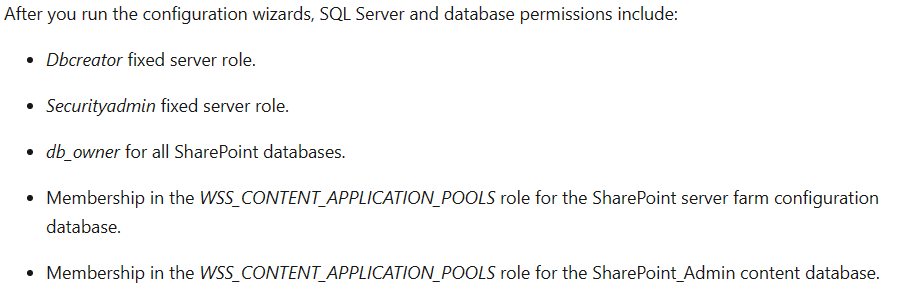
Then, make sure the following SQL services are running normally:

If they are stopped, please start them.
After the above, please try to run SharePoint Configuration Wizard again and let's know the result.
-----
If the answer is helpful, please click "Accept Answer" and kindly upvote it. If you have extra questions about this answer, please click "Comment".
Note: Please follow the steps in our documentation to enable e-mail notifications if you want to receive the related email notification for this thread.
@Tevon2.0 Is there any progress on this thread?