
Scroll down in that window, see if there is any option for Windows Hello (PIN, fingerprint etc) option.
Else, make sure you're on administrator account.
Or you can also give a try with different account if possible.
This browser is no longer supported.
Upgrade to Microsoft Edge to take advantage of the latest features, security updates, and technical support.
' cx='32' cy='32' r='32' /%3E%3Ctext x='50%25' y='55%25' dominant-baseline='middle' text-anchor='middle' fill='%23FFF' %3EJM%3C/text%3E%3C/svg%3E)
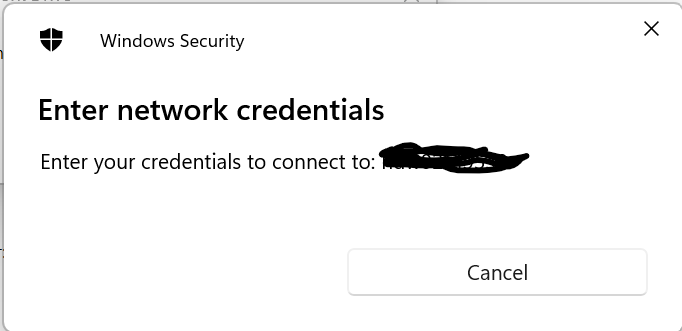
When I try to map to a remote drive using different network credentials, I see a pop up asking me to enter my credentials. Problem is, there are no fields for username and password. It just shows a cancel button.

Scroll down in that window, see if there is any option for Windows Hello (PIN, fingerprint etc) option.
Else, make sure you're on administrator account.
Or you can also give a try with different account if possible.
 ]1
]1
This is what it looks like. I'm not getting access denied or anything as I don't even have a chance to put any credentials.
It's just the cancel button.