Azure Data Factory
An Azure service for ingesting, preparing, and transforming data at scale.
This browser is no longer supported.
Upgrade to Microsoft Edge to take advantage of the latest features, security updates, and technical support.
' cx='32' cy='32' r='32' /%3E%3Ctext x='50%25' y='55%25' dominant-baseline='middle' text-anchor='middle' fill='%23FFF' %3EK%3C/text%3E%3C/svg%3E)
Azure Data Factory allows you through COPY INTO activity to copy a JSON file to Snowflake in one column table. (VARIANT TYPE)
According to the documentation:
For JSON format, direct copy only supports the case that source Snowflake table or query result only has single column and the data type of this column is VARIANT, OBJECT, or ARRAY.
I would like to have instead of one column, two columns, being the first one the JSON file and the second one the load_date which would come from the pipeline activity date.
With parquet files I had some issues.
Does someone have a solution for this ?
I found a workaround:
I used the normal copy activity in ADF and copy only one column. Then I create a script in ADF that copies the previous table and adds a new column.
BEst!
' cx='32' cy='32' r='32' /%3E%3Ctext x='50%25' y='55%25' dominant-baseline='middle' text-anchor='middle' fill='%23FFF' %3EKM%3C/text%3E%3C/svg%3E)
Hello @kosmos ,
Glad to know that you were able to figure out a workaround and appreciate much for sharing the workaround details here as it would be helpful for others reading this thread.
Thank you & have a good day! :)
Hello @kosmos ,
Thanks for the question and using MS Q&A platform.
I doubt it is possible using single ADF copy activity, as the document clearly states that the ADF service checks the settings and fails the Copy activity run if the following criteria is not met:
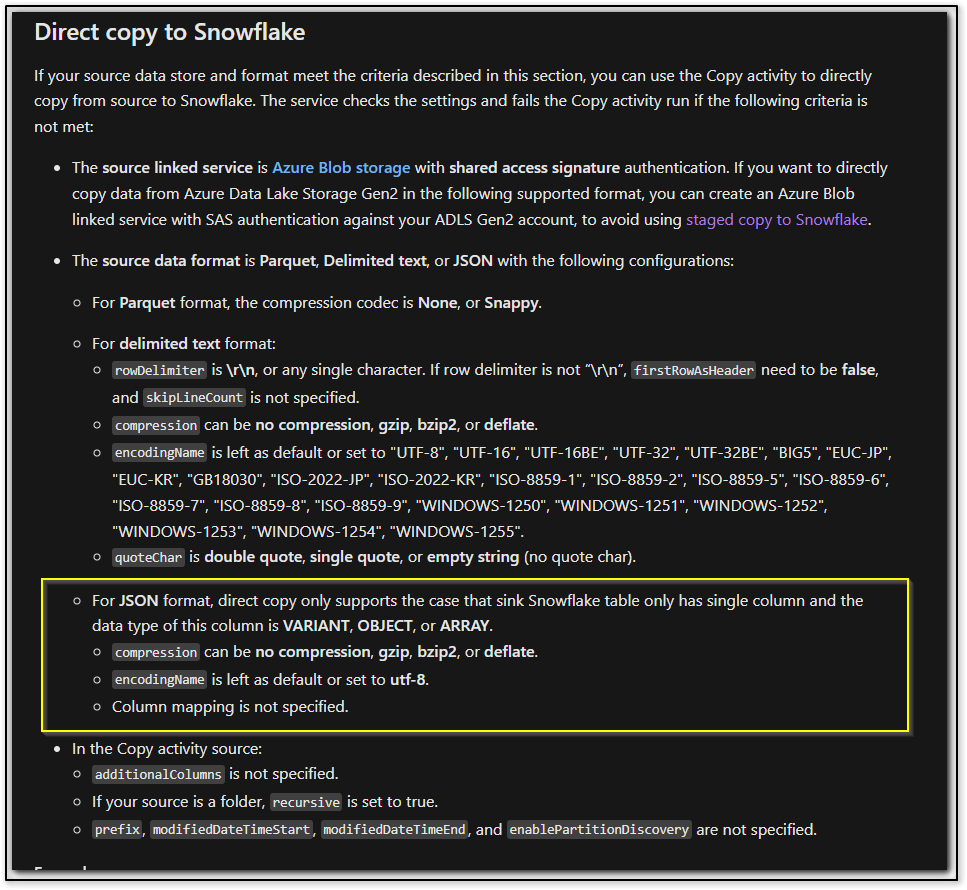
But as a workaround I would recommend giving a try by adding an additional column to your source section and do a mapping and see if the copy work.
Sorry I wasn't able to test this as I don't have a snowflake instance, but you can simply create an additional column in your copy activity source and add mapping and see how it goes.
In case if it fails, then as mentioned in the documentation, the criteria have to be met to run a successful copy.
Do let us know how it goes.
Thank you