Developer technologies | Visual Studio | Testing
A suite of integrated tools for creating, running, and managing tests to ensure code quality and reliability.
This browser is no longer supported.
Upgrade to Microsoft Edge to take advantage of the latest features, security updates, and technical support.
' cx='32' cy='32' r='32' /%3E%3Ctext x='50%25' y='55%25' dominant-baseline='middle' text-anchor='middle' fill='%23FFF' %3EMV%3C/text%3E%3C/svg%3E)
Hey,
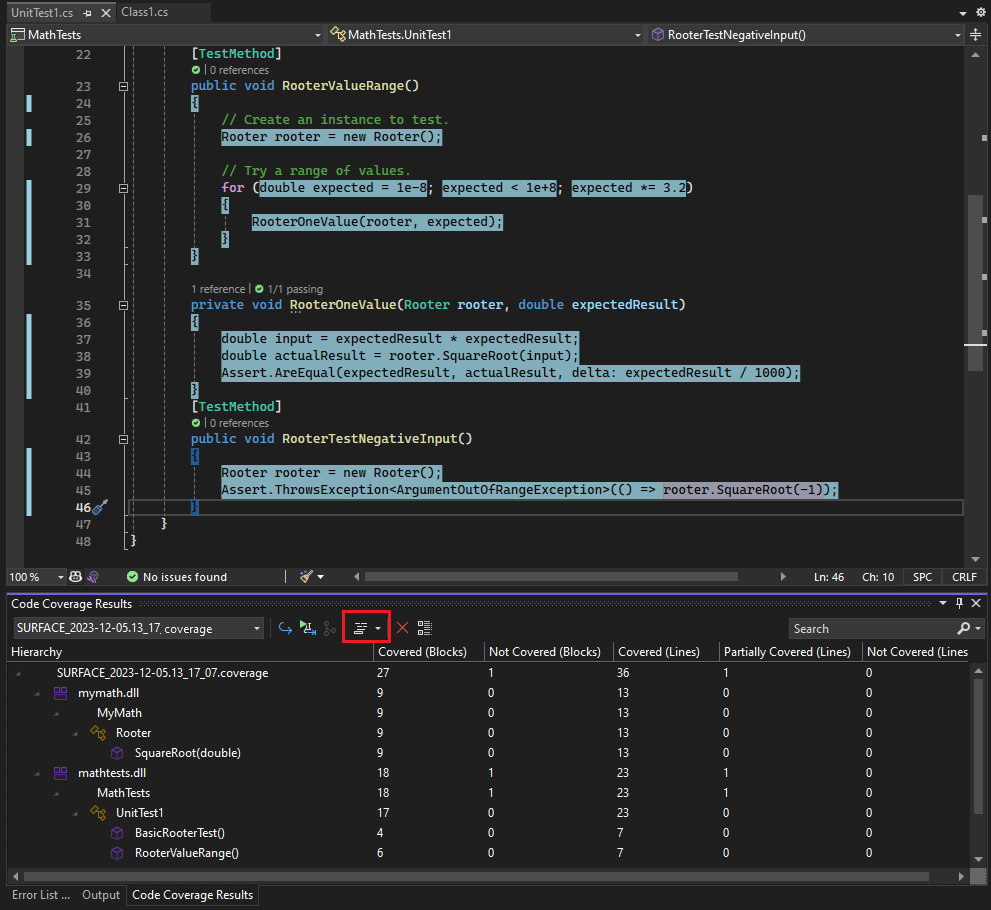
we're moving from VS2019 Enterprise to VS22 Enterprise. In 2019 the code coverage looks like described here: https://learn.microsoft.com/en-us/visualstudio/test/using-code-coverage-to-determine-how-much-code-is-being-tested?view=vs-2022&tabs=csharp#analyze-code-coverage so we have a table with these columns:
In VS22 we get these columns:
So the percentage values are not shown anymore. Is there a way to show them again?
Thanks
A suite of integrated tools for creating, running, and managing tests to ensure code quality and reliability.
A family of Microsoft suites of integrated development tools for building applications for Windows, the web, mobile devices and many other platforms. Miscellaneous topics that do not fit into specific categories.
Answer accepted by question author
' cx='32' cy='32' r='32' /%3E%3Ctext x='50%25' y='55%25' dominant-baseline='middle' text-anchor='middle' fill='%23FFF' %3ETS%3C/text%3E%3C/svg%3E)
Hi @Micha Vosse ,
Welcome to Microsoft Q&A forum.
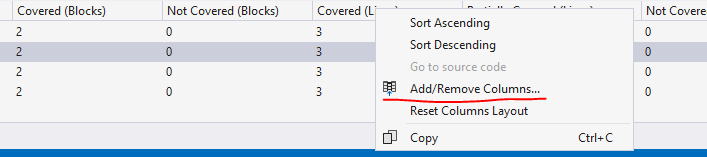
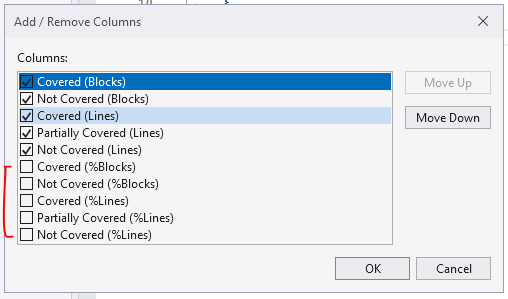
Please right-click one of the columns and select Add/Remove Columns… > then select to add the columns which you want.

Best Regards,
Tianyu
' cx='32' cy='32' r='32' /%3E%3Ctext x='50%25' y='55%25' dominant-baseline='middle' text-anchor='middle' fill='%23FFF' %3EHJ%3C/text%3E%3C/svg%3E)
Hii,
In the pictures in that link (https://learn.microsoft.com/en-us/visualstudio/test/using-code-coverage-to-determine-how-much-code-is-being-tested?view=vs-2022&tabs=csharp)
I do see code coverage % and not covered %.
The link you're viewing (the one I confirmed above) is actually the vs 2022 link.
Hope this clarifies things. If you need any further help, please do share a screenshot of what you see in both versions of the IDE
----------
If this helps, please accept the answer and upvote.
yes, in the picture of the documentation the percentages are still shown, but the image itself is I'll think from VS2017 (explicit image url: https://learn.microsoft.com/en-us/visualstudio/test/media/vs-2022/code-coverage-highlight.png?view=vs-2017&viewFallbackFrom=vs-2022).
In my default VS2022 it looks like this:

' cx='32' cy='32' r='32' /%3E%3Ctext x='50%25' y='55%25' dominant-baseline='middle' text-anchor='middle' fill='%23FFF' %3EA%3C/text%3E%3C/svg%3E)