Outlook | Windows | Classic Outlook for Windows | For business
Using classic Outlook for Windows in business environments

This browser is no longer supported.
Upgrade to Microsoft Edge to take advantage of the latest features, security updates, and technical support.
' cx='32' cy='32' r='32' /%3E%3Ctext x='50%25' y='55%25' dominant-baseline='middle' text-anchor='middle' fill='%23FFF' %3EMW%3C/text%3E%3C/svg%3E)
We use Microsoft 365 hybrid deployment. We are trying to run reports to see when team members who have access to Outlook Web when off premises open email attachments or download email attachments. The report we found will show if the user opens an attachment that is stored on Sharepoint or One Drive; however, I would like to see all attachments that are opened by the user when he/she is not on premises. We are able to see when the user logs in using Outlook Web and the IP address. Does anyone know of a report or a powershell script I can run?
Using classic Outlook for Windows in business environments
' cx='32' cy='32' r='32' /%3E%3Ctext x='50%25' y='55%25' dominant-baseline='middle' text-anchor='middle' fill='%23FFF' %3EFF%3C/text%3E%3C/svg%3E)
Hi @M Ward ,
Welcome to our forum!
From your description, I understand that you want to view a record of a specific user logging in from the web and accessing attachments. If there is any misunderstanding, please feel free to let me know.
Based on my research, you can use the audit log search tool in the Microsoft Purview compliance portal to search for, view, and export (to a CSV file) the audit records for these operations.
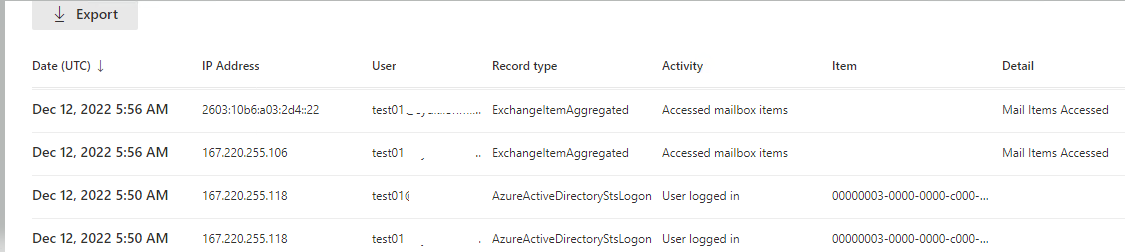
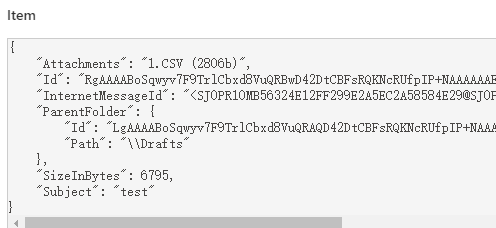
You can click on each one to see the specific details
More information, see:
Search the audit log
Export, configure, and view audit log records
Besides, according to my test on PowerShell, you can use commands to view folder data which is accessed by a user, as shown in the screenshot below, attachment items that
the user access does not appear, however you can according to the message header to locate the email.
Search-MailboxAuditLog -Identity test01 -LogonTypes Owner -StartDate 12/12/2022 -EndDate 12/13/2022 -ResultSize 2000 -ShowDetails | where{$_.Operation -eq "MailItemsAccessed"} | fl AggregatedRecordFoldersData

For information about the parameter sets in New-MailboxAuditLogSearch
Hope that may help you!
Hi @M Ward ,
Just checking in to see if above information was helpful. If you have any further updates on this issue, please feel free to post back. If you think my reply is helpful to you, please remember to mark it as an answer. Warm thanks.
Hi @M Ward ,
It has been a while and I am writing to see how things are going on with this issue. Have you had a chance to check the replies provided? Any update would be appreciated.
' cx='32' cy='32' r='32' /%3E%3Ctext x='50%25' y='55%25' dominant-baseline='middle' text-anchor='middle' fill='%23FFF' %3EAC%3C/text%3E%3C/svg%3E)
Hi, trying to do the same to audit one of our users but I have no luck seeing that the email is being accessed. Is it possible that if it was accessed from his phone it would not be logged?