both display unidentified network on the network card connectivity status
What's expected here? Does the VM have an address assigned?
This browser is no longer supported.
Upgrade to Microsoft Edge to take advantage of the latest features, security updates, and technical support.

Hi,
I'm trying to run VMs on the following host server, the configuration is as follows:
Host machine: HPE DL380G10 server 1Gb 4 port network card running Win2019 Hyper-v server
Two virtual switches (Type: External)
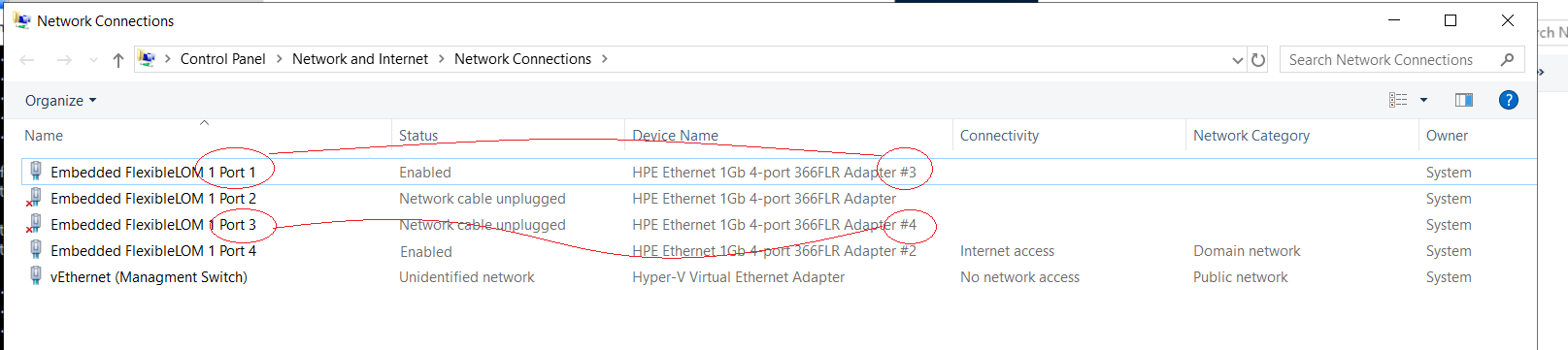
-Admin V-switch binded to port #4 with sharing enabled. A static IP is configured to reach the management VLAN 99
-LAN1 V-switch binded to port #1 with no IP configured and no sharing is enabled (Physical Port #1 is connected to VLAN 1)
Two VMs running Win2016 server with a legacy network card configured to bind to the LAN1 V-switch
The Host machine can ping the admin VLAN (99) gateway
Both VMs are unable to ping the LAN1 gateway, both display unidentified network on the network card connectivity status
Note:
-I'm running similar setup with 5 VMs on an older G7 server with no problems.
-I have checked the wiring and make sure that ports are connected to their designated VLANs ports. also I have updated the host network card drivers.
Can someone shed some light on what could be causing this
Thank you in advance
' cx='32' cy='32' r='32' /%3E%3Ctext x='50%25' y='55%25' dominant-baseline='middle' text-anchor='middle' fill='%23FFF' %3EA%3C/text%3E%3C/svg%3E)
both display unidentified network on the network card connectivity status
What's expected here? Does the VM have an address assigned?
Both VMs have IP addresses assigned
Both VMs can not ping the gateway
Expected: VMs should have connectivity to the LAN1 gateway/network
I found the problem, it is related to the NIC naming, I was binding nics according to the auto naming serial given by the server which was mismatched!!!
Nic #1 to