Developer technologies | .NET | .NET MAUI
A Microsoft open-source framework for building native device applications spanning mobile, tablet, and desktop.
This browser is no longer supported.
Upgrade to Microsoft Edge to take advantage of the latest features, security updates, and technical support.
' cx='32' cy='32' r='32' /%3E%3Ctext x='50%25' y='55%25' dominant-baseline='middle' text-anchor='middle' fill='%23FFF' %3EZ%3C/text%3E%3C/svg%3E)
How add more simulators on list on Visual Studio on Windows Platform ?
I have problem, because I don't see all simulators on list:
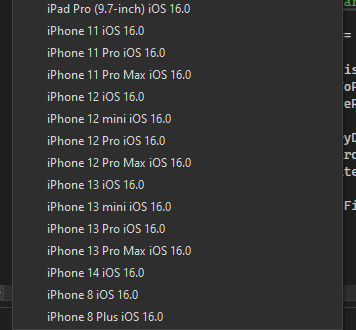 ][2]
][2]
I need more iPads.
I tried turn on simulators on Macbook and these simulators appear on the list

but I can't run app on this simulators, because I have error it doesn't found this device.
' cx='32' cy='32' r='32' /%3E%3Ctext x='50%25' y='55%25' dominant-baseline='middle' text-anchor='middle' fill='%23FFF' %3EWZ%3C/text%3E%3C/svg%3E)
Hello @zc ,
The missing simulators are iOS16.1, Xcode14.1 includes iOS16.1 SDK. You can update VS to the latest stable version, it has added Xcode 14.1 support for .NET for iOS, tvOS, macOS, Mac Catalyst. For more details, please refer to Visual Studio 2022 version 17.4.3 release note.
In addition, all simulators may be iOS16.1 (missing the iOS16.0 simulators) after updating, you could open VS, double-click Info.plist, select Deployment Target, then enter 14.2, and check if the simulators appear.
Best Regards,
Wenyan Zhang
If the answer is the right solution, please click "Accept Answer" and kindly upvote it. If you have extra questions about this answer, please click "Comment".
Note: Please follow the steps in our documentation to enable e-mail notifications if you want to receive the related email notification for this thread.