Community Center | Not monitored
Tag not monitored by Microsoft.

This browser is no longer supported.
Upgrade to Microsoft Edge to take advantage of the latest features, security updates, and technical support.
' cx='32' cy='32' r='32' /%3E%3Ctext x='50%25' y='55%25' dominant-baseline='middle' text-anchor='middle' fill='%23FFF' %3ECS%3C/text%3E%3C/svg%3E)
Hi all,
May someone could help me with this. I have a table that I've got after import a text file with not homogeneous format.
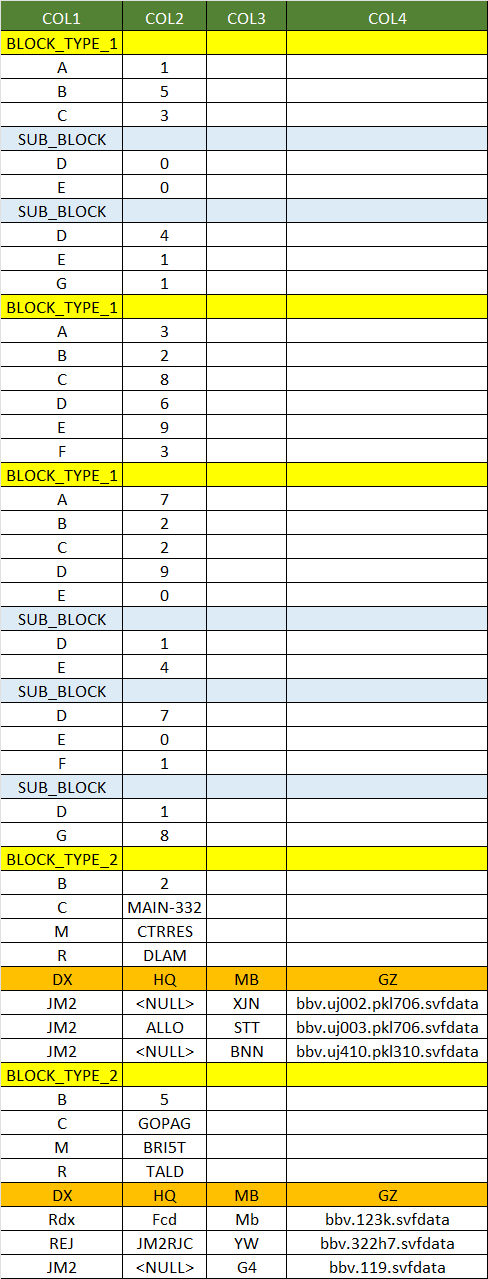
The data appears in blocks (in yellow block type 1 and 2) that begins with parameter A to G (here for ease the parameters are a letter of one length but actually are words). Within each block [A to G] are sub blocks (in blue). So when tabulate the values of those sub blocks should go in different lines.
For the lower part of the data with second format (a mix of first format and new format), the blocks of data begins with parameter "B" until "R". Then comes some consecutive lines arranged in 4 columns. The four columns have 4 headers that are DX, HQ, MB, GZ.
This is the table I have so far in M code
let
    Source = Table.FromRows(Json.Document(Binary.Decompress(Binary.FromText("jVNdb4JAEPwvPFty3KHUR1C4Sg+0x5lqqSF+tGlqH5q0mv787hkal41FEsLNLjczu5NQlk6kpqP7yixnceU5Pad+Vr3SCQF4qI4A9FE9AiBQXcyj6qTWlBkDYKiOSd1C8wkNTyPpdK174DntHpzscUucB8R5iOqE6rU6B1ecOXEeEueOUXmE5nejBS1uCZHt6C5JnCge3mReiiMLJ/mNELidARgZreMCNTWAsQozPMgC0N2DFbHK8unUTTOr9XxgTGzzuVIn9AKtRZrDe7M5uod3xrj7uf8I2MD9Or7u1t9rxA2VmsJRGIPui//vX/CK8rOX7zHLFXBgbntM9L+T01koSUaRnvQNiciEanw1Ir37gSLZ7mx/Uw/qcbFvDKjjFD7Bijq1Eywf64uC87egWwzS/xP3hmfG6hc=", BinaryEncoding.Base64), Compression.Deflate)), let _t = ((type nullable text) meta [Serialized.Text = true]) in type table [COL1 = _t, COL2 = _t, COL3 = _t, COL4 = _t])
in
    Source
This is the image of the table:
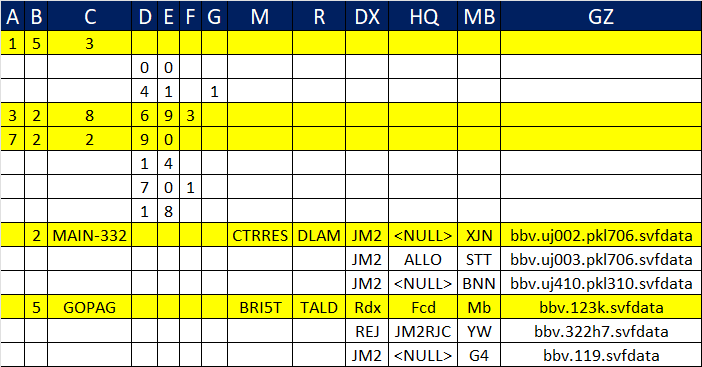
and this is the desired output I'm trying to get:
Thanks in advance for any help.