Azure Virtual Desktop
A Microsoft desktop and app virtualization service that runs on Azure. Previously known as Windows Virtual Desktop.
This browser is no longer supported.
Upgrade to Microsoft Edge to take advantage of the latest features, security updates, and technical support.
' cx='32' cy='32' r='32' /%3E%3Ctext x='50%25' y='55%25' dominant-baseline='middle' text-anchor='middle' fill='%23FFF' %3EPH%3C/text%3E%3C/svg%3E)
I have setup a new AvD Infrastructure, with no AADFS Service.
Everything works well, but I cannot connect to the AvD Session Host using the Remote Desktop App or even Webclient.
Error-Message:
Sorry, we couldn't connect to SessionDesktop.
A connection could not be established with the gateway due to an error.
If the problem occurs repeatedly, contact your administrator or technical support.
The User I'm using to connect has the correct assignment via a security group to the Hostpool. The VM is up and running, everything shows as wanted.
But still, no connection possible.
Any Hints to solve this?
The Azure Tenant actual has a Azure Free Plan, with a valid Subscription. Maybe this be an issue?

Hi
how are your hosts configured, are they Azure AD or AD Domain-joined?
Do you have Log Analytics set up to give you more insights into the exact errors? Its the best way to diagnose the issues.
Create a Log Analytics Workspace - https://learn.microsoft.com/en-us/azure/azure-monitor/logs/quick-create-workspace
How to use Log Analytics - https://learn.microsoft.com/en-us/azure/virtual-desktop/diagnostics-log-analytics
Hope this helps,
Thanks
Michael Durkan
Hi Michael, The Client is Azure AD joined. There is no on-prem or Azure Service ADFS available.
I have a LogAnalystics Workspace running and configured, but I don't know exactly what to setup in the Log-Space to get useful information. Any Hints on that?

Hi,
Please add targetisaadjoined:i:1 to your host pool RDP Properties, similar to below. After refreshing on client please test again.
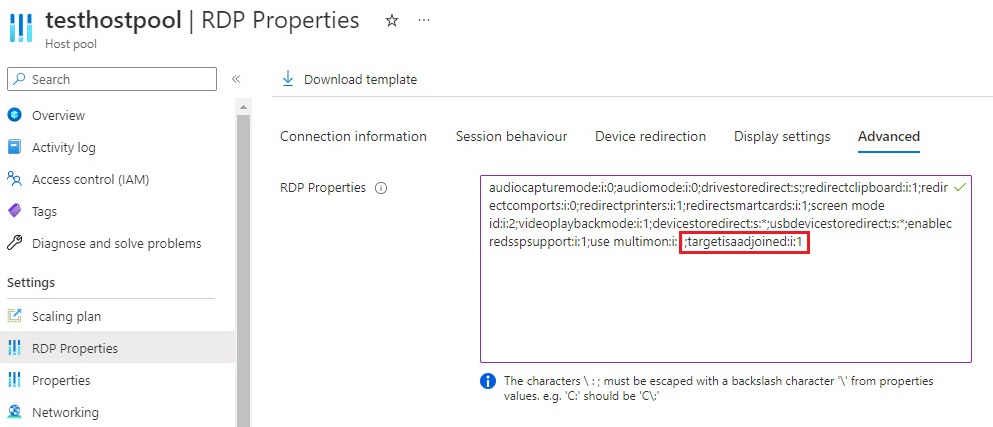
Thanks.
-TP
Hi TP-MVP,
I added the configuration, still no connection possible. Or do I have to restart the VM I try to connect to?
I think there is no option to "reset" a Hostpool / Workspace, right?
On client PC, refresh the page if using web browser, then test again. Idea is to make sure it downloads the updated .rdp file settings that you changed on the host pool.
Here is a Message from the Log Analytics:
Failed to add user = ≤AzureAD\xxx@X .com≥ to group = Remote Desktop Users. Reason: Win32.ERROR_NO_SUCH_MEMBER 1
Another Issue i recently discoverd: The VM which is listed in the hostpool is NOT AAD joined. The VM is simply not available in the AAD Devices list.
Although, the Detail View of the Session Host list shows status "available" with a DomainJoinedCheck successfull.
I think the main reason is that the VM is not AAD joined.
But why is that?