Handling hash table variables

Priya Jha 901 Reputation points
2022-12-15T13:35:27.267+00:00

Hi All,

I am referring to the below URL:
https://learn.microsoft.com/en-us/answers/questions/1127027/depender-and-dependee-variable-reallignment.html

@Rich Matheisen , @Aung Zaw Min Thwin - I am trying the below code:

cls  
$source=@(1,2,3,3,3)  
$Entity=@(1,1,1,2,1)  
$Attribute=@(1,5,6,7,7)  
$UsedIn = @{}  


write-host "Entity"  


for($i=0;$i -lt $source.Count;$i++)  
{  
       if ($UsedIn.ContainsKey($source[$i])){  
                     $UsedIn[$source[$i]] += $Entity[$i]  
                 }  
                 else{  
                     $UsedIn[$source[$i]] = ,$Entity[$i]        
                 }  
}  


$UsedIn  


write-host "Attribute"  


for($i=0;$i -lt $source.Count;$i++)  
{  
       if ($UsedIn.ContainsKey($source[$i])){  
                     $UsedIn[$source[$i]] += $Attribute[$i]  
                 }  
                 else{  
                     $UsedIn[$source[$i]] = ,$Attribute[$i]        
                 }  
}  


$UsedIn  

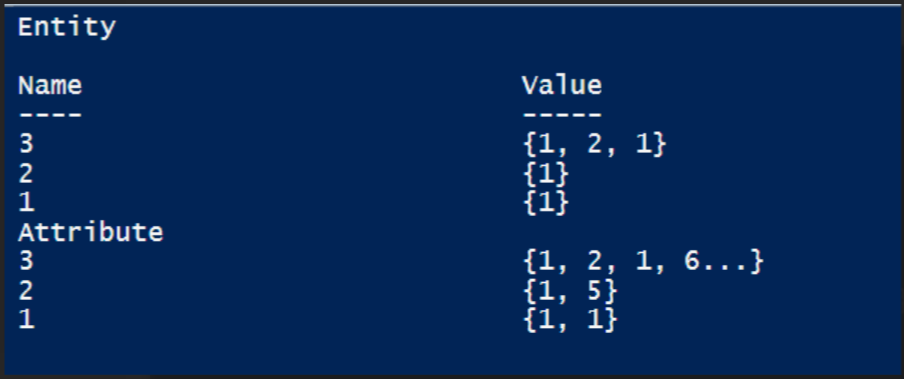
Below is the output:
271036-image.png

I want to avoid duplicate values for the same key in case if it is coming from the same array. Meaning - I need the below output from the hash table:

1 1 1
2 1 5
3 1 2 6 7

Also, is it possible that when i enumerate the hash table i need to map the value to the corresponding array name. Like,

Key1 has value Entity1 Attribute1
Key3 has value Entity1 Entity2 Attribute6 Attribute7

Windows for business | Windows Server | User experience | PowerShell
{count} votes

Answer accepted by question author
  1. Rich Matheisen 48,026 Reputation points
    2022-12-15T16:44:52.997+00:00

    Avoid the duplicates by looking to see if the array already contains the value before adding the "Attribute" calue:

    cls  
    $source =       @(1, 2, 3, 3, 3)  
    $Entity =       @(1, 1, 1, 2, 1)  
    $Attribute =    @(1, 5, 6, 7, 7)  
    $UsedIn = @{}  
      
    Write-Host "Entity"  
    for ($i = 0; $i -lt $source.Count; $i++) {  
        if ($UsedIn.ContainsKey($source[$i])) {  
            $UsedIn[$source[$i]] += $Entity[$i]  
        }  
        else {  
            $UsedIn[$source[$i]] = , $Entity[$i]        
        }  
    }  
    $UsedIn  
          
    Write-Host "Attribute"  
    for ($i = 0; $i -lt $source.Count; $i++) {  
        if ($UsedIn.ContainsKey($source[$i])) {  
            if ($UsedIn[$source[$i]] -notcontains $Attribute[$i]) {  
                $UsedIn[$source[$i]] += $Attribute[$i]  
            }  
        }  
        else {  
            $UsedIn[$source[$i]] = , $Attribute[$i]        
        }  
    }  
    $UsedIn  

    
    0 comments No comments

2 additional answers

Sort by: Most helpful
  1. Nandan Hegde 36,716 Reputation points MVP Volunteer Moderator
    2022-12-15T16:18:50.043+00:00

    you can use the below logic to remove duplicates:

    $NewUsedIn = $UsedIn.GetEnumerator() |% { $_.value = ($_.value -split "," | select -unique) -join "," ; $_}  
    $NewUsedIn  
    
    0 comments No comments

  2. Aung Zaw Min Thwin 306 Reputation points
    2022-12-16T05:15:43.773+00:00

    If you prefer one liner....

    $(for ( $i=0; $i -lt $source.Count; $i++ ) { New-Object PsObject -p ([ordered]@{Source=$source[$i]; E = $Entity[$i]; A=$Attribute[$i] }) }) | Group Source |Select @{n='Source'; e= { $_.Name}}, @{n='E'; e= { $_.Group.E | select -Unique }}, @{n='A'; e= { $_.Group.A | select -Unique }}  
    

    If you want to combine Entity and Attribute:

    $(for ( $i=0; $i -lt $source.Count; $i++ ) { New-Object PsObject -p ([ordered]@{Source=$source[$i]; EnA= $Entity[$i],$Attribute[$i]}) }) | Group Source |Select @{n='Source'; e= { $_.Name}}, @{n='EnA'; e= { $_.Group.EnA | select -Unique }}  
    

    rgds,

    0 comments No comments

Your answer

Answers can be marked as 'Accepted' by the question author and 'Recommended' by moderators, which helps users know the answer solved the author's problem.