Microsoft 365 and Office | Development | Office JavaScript API
An Office service that supports add-ins to interact with objects in Office client applications.

This browser is no longer supported.
Upgrade to Microsoft Edge to take advantage of the latest features, security updates, and technical support.
' cx='32' cy='32' r='32' /%3E%3Ctext x='50%25' y='55%25' dominant-baseline='middle' text-anchor='middle' fill='%23FFF' %3ESS%3C/text%3E%3C/svg%3E)
I did like this in js (i need to check if the credit card details are correct). so I want instead of the return true to send it to aspx.cs
if (submit != "") {
            if (card != "" && validity != "" && digits != "") {

                if (card.length == 16) {

                    for (var i = 0; i < card.length; i++) {
                        if (card[i] >= 0 && card[i] <= 9) {

                            for (var i = 0; i < validity.length; i++) {
                                if (validity[i] >= 0 && validity[i] <= 9) {

                                    for (var i = 0; i < digits.length; i++) {
                                        if (digits[i] >= 0 && digits[i] <= 9) {

                                            if (digits.length == 3) {
                                                return true;
                                            }
                                        }
                                    }
                                }
                            }
                        }
                    }
                }
            }
        }
' cx='32' cy='32' r='32' /%3E%3Ctext x='50%25' y='55%25' dominant-baseline='middle' text-anchor='middle' fill='%23FFF' %3EA%3C/text%3E%3C/svg%3E)
Hi @shilat shay ,
so I want instead of the return true to send it to aspx.cs
Based on your description, it looks like you want to send this result to the backend in WebForms project using javascript, right? If this is the case, you could use the ajax request with jquery.js to implement this requirement, like this:
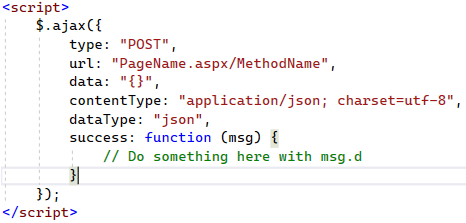
And the WebMethod in asp.cs:
   [WebMethod]
   public static string MethodName(string name)
   {
       return "Hello " + name;
   }
In addition, you need to set RedirectMode.Off in RouteConfig.cs. Something like this:
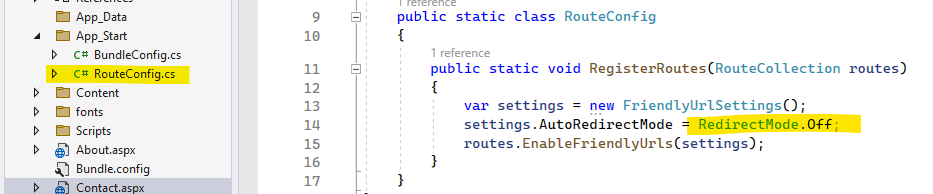
If I misunderstood anything on this question, please let me know.
Best regards,
Xudong Peng
If the answer is the right solution, please click "Accept Answer" and kindly upvote. If you have extra questions about this answer, please click "Comment".
Note: Please follow the steps in our documentation to enable e-mail notifications if you want to receive the related email notification for this thread.
hi I didn't almost anything :(
I just need to finds a way to connect js so when i do a for and everything correct and it returns true so in aspx.cs it'll get id its true or false and if it is so it'll do something
Hi @shilat shay ,
If this is the case, I'm afraid I can't understand your real requirement. connect js? what does it mean? The most I can think of is using ajax to interact with the backend, please clarify if it means something else.