Community Center | Not monitored
Tag not monitored by Microsoft.

This browser is no longer supported.
Upgrade to Microsoft Edge to take advantage of the latest features, security updates, and technical support.
' cx='32' cy='32' r='32' /%3E%3Ctext x='50%25' y='55%25' dominant-baseline='middle' text-anchor='middle' fill='%23FFF' %3EAM%3C/text%3E%3C/svg%3E)
Hi, When I create a WinUI project in Visual Studio, below is how the project structure looks like:
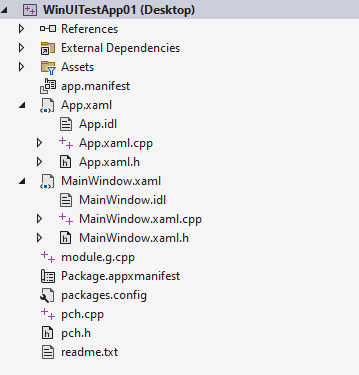
This project by default gets built using MSBuild.
However, I would like to build this project using LLVM Clang-Cl. Stating for ample clarity, I would also be wanting to use the Generator as 'Ninja'.
Is this possible to achieve?
As a bunch of headers get generated when this project is built, I tried using running cppwinrt.exe manually on this project to generate the relevant headers. While few headers got generated but still a bunch were missing. Also, could not understand how the .g.h/.g.cpp files can get generated without MSBuild.
I have also tried this link - https://github.com/fredemmott/cmake-cpp-winrt-winui3. However, the same doesnt work with LLVM/Clang and Ninja.
Any pointers/suggestions will help.
' cx='32' cy='32' r='32' /%3E%3Ctext x='50%25' y='55%25' dominant-baseline='middle' text-anchor='middle' fill='%23FFF' %3EA%3C/text%3E%3C/svg%3E)
Microsoft Q&A does not support questions that related to third party tools. Your question about LLVM is not supported now. You might need to ask in LLVM's official forum about this.
' cx='32' cy='32' r='32' /%3E%3Ctext x='50%25' y='55%25' dominant-baseline='middle' text-anchor='middle' fill='%23FFF' %3EMM%3C/text%3E%3C/svg%3E)
@Roy Li Can we use clang-cl being shipped with VS. So basically can the below be achieved?
WinUI project using MSBuild build system (i.e Visual Studio Generator) and for compiler/linker as clang-cl compiler shipped with Visual Studio.
So this is how I am trying.
It seems MSBuild did not generate App.xaml.g.h/App.xaml.g.xpp (and many more files that gets generated if we use VS cl compiler) which means that MSBuild did not run the xamlCompiler task.
Is there anything specific need to be done to resolve this issue ?
Regards,
Mohsin Siddiqui