Developer technologies | ASP.NET | ASP.NET Core
A set of technologies in the .NET Framework for building web applications and XML web services.
This browser is no longer supported.
Upgrade to Microsoft Edge to take advantage of the latest features, security updates, and technical support.
' cx='32' cy='32' r='32' /%3E%3Ctext x='50%25' y='55%25' dominant-baseline='middle' text-anchor='middle' fill='%23FFF' %3EA%3C/text%3E%3C/svg%3E)
Is it possible to build an ASP.NET Core page to forward all HTTP request (query string/headers/post data) to an external URL and then captures response and send it back to client?
For example:

Sure. It is called a proxy. What have you tried? What's not working? Where's your code?
' cx='32' cy='32' r='32' /%3E%3Ctext x='50%25' y='55%25' dominant-baseline='middle' text-anchor='middle' fill='%23FFF' %3EA%3C/text%3E%3C/svg%3E)
Hi @杨岑 ,
Is it possible to build an ASP.NET Core page to forward all HTTP request (query string/headers/post data) to an external URL and then captures response and send it back to client?
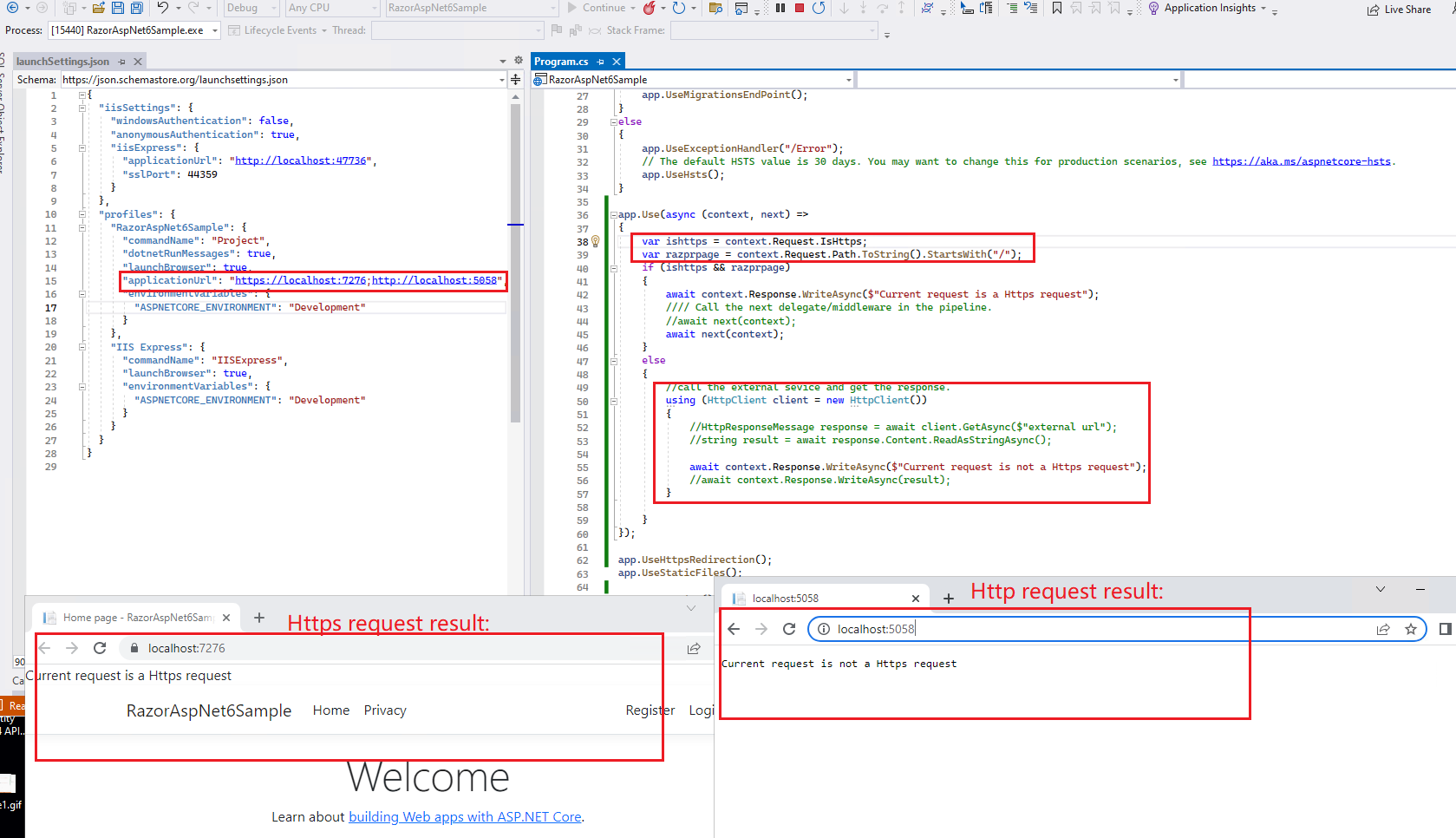
In Asp.net core, you can write a custom ASP.NET Core middleware to filter the request (use the Map, and Use extension methods), then use the HttpContext.Request.IsHttps property to verify whether the request is a http request or https request. After that based on the result to invoke the middleware or call the external method and make a custom response.
Code like this:
app.Use(async (context, next) =>
{
    var ishttps = context.Request.IsHttps;
    var razprpage = context.Request.Path.ToString().StartsWith("/");
    if (ishttps && razprpage)
    {
        await context.Response.WriteAsync($"Current request is a Https request");
        //// Call the next delegate/middleware in the pipeline.
        //await next(context);
        await next(context);
    }
    else
    {
        //call the external sevice and get the response.
        using (HttpClient client = new HttpClient())
        {
            //HttpResponseMessage response = await client.GetAsync($"external url");
            //string result = await response.Content.ReadAsStringAsync();

            await context.Response.WriteAsync($"Current request is not a Https request");
            //await context.Response.WriteAsync(result);
        }

    }
});

app.UseHttpsRedirection();
[Note] By default, Asp.net core enforce HTTPS using the UseHttpsRedirection middleware, so, if you want to check request url via the above method, you should add the custom middleware before the UseHttpsRedirection middleware. Or you can remove the UseHttpsRedirection middleware.
The result as below:
More detail information about custom Middleware, see:
Write custom ASP.NET Core middleware
If the answer is the right solution, please click "Accept Answer" and kindly upvote it. If you have extra questions about this answer, please click "Comment".
Note: Please follow the steps in our documentation to enable e-mail notifications if you want to receive the related email notification for this thread.
Best regards,
Dillion