Debugging a cmd window program

John Hite 41 Reputation points
2022-12-19T01:08:21.28+00:00

I have an existing program that runs in a cmd window that takes a variable number of arguments. I need to modify this program and wish to debug it in VS C++. Is there an easy way to provide a command string to the debugger or pass a command string to _tmain()?

Thanks,
John

Developer technologies | C++
A high-level, general-purpose programming language, created as an extension of the C programming language, that has object-oriented, generic, and functional features in addition to facilities for low-level memory manipulation.
0 comments No comments
{count} votes

Answer accepted by question author
  1. WayneAKing 4,931 Reputation points
    2022-12-19T03:01:50.74+00:00

    You should always state which version of Visual Studio
    or Visual C++ you're using, as the exact instructions may
    vary across versions and editions.

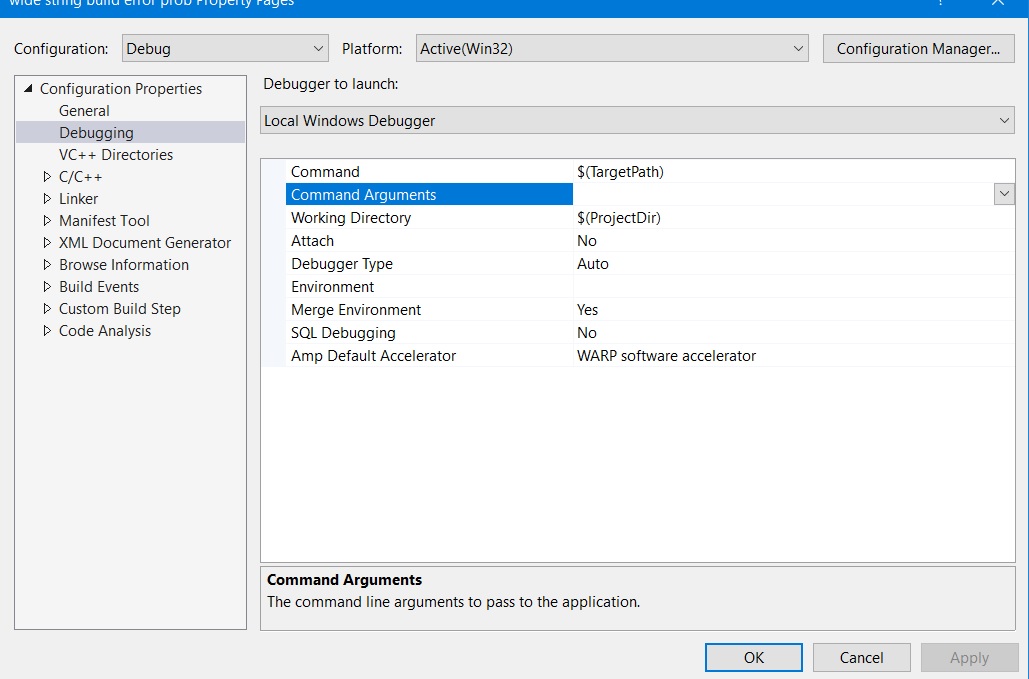
    By way of a general visual assist to the suggestion from
    RLWA32, the steps to get to the properties described in
    the page provided are generally as follows:

    In the Solution Explorer window, right-click the mouse
    on the Project node.

    On the menu that pops up, scroll to the bottom and
    click on the Properties link.

    A Properties Page should appear that looks more or less
    like this pic from VS 2017.
    271906-command-args.jpg

    Select the "Debugging" property, and in the pane
    on the right enter your command line arguments
    where shown.

    • Wayne
    0 comments No comments

1 additional answer

Sort by: Most helpful
  1. RLWA32 51,536 Reputation points
    2022-12-19T01:28:29.37+00:00

    You can specify command line arguments for your C++ program in the project properties page as described here debugging-prop-pages

    0 comments No comments

Your answer

Answers can be marked as 'Accepted' by the question author and 'Recommended' by moderators, which helps users know the answer solved the author's problem.