Azure Internet of Things
A category of Azure services for internet of things devices.
This browser is no longer supported.
Upgrade to Microsoft Edge to take advantage of the latest features, security updates, and technical support.
' cx='32' cy='32' r='32' /%3E%3Ctext x='50%25' y='55%25' dominant-baseline='middle' text-anchor='middle' fill='%23FFF' %3ENT%3C/text%3E%3C/svg%3E)
Hello everyone,
I follow this video on youtube to make a Device Simulator and receive message from it:
https://www.youtube.com/watch?v=PQ58jYDxNOg&list=LL&index=4
But when I created Event Hub trigger, copy IoT Hub endpoint and paste it to local.settings.json file

After that I published to Azure and get this error, can somebody help me to fix it, thanks.


Hello @Nguyen Thuan An , thank you for posting this question.
The function might have missed the connection string parameter reference during the deployment. You can address this by navigating to the configuration section of the Azure function on the cloud portal and add the application setting. Please refer the below image for more details.
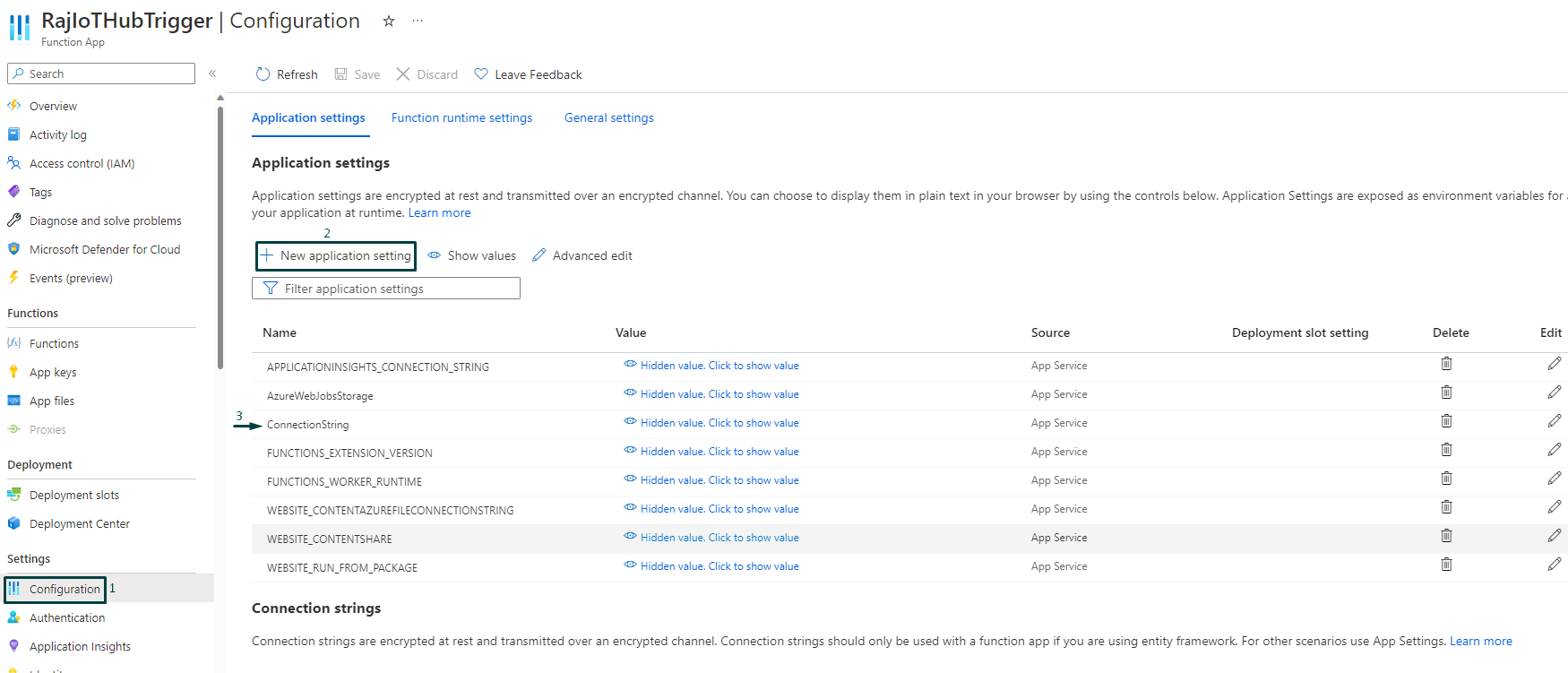
Make sure to name your application setting parameter as EventHub and provide the same endpoint value as used in your local.settings.json file. Note that no quotes are needed when you provide the key and value for the parameters.
Please refer to this resource Azure Event Hubs trigger for Azure Functions if you need any information on Event Hub Triggers.
Let us know if you still run into any issues after trying the above recommendation.
----------
Kindly accept answer or upvote if the response is helpful so that it would benefit other community members facing the same issue. I highly appreciate your contribution to the community.