Developer technologies | .NET | .NET MAUI
A Microsoft open-source framework for building native device applications spanning mobile, tablet, and desktop.
This browser is no longer supported.
Upgrade to Microsoft Edge to take advantage of the latest features, security updates, and technical support.
' cx='32' cy='32' r='32' /%3E%3Ctext x='50%25' y='55%25' dominant-baseline='middle' text-anchor='middle' fill='%23FFF' %3ENP%3C/text%3E%3C/svg%3E)
I'm using Visual Studio 2022 on Windows for building .NET MAUI App
I want to test App on different iOS version
I use pair to Mac of VS 2022 to connect with a IMAC
On IMAC, i create 2 simulators with different version of iOS (15.4 and 16.0) for testing iOS version
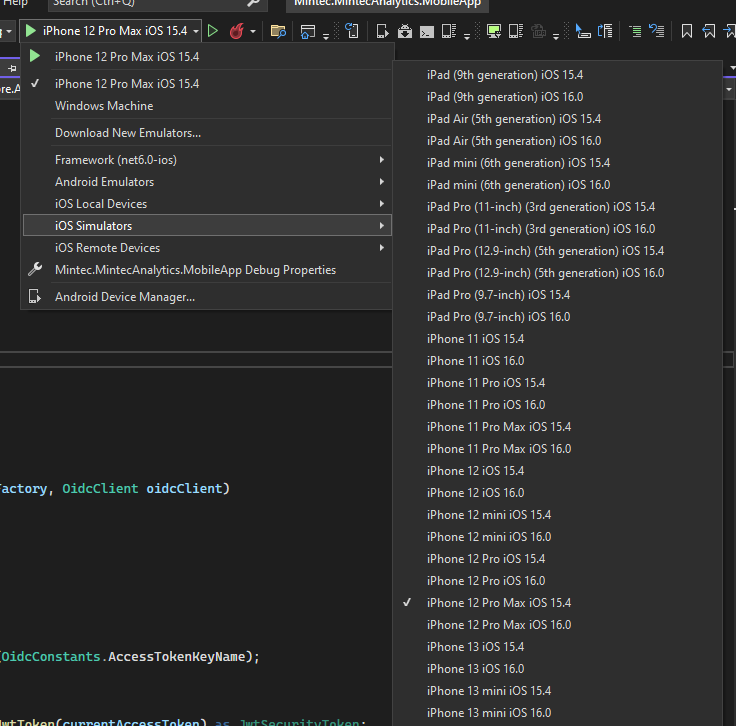
When i run the project it has an error
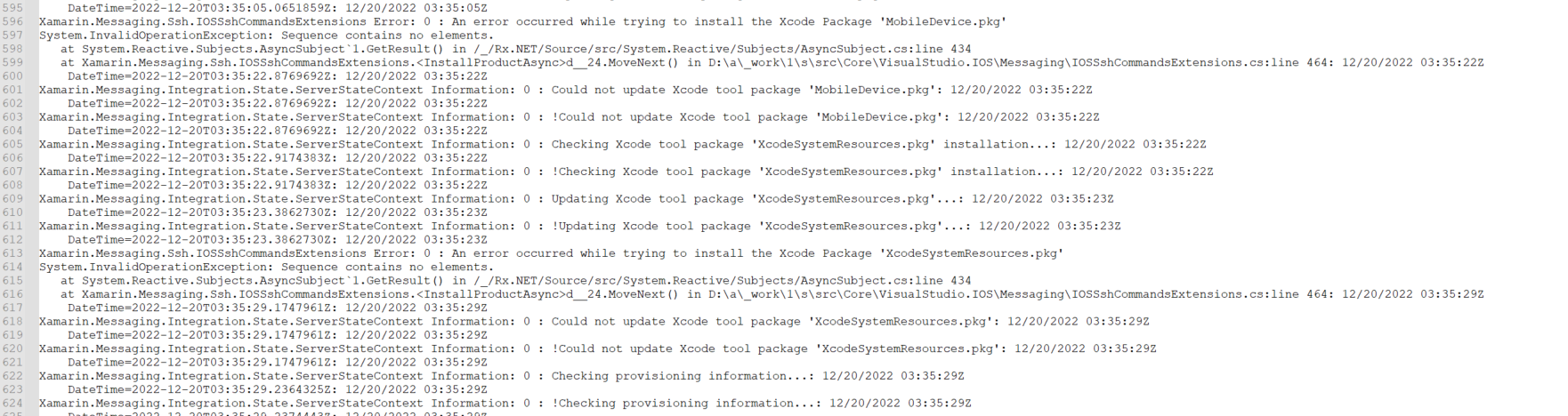
Does anyone know how to fix it, if it doesn't please let me know is there any way to test iOS version
thanks in advance.
' cx='32' cy='32' r='32' /%3E%3Ctext x='50%25' y='55%25' dominant-baseline='middle' text-anchor='middle' fill='%23FFF' %3EWZ%3C/text%3E%3C/svg%3E)
Usually, MobileDevice.pkg is in the package of Xcode, this error means there is something wrong with the Xcode tool. You could try to open Xcode and check if there is a prompt to install additional components.
In addition, may I ask the detailed XCode version, VS version? Could you run an iOS app on the simulator via XCode? Do you meet the same error when you build a MAUI app via VS for Mac? As noted in the Q&A FAQ: How to write a quality question
VS version is 17.3.5, XCode version is 14.1, but with XCode version 14.1, the simulator doesn't work, then i try to install XCode 13.3 and change location on XCode to 13.3, the simulator works properly
I tried to run App vis VS on IMAC with different version iOS, it works, but when i run App in VS pair to MAC, it has error
May I know whether your issue has been solved or not? If not, please share it in here. We can work together to figure it out.
Hello @Nam Pham ,
You could try to update VS to the latest version ( Visual Studio 2022 version 17.4.3 ), Xcode 14.1 has been supported for MAUI and Xamarin. And you need to set the Command Line Tool to 14.1 under Location of Xcode preference.
Best Regards,
Wenyan Zhang
If the answer is the right solution, please click "Accept Answer" and kindly upvote it. If you have extra questions about this answer, please click "Comment".
Note: Please follow the steps in our documentation to enable e-mail notifications if you want to receive the related email notification for this thread.
thanks i will try it
OK, waiting for your updates.
May I know whether your issue has been solved or not? If not, please share it in here. We can work together to figure it out.
Thanks @Wenyan Zhang (Shanghai Wicresoft Co,.Ltd.)
after update VS version to 17.4.3, i can connect to MAC (version 14.1) and run app on iOS simulator. everything works properly.
about testing app on different iOS version i'm working on it, i will tell you when it has a result.
Ok, waiting for your updates. For the different simulators issue, you can refer to the following steps.
If you have different iOS simulator in Xcode(Window->Devices and Simulators->Simulators), you can open your MAUI project with VS, then double-click Info.plist, select Deployment Target, then enter 14.2. After that, you can check whether there are the simulators above 14.2.
If you have any other issues, please feel free to post here.