Azure Data Factory
An Azure service for ingesting, preparing, and transforming data at scale.
This browser is no longer supported.
Upgrade to Microsoft Edge to take advantage of the latest features, security updates, and technical support.
' cx='32' cy='32' r='32' /%3E%3Ctext x='50%25' y='55%25' dominant-baseline='middle' text-anchor='middle' fill='%23FFF' %3EPJ%3C/text%3E%3C/svg%3E)
I have created adf pipeline with look up activity that is reading dynamic json content key values e. g. filename and filelocation
Now these two above values (output of look up) need to pass to dataflow activity source dataset "wildcard path"
Could you please advise how it is possible to do that?
' cx='32' cy='32' r='32' /%3E%3Ctext x='50%25' y='55%25' dominant-baseline='middle' text-anchor='middle' fill='%23FFF' %3EKM%3C/text%3E%3C/svg%3E)
Hello @Anonymous ,
We still have not heard back from you. Just wanted to check if any of the below suggestions were helpful? If it answers your query, please do click Accept Answer and/or Up-Vote, as it might be beneficial to other community members reading this thread. And, if you have any further query do let us know.

To pass the output of a Lookup activity to a Dataflow activity in an Azure Data Factory (ADF) pipeline, you can use a WildcardPath parameter in the source dataset for the Dataflow activity.
Here's an example of how you might do this:
If the answer is helpful, please click "Accept Answer" and kindly upvote it. If you have extra questions about this answer, please click "Comment".
In dataflow syntax @activity('lookupActivityName').output is not working since it is related with look up activity of pipeline and cannot be referred in dataflow "source" dataset.
Do I need to use parameter to pass look up activity output value to dataflow dataset?
Please let me know if there is any website doing the same for file based operation?
Just for you info We are not using any database?
Hello @Anonymous ,
Thanks for the question and using MS Q&A platform.
As suggested by @Arun Siripuram you can directly use the lookup output values using pipeline expression and pass the values to your dataflow. To do so you will have to follow below steps.
First you will have to create 2 dataflow parameters as shown below for which you will pass the values from pipeline expression at pipeline level.
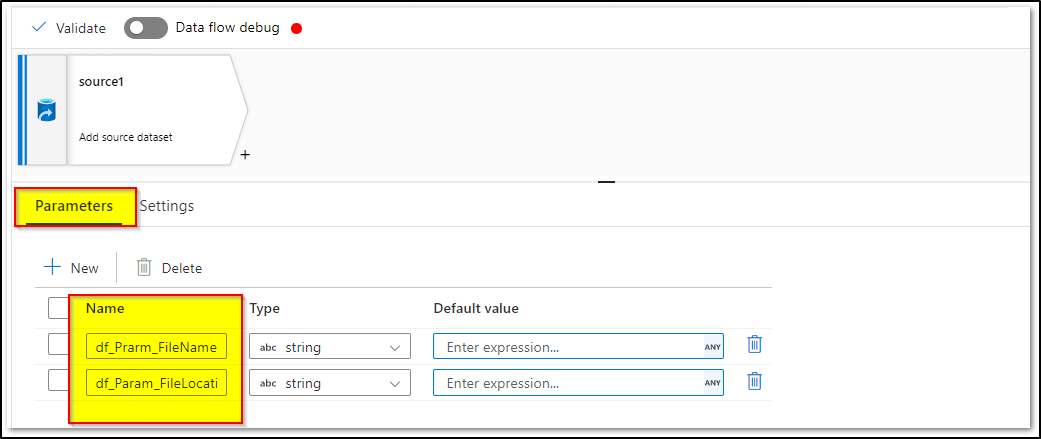
Then once you have your lookup activity output, your focus would be @activity('lookupActivityName').output.value which contains an array of values for your fileNames and respective fileLocations as below:
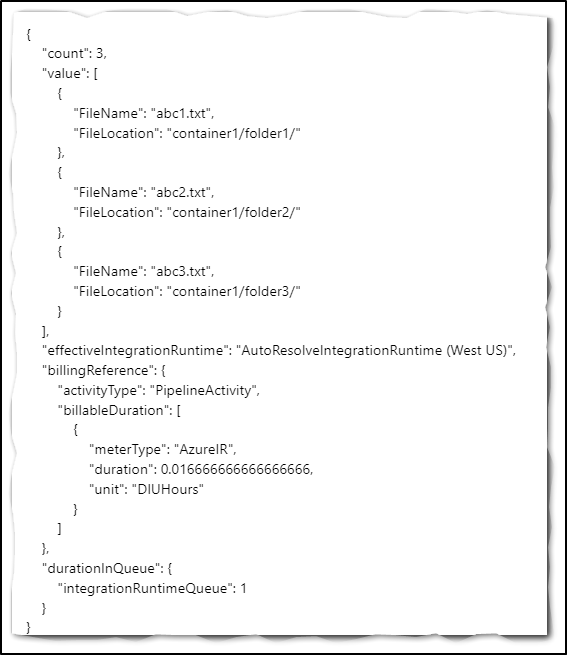
and you will have to map them to Items in ForEach activity
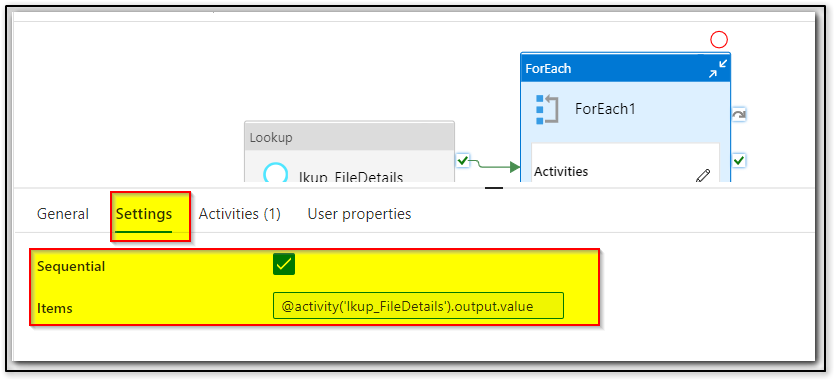
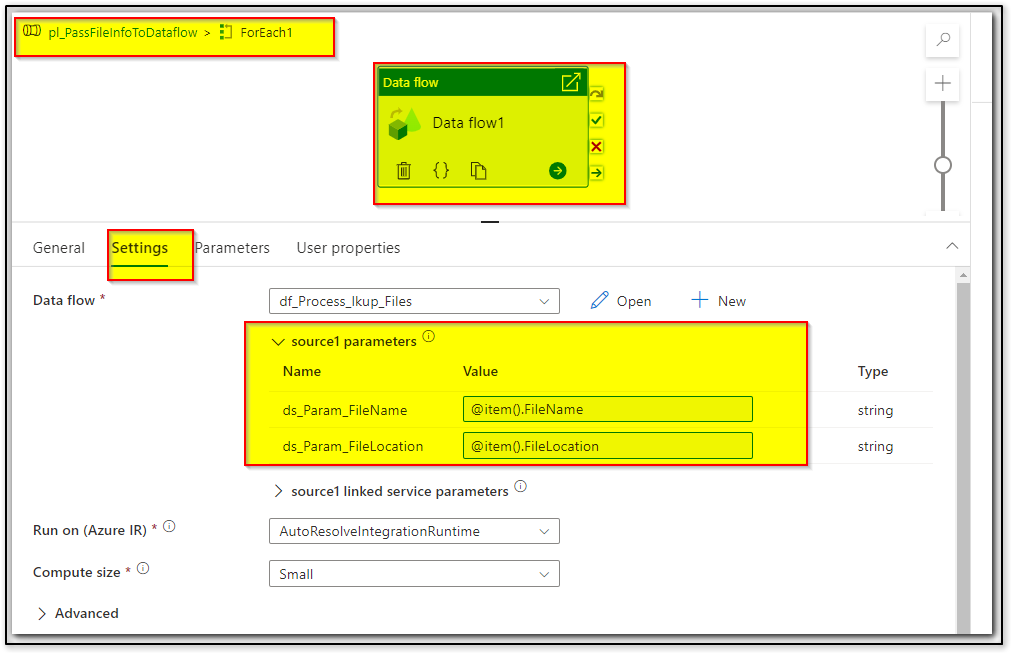
Inside ForEach activity you can have mapping data flow activity and pass the fileName and fileLocation for each iteration by using expressions - @item().FileName and @item().FileLocation

Now you can configure your source dataset using this dataflow parameters as needed. In case if you want to directly map the the fileNames and folder path directly in dataset instead of dataflow parameters, you can also create dataset parameters as below:
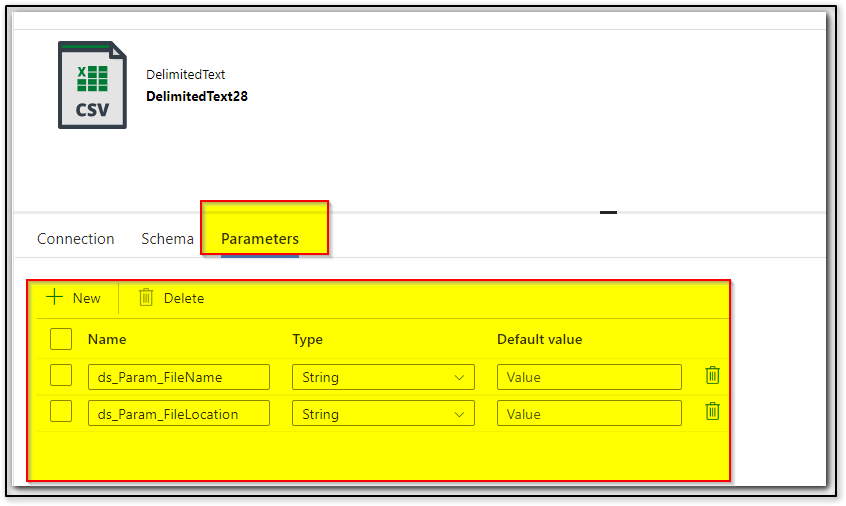

Then you can directly map the forEach item() values (nothing but fileName and folderpath for each iteration) to your dataset parameters instead of dataflow parameters below :
Hope this info helps.
------------------------------
 or upvote
  button whenever the information provided helps you. Original posters help the community find answers faster by identifying the correct answer. Here is how
 ' cx='32' cy='32' r='32' /%3E%3Ctext x='50%25' y='55%25' dominant-baseline='middle' text-anchor='middle' fill='%23FFF' %3EBG%3C/text%3E%3C/svg%3E)
And what parameter values should we fill in for the linked service?